
Default Render Mode
Default Render Mode Settings
You can open the Solution Options dialog from [ File > Solution Options ] in the menu bar to configure various rendering properties under [ Default Render Mode ]. These properties are automatically applied by SCHost unless another render mode is explicitly set for the object.
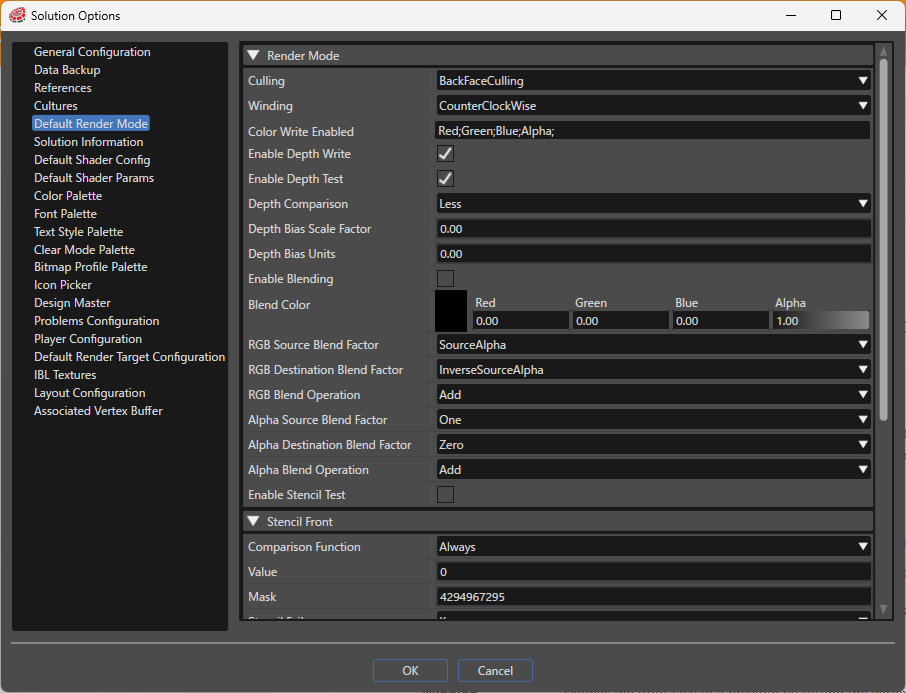
If there is a render mode associated with an object, Scene Composer compares these property values with the default render mode settings and includes a bitmask used by the Candera engine within the asset to optimize rendering.
Render Mode
| Setting | Description |
|---|---|
| CullMode | Configure culling (excluding surfaces from rendering) according to the selected setting. Applying front or back culling optimizes rendering.
|
| Winding | Defines the front face of a polygon by setting the vertex drawing order to clockwise or counterclockwise.
|
| Color Write Enabled | Enables or disables writing fragment color values to the color buffer, configurable per RGBA channel. |
| Enable Depth Write | Enables or disables writing to the depth buffer during rendering. When enabled, depth information is recorded in the depth buffer during rendering. |
| Enable Depth Test | Enables or disables depth testing. When enabled, the depth buffer is used to control rendering based on depth. If disabled, depth writing is also disabled. |
| Depth Comparison |
Configure the comparison function that determines which source (new) pixel depth values pass the depth test. The source depth is compared with the destination (existing) pixel depth using the selected comparison function.
|
| Depth Bias Scale Factor | Specifies the scale factor to determine how much bias to apply to primitives, mainly used to avoid z-fighting (depth conflicts). |
| Depth Bias Units | Specifies a constant depth offset value used together with the scale factor to adjust and avoid z-fighting. |
| Enable Blending | Enables or disables blending (color composition). When enabled, the source color is blended with the destination color in the framebuffer. |
| Blend Color | Defines the constant blend color used when a constant color blend factor is selected. |
| RGB Source Blend Factor | Sets the blend factor applied to the source color in the RGB channels.
|
| RGB Destination Blend Factor | Sets the blend factor applied to the destination color in the RGB channels. Available values are the same as RGB Source Blend Factor. |
| RGB Blend Operation | Specifies the operation used for blending RGB values.
|
| Alpha Source Blend Factor | Specifies the blend factor for the source alpha channel, with the same available values as RGB Source Blend Factor. |
| Alpha Destination Blend Factor | Specifies the blend factor for the destination alpha channel, with the same available values as RGB Source Blend Factor. |
| Alpha Blend Operation | Specifies the operation for blending alpha values, using the same options as RGB Blend Operation. |
| Enable Stencil Test | Enables or disables stencil testing on the stencil buffer, allowing control of rendering based on stencil buffer conditions (area control, masking, etc.). |
Stencil Front / Stencil Back
| Setting | Description |
|---|---|
| Comparison Function |
Configure the comparison function that determines which source (new) values pass the stencil test. The masked reference value (Value) and the masked stencil buffer value are compared, and pass/fail is determined by the selected function.
|
| Value | Specifies the reference value used with the comparison function for stencil testing. |
| Mask | Specifies the mask value applied to the source and destination data during stencil testing, useful for targeting specific bits during comparison. |
| StencilFail | Sets the stencil buffer operation if the stencil test fails.
|
| DepthFail | Sets the operation if the stencil test passes but the depth test fails. Options are the same as StencilFail. |
| DepthPass | Sets the operation if both the stencil and depth tests pass. Options are the same as StencilFail. |
| WriteMask | Specifies the mask value used when writing values to the stencil buffer, allowing control over which bits are written. |