
Annotations
Add Annotations
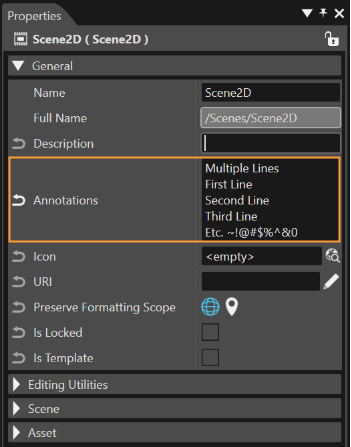
A property named "Annotations" is available on each SceneComposer element. By using this property the user can add individual information to selected objects. The property is located in the "Properties" panel under the "General" section next to the "Description" property. It is provided with a "Restore Default" button which allows the user to reset it. Inside the field of the mentioned property, it is possible to add multi-line information as desired; a new line can be started using <CTRL><Enter>
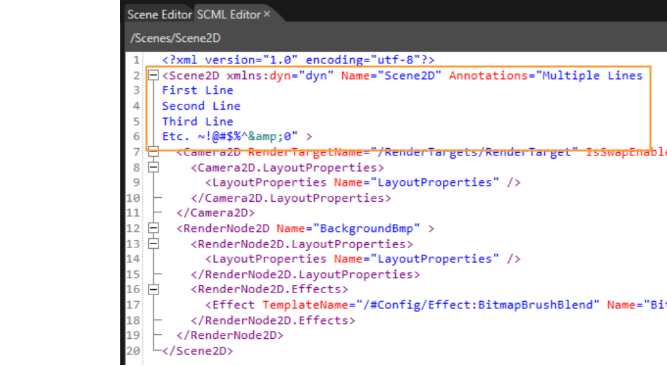
Annotations in SCML Editor
The "Annotations" is serialized only to SCML (no asset, no mff). In this way, the user will be able to see any added "Annotations" in SCML Editor (see the image below).
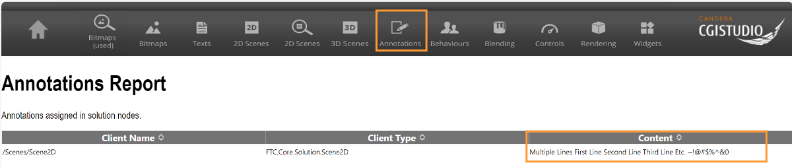
Annotations in HMI Reports
The information added on any desired item (scene, bitmap etc.) is shown in the generated HMI report under a separate "Annotations" section.
For many details related to the HMI Reports please, consult chapter HMI Report.