
Level of Detail (LOD)
Description
This chapter briefly describes Level Of Detail techniques supported by Candera.
See also:
- Level of Detail in SceneComposer User Manual
Example Solution:
- LODSolution from folder cgi_studio_player/content/Tutorials/08_SpecialRenderTechniques/Special3DRenderTechniques
Introduction
Level of Detail
Level of detail (LOD) is a discipline of interactive computer graphics attempts
to bridge complexity and performance by regulating the amount of detail used
to represent the virtual world.
(Level of Detail for 3D Graphics, David Luebke, Morgan Kaufmann Publisher, 2003)
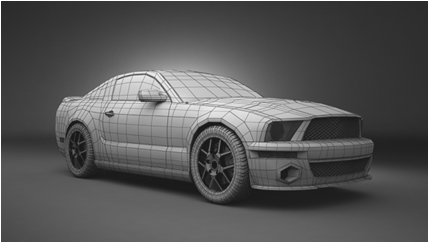
Motivation
Reduce render complexity in order to increase runtime performance with minimal or without visual penalty
Detail Simplifications
- Geometric: Meshes, Imposters, Shadow LOD, ...
- Non-geometric: Shader, Lighting, Textures (MipMapping), Material, ...
Level of Detail - Geometry Reduction Types
Discrete LOD
- Creates multiple versions of an object with different level of details. Often refered to as isotropic or view-independent LOD, as detail reduction is applied uniformly accross the object.
- Widely used in real time environments as LOD levels are generated during an offline preprocess. Supported by Candera.
Continuous or progressive LOD
- Simplification system creates a data structure encoding a continuous spectrum of detail. The desired LOD is extracted from this structure at run-time. Supports LOD streaming and interruptible loading.
View-dependent LOD
- Extends continuous LOD by using view-dependent simplification criteria to dynamically select the most appropriate LOD for current view. Thus, view-dependent view is anisotropic.
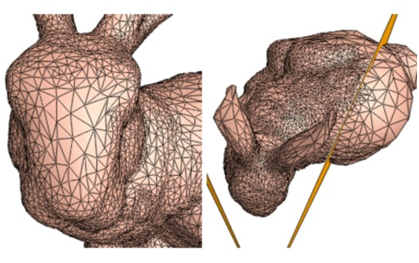
Level of Detail - Chain
- A LodNode accomodates a node for each level of detail.
- Candera Nodes are e.g: Mesh, Billboard, Light, Group, etc.
Typical LOD Chain
The following figure depicts a typical LOD chain:
- Level 0 .. 2: Meshes.
- Level 3: Billboard.
- Level 4: null-Node
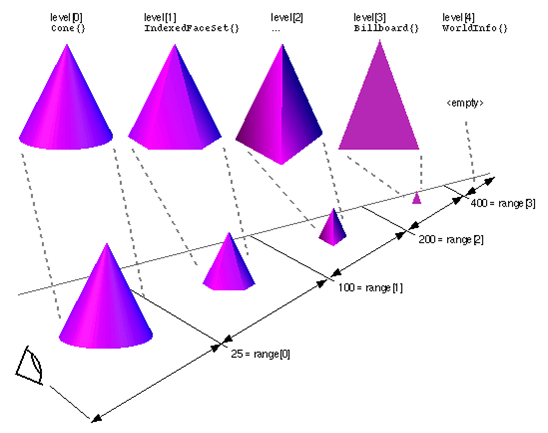
Candera - Discrete LOD Concept
Candera::LodNode, LoD Level
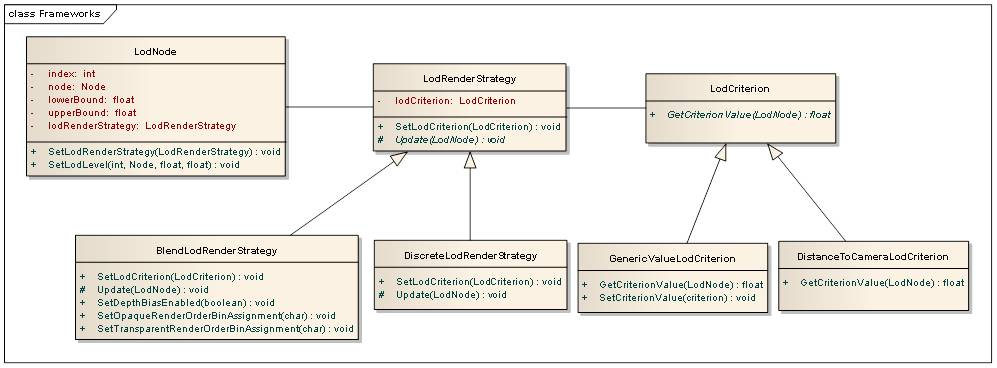
The class Candera::LodNode implements discrete LOD technique. Any Candera class derived from class Candera::Node is accepted as LOD representation.
Each LOD level in Candera::LodNode defines:
- LOD level index,
- Node,
- Lower bound of its visibility range,
- Upper bound of its visibility range.
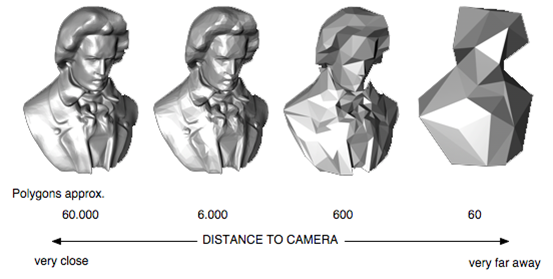
LOD Render Strategy
The LOD render strategy defines the transition between adjacent LOD levels.
- Candera::DiscreteLodRenderStrategy: Stepwise transition.
- Candera::BlendLodRenderStrategy: alpha-blended transition.
LOD Criterion
The LOD criterion delivers a source value to map onto the LOD nodes visibility boundaries.
- Candera::DistanceToCameraLodCriterion: distance from LOD node to camera.
- Candera::GenericValueLodCriterion: Application defined value.
Candera - LOD Render Strategy
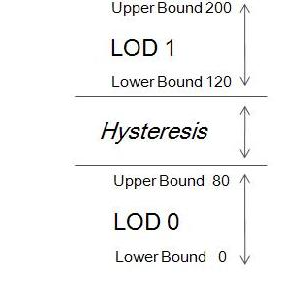
Discrete LOD Render Strategy
- Stepwise transition between LOD levels
- Non-adjacent boundaries between contiguous LOD levels define a Hysteresis.
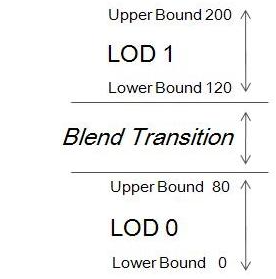
Blend Transition LOD Render Strategy
- Alpha blended transitions between LOD levels
- Non-adjacent boundaries between contiguous LOD levels define transition phase.
- During blend transition one alternating LOD node is always opaque to avoid 'see-through' effects.
Candera - LOD Architecture Overview
- A Candera::LodNode has 0..1 associated LodRenderStrategy objects.
- A Candera::LodRenderStrategy has 0..1 associated LodCriterion objects.
- According to use case LodRenderStrategy and LodCriterion objects are interchangeable arbitrarily.
Example - LOD in SceneComposer
Example - Level of Detail in SceneComposer
This chapter shows a typical LOD use case and explains how the transition from two different LODs can be realized with CGI Studio SceneComposer.
To experiment with LOD transition, the following can be used:
- LODSolution from folder cgi_studio_player/content/Tutorials/08_SpecialRenderTechniques/0801_Special3DRenderTechniques
Use Case
The example solution is based on following use case:
- The tire is shown from a certain distance in sufficient resolution.
- The camera zooms in to the tire (animation).
- As the camera captures the tire from a close distance, the tire model shall be exchanged with a higher resolution model.
- The transition between the low- and the high-resolution tire model shall appear smooth.
You can experiment with following node properties:
- (Lower and Upper) Boundary Values: Modify boundary values of low and high node.
- Criterion: Set criterion 0:DistanceToCamera 1:Generic.
- Strategy: Set render strategy 0:Blend 1:Discrete.
See also:
- Level of Detail in SceneComposer User Manual
Example - Blended LOD
Blended LOD
- Initialize LOD node with 2 LOD objects.
- LOD is automatically changed by distance to camera criterion.
- Desired Behavior:
- LOD 0 is exclusively visible at camera distance 0 - 40 (in the LodNode set Lower Bound 0, and Upper Bound 40).
- LOD 1 is exclusively visible at camera distance 60 - 100 (in the LodNode set Lower Bound 60, and Upper Bound 60).
- Blend Transition between LOD 0 and LOD 1 is defined at camera distance 40 - 60 (in the LodNode select RenderStrategy 0:Blend).
Change CameraDistance or start CameraPosition animation to see the smooth transition.
In application code the LodNode is set up as follows:
Initializing the LodNode
    // init LodNode bounds
    static_cast<void>(lodNode->SetLodLevel(0, lodNode->GetLodLevel(0).node, m_lowBoundHigh, m_upBoundHigh));
    static_cast<void>(lodNode->SetLodLevel(1, lodNode->GetLodLevel(1).node, m_lowBoundLow, m_upBoundLow));
    // end init
Define Criterion and RenderStrategy
        // Define DistanceToCameraLodCriterion and BlendLodRenderStrategy

        static DistanceToCameraLodCriterion cameraLodCriterion; // LOD is automatically selected by distance to camera.
        static BlendLodRenderStrategy blendLodStrategy; // LOD is automatically blended between non-adjacent boundaries

        // End Define DistanceToCameraLodCriterion and BlendLodRenderStrategy
Link pieces together
        // Init BlendLodRenderStrategy and set to LodNode

        blendLodStrategy.SetLodCriterion(&cameraLodCriterion);
        lodNode->SetLodRenderStrategy(&blendLodStrategy);

       // End Init BlendLodRenderStrategy and set to LodNode
Example - Step-wise LOD
Step-wise LOD
- Initialize LOD node with 2 LOD objects.
- LOD criterion value can be set by application directly. (in the LodNode set Criterion to 1:Generic).
- Desired Behavior:
- LOD 0 is exclusively visible at camera distance 0 - 40 (in the LodNode set Lower Bound 0, and Upper Bound 40).
- LOD 1 is exclusively visible at camera distance 60 - 100 (in the LodNode set Lower Bound 60, and Upper Bound 60).
- Hysterese is defined at 40 - 60. Thus, criterion values within that range do not lead to LOD level swaps. (in the LodNode select RenderStrategy 1:DiscreteLodRenderStrategy).
Change CriterionValue property appropriate to see the transition.
In application code the LodNode is set up as follows:
Initializing the LodNode
    // init LodNode bounds
    static_cast<void>(lodNode->SetLodLevel(0, lodNode->GetLodLevel(0).node, m_lowBoundHigh, m_upBoundHigh));
    static_cast<void>(lodNode->SetLodLevel(1, lodNode->GetLodLevel(1).node, m_lowBoundLow, m_upBoundLow));
    // end init
Define Criterion and RenderStrategy
        // Define GenericLodCriterion and DiscreteLodRenderStrategy

        static GenericValueLodCriterion genericLodCriterion; // Application defined criterion value can be set.
        static DiscreteLodRenderStrategy discreteLodStrategy; // Stepwise LOD switch.

        // End Define GenericLodCriterion and DiscreteLodRenderStrategy
Link pieces together
        // Init DiscreteLodRenderStrategy and set to LodNode

        genericLodCriterion.SetCriterionValue(m_criterionValue); // Set application defined criterion value.
        discreteLodStrategy.SetLodCriterion(&genericLodCriterion);
        lodNode->SetLodRenderStrategy(&discreteLodStrategy);

        // End Init DiscreteLodRenderStrategy and set to LodNode
Example - Set LOD directly
Set LOD directly
- Create LOD node with 2 LOD objects.
- LOD level index is set by application directly.
- Hint: Direct LOD level initialization is helpful, if first criterion value falls into hysteresis range, and no LOD is set active.
// Create LodNode object with 2 empty LOD levels.
m_lodNode = LodNode::Create(2);
// Set LOD 0 active and deactivate LOD 1. No RenderCriterion is attached.
m_lodNode->GetLodLevel(0).node->SetRenderingEnabled(true);
m_lodNode->GetLodLevel(1).node->SetRenderingEnabled(false);