
EGL Context Handling
Description
EGL is an interface between rendering APIs like OpenGL ES and the underlying native platform window system. Rendering APIs like OpenGL (ES) and OpenVG use EGL contexts to manage their states and resources.
EGL Concepts
EGL Context: WindowSurface
An EGL context typically stores render states, shaders, textures, vertex buffers and framebuffer resources. In Candera each WindowSurface (onscreen framebuffer) creates an EGL context when uploaded. Thus, each WindowSurface owns its separate context to store related render states, like for instance depth buffer, and blend mode settings.
EGL Context Sharing: ContextResourcePool
An EGL context can also be shared to store resources like textures, vertex buffer objects, and shaders. This feature avoids redundant video memory uploads of shared resources to multiple EGL contexts and reduces memory footprint. Candera provides context sharing functionality with class ContextResourcePool. Each display is associated to exactly one context resource pool. One context resource pool can be shared accross different displays, if supported by platform. In case context sharing is not supported, for instance as displays are driven by separate display controllers, Candera allows to upload resources of a single scene graph to multiple EGL contexts.
Framebuffer Objects using ContextResourcePool
Framebuffer objects (FBOs) are defined in OpenGL ES API and do, different to WindowSurfaces, not own a dedicated EGL context. Instead, FBOs require a context provided from an EGL surface to store related data in video memory. In Candera a WindowSurface is such a context provider, which registers its EGL context to ContextResourcePool to be shared. FBOs
Uploading To Multiple Contexts
Overview
A device object can be uploaded to multiple context resource pools but there is no association from a device object to its context resource pools, before the uploading. Further, AssetLoader could upload a device object to a context resource pool activated accidentally. In order to prevent such situations, Candera offers a dedicated interface meant to give more control in the process of uploading/unloading device objects in multiple contexts.
Multiple Contexts Uploading
The uploading to more then one context at a time can be accomplished by the means of the Node::UploadAll() method. There is also a method, Node::UnloadAll(), which does the reverse operation, the unloading from video memory.
These methods take two parameters, a scope mask and a multi context flag. The multiContext flag controls if the operation is performed strictly on the active context or on all existing context resource pools belonging to the cameras which are in the scope of the upload/unload operations. The scopeMask parameter is useful to filter the nodes which are to be uploaded/unloaded from scenes containing multiple nodes. The algorithm of filtering using the scope mask works as follows:
- First it creates a list of cameras which are in the scope of the upload/unload operation.
- Then, for each of these cameras, it will iterate over the nodes "seen" by the camera and it will upload/unload only the nodes (and their descendants) which are in the scope of the camera intersected with the scope of the upload/unload operation. The context resource pool targeted by this operation is the one belonging to the camera.
For a better understanding of the feature, please have a look on the example presented on the next item.
Code Example
    Candera::ScopeMask m_scopeMask;
    m_scopeMask.SetAllScopesEnabled(false);
    m_scopeMask.SetScopeEnabled(2, true);

    m_group->UploadAll(m_scopeMask, true);
    //...
    m_group->UnloadAll(m_scopeMask, true);
Uploading To Multiple Contexts Example
Introduction
The example below tries to offer you a better understanding of the way the method Candera::Node::UploadAll() / Candera::Node::UnloadAll() works. In order to do that, we chose a complex configuration in which the nodes to be uploaded, the cameras and the uploading method itself, are set with different values for the scope masks.
Scene Setup
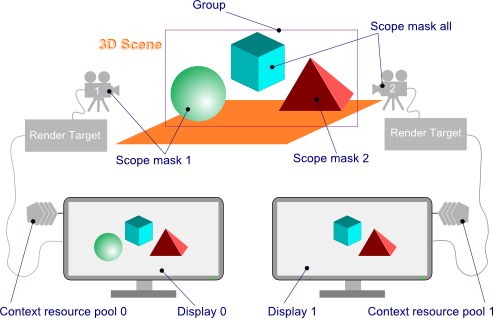
The setup consists in a 3D scene which contains three nodes: a sphere, a cube and a pyramid, all three nodes are children of a Candera::Group. The 3D content is rendered by two cameras on two displays.
We assume that the context resource pools associated to the displays are not shared, so each display will have its own context resource pool. Each of these nodes and cameras have assigned a distinct Candera::ScopeMask as follows:
| Object | Scope Mask |
|---|---|
| Sphere | 1 |
| Pyramid | 2 |
| Cube | All |
| Camera 1 | 1 |
| Camera 2 | All |
The scene setup is shown also in the image below:
The mask scopes are created as follows:
    Candera::ScopeMask m_scopeMask1;
    m_scopeMask1.SetAllScopesEnabled(false);
    m_scopeMask1.SetScopeEnabled(1, true);

    Candera::ScopeMask m_scopeMask2;
    m_scopeMask2.SetAllScopesEnabled(false);
    m_scopeMask2.SetScopeEnabled(2, true);

    Candera::ScopeMask m_scopeMaskAll;
    m_scopeMaskAll.SetAllScopesEnabled(true);
Then they are set as scope masks for the nodes:
    m_meshSphere->SetScopeMask(m_scopeMask1);
    m_meshPyramid->SetScopeMask(m_scopeMask2);
    m_meshCube->SetScopeMask(m_scopeMaskAll);
    m_camera1->SetScopeMask(m_scopeMask1);
    m_camera2->SetScopeMask(m_scopeMask2);
-
For the convenience, we will assume that the last context activated by the application is Context Resource Pool 1.
Upload Scenarios
The table below shows in yellow the input parameters for the UploadAll method and in blue whether the nodes are uploaded or not and in which context.
For example, the first row in the table data says that the UploadAll method was called with the parameters:
m_group->UploadAll(/*scopeMask=*/m_scopeMask1, /*multiContext=*/true);
Fifth row correspond to the following call:
m_group->UploadAll(/*scopeMask=*/m_scopeMask2, /*multiContext=*/false);
And so on.
| Index | MultiContext flag | Upload scope mask | Uploaded in CRP 0 | Uploaded in CRP 1 | ||||||
|---|---|---|---|---|---|---|---|---|---|---|
| 1 | 2 | All | Cube | Sphere | Pyramid | Cube | Sphere | Pyramid | ||
| 1 |
|
 |
|
 |
|
|
|
|
|
|
| 2 |
|
|
|
|
|
|
|
|
|
|
| 3 |
|
|
|
|
|
|
|
|
|
|
| 4 |
|
|
|
|
|
|
|
|
|
|
| 5 |
|
|
|
|
|
|
|
|
|
|
| 6 |
|
|
|
|
|
|
|
|
|
|
Result explanation:
1) Because multi context flag is enabled, the application will try to upload device objects in both context resource pools. Both cameras are in the scope of the upload (scope 1). Camera 1, corresponding to the Context Resource Pool 0 has the scope mask 1 so the application will upload the Cube (scope mask all) and the Sphere (scope mask 1) but not the pyramid (scope mask 2). In the Context Resource Pool 1, corresponding to the Camera 2 (scope mask all) the application will upload Cube (scope mask all) and the Sphere (scope mask 1). The pyramid will not be uploaded because it is not in the scope of upload intersected with scope of the camera (1 & "all" = 1).
2) Because multi context flag is enabled, the application will try to upload device objects in both context resource pools but only Camera 2 is in the scope of the upload (scope mask 2). Consequently, application will not upload anything in the Context Resource Pool 0 corresponding to the Camera 1. In the Context Resource Pool 1, corresponding to the Camera 2 (scope mask all), the application will upload the Cube (scope mask all) and the Pyramid (scope mask 2). The Sphere (scope mask 1) will not be uploaded because it is not in the scope of upload intersected with scope of the camera (2 & "all" = 2).
3) Because multi context flag is enabled, the application will try to upload device objects in both context resource pools. Both cameras are in the scope of the upload (scope maks all). Camera 1, corresponding to the Context Resource Pool 0 has the scope mask 1 so the application will upload the Cube (scope mask all) and the Sphere (scope mask 1). The pyramid will not be uploaded because it is not in the scope of upload intersected with scope of the camera ("all" & 1 = 1). In the Context Resource Pool 1, corresponding to the Camera 2, all three nodes will be uploaded.
4) The multi context flag is disabled, so the upload will be performed only in the last activated context (Context Resource Pool 1). Consequently, the application will not upload anything in the Context Resource Pool 0. Camera 2 (scope mask all) is in the scope of the upload (scope mask 1) so it will be taken into account for the upload. In the Context Resource Pool 1, corresponding to the Camera 2 (scope mask all) the application will upload Cube (scope mask all) and the Sphere (scope mask 1). The pyramid will not be uploaded because it is not in the scope of upload intersected with scope of the camera (1 & "all" = 1).
5) The multi context flag is disabled, so the upload will be performed only in the last activated context (Context Resource Pool 1). Consequently, the application will not upload anything in the Context Resource Pool 0. Camera 2 (scope mask all) is in the scope of the upload (scope mask 2) so it will be taken into account for the upload. In the Context Resource Pool 1, corresponding to the Camera 2 (scope mask all), the application will upload the Cube (scope mask all) and the Pyramid (scope mask 2). The Sphere (scope mask 1) will not be uploaded because it is not in the scope of upload intersected with scope of the camera (2 & "all" = 2).
6) The multi context flag is disabled, so the upload will be performed only in the last activated context (Context Resource Pool 1). Consequently, the application will not upload anything in the Context Resource Pool 0. Camera 2 (scope mask all) is in the scope of the upload (scope mask 1) so it will be taken into account for the upload. In the Context Resource Pool 1, corresponding to the Camera 2, all three nodes will be uploaded because their scope are in the scope of upload intersected with scope of the camera ("all" & "all" = "all") .