
Create an own Script
This chapter provides an explanation of how a new Lua-Script can be created to make it ready to be usable in the SceneComposer.
How to create a new Script.
In difference to a Widget or a Behavior Lua-Scripts are completely generated in the SceneComposer by one simple step:
Click "Script" in the menu...
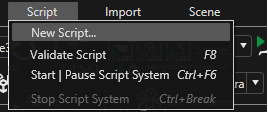
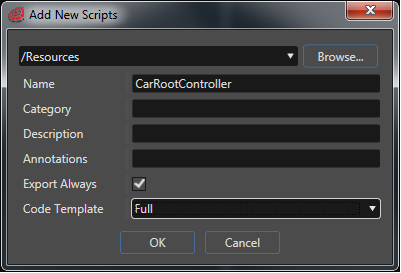
... and chose "New Script". Browse for the desired folder and define where to save the new script. Name the script "CarRootController". This will be our root node script which controls other scripts. For the code template we recommend to choose "Full" to see all the predefined Callback-Functions.
Now you will find your new script in the Toolbox under Scripts. To apply it to the desired node just drag and drop the script from the Toolbox to your node. (For the tutorial example apply it to the root node of the car)