
Camera Groups
Description
This section explains how to use Camera Groups to handle cameras uniformly across multiple scenes.
Example Solution
- CameraGroupSolution example in folder cgi_studio_player/content/Tutorials/07_RenderTargetsCameras
Camera Group - Interface
Candera::CameraGroup is a container that groups an arbitrary number of 2D and/or 3D cameras from different scenes. This feature is especially useful for complex applications because it offers a simpler way to control which cameras are rendering at a certain moment.
The snippet below shows how to add cameras to a Candera::CameraGroup object:
    m_cameraGroup[0].AddCamera2D(m_cameraCubeTex1);
    m_cameraGroup[0].AddCamera2D(m_cameraSphereTex1);
    m_cameraGroup[0].AddCamera(m_cameraFront);

    m_cameraGroup[1].AddCamera2D(m_cameraCubeTex2);
    m_cameraGroup[1].AddCamera2D(m_cameraSphereTex1);
    m_cameraGroup[1].AddCamera(m_cameraFront);

    m_cameraGroup[2].AddCamera2D(m_cameraCubeTex2);
    m_cameraGroup[2].AddCamera2D(m_cameraSphereTex2);
    m_cameraGroup[2].AddCamera(m_cameraFront);

    m_cameraGroup[3].AddCamera2D(m_cameraCubeTex2);
    m_cameraGroup[3].AddCamera2D(m_cameraSphereTex2);
    m_cameraGroup[3].AddCamera(m_cameraSide);

    m_cameraGroup[4].AddCamera2D(m_cameraCubeTex1);
    m_cameraGroup[4].AddCamera2D(m_cameraSphereTex2);
    m_cameraGroup[4].AddCamera(m_cameraSide);

    m_cameraGroup[5].AddCamera2D(m_cameraCubeTex1);
    m_cameraGroup[5].AddCamera2D(m_cameraSphereTex1);
    m_cameraGroup[5].AddCamera(m_cameraSide);
Then, any group can be enabled for rendering as follows:
    m_cameraGroup[idx].SetRenderingEnabled(true);
    if (idx < 3){
        m_cameraFront->SetSwapEnabled(true);
        m_cameraSide->SetSwapEnabled(false);
    }
    else{
        m_cameraFront->SetSwapEnabled(false);
        m_cameraSide->SetSwapEnabled(true);
    }
Camera Groups - Example
The diagram below presents a brief example of how to dynamically set 3D nodes textures by enabling the rendering of different camera groups.
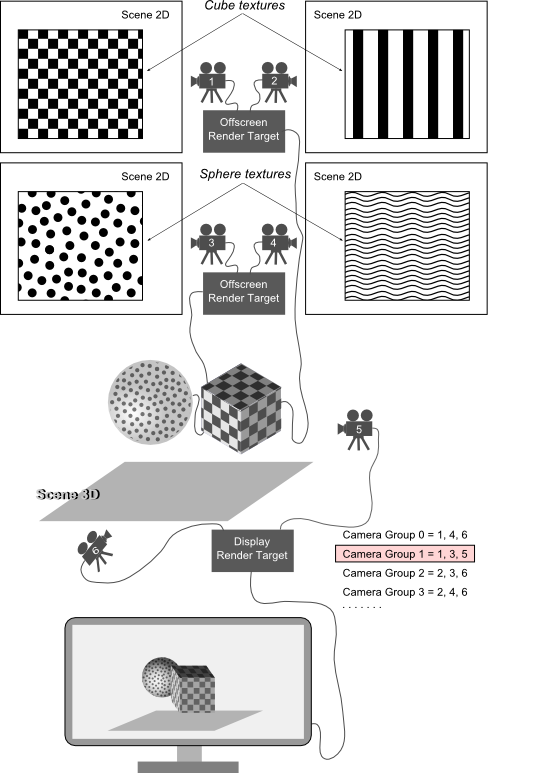
The texture of each of the two nodes from the 3D scene is an offscreen render target linked to a pair of cameras 2D. Each of the 2D cameras is "seeing" a pattern which is "projected" on the node surface when the camera is enabled for rendering. The cameras are added in CameraGroups, each camera group contains three cameras: a camera 3D and two camera 2D corresponding to the cube and sphere textures. By enabling/disabling the rendering of different camera groups the textures on the nodes will change accordingly. For best results enable for rendering only one camera group at a time.
-
A camera can belong to multiple groups, but its state is unique, meaning that enabling the camera in one group will enable it in all groups and also in the Render Target panel where it is associated to a render target. If a group is disabled or enabled, all the cameras inside it will be disabled or enabled. If one or many from those cameras are members of another group, the second group will be enabled or disabled too.
See also:
- Camera Group in SceneComposer User Manual
Example Solution
- CameraGroupSolution example in folder cgi_studio_player/content/Tutorials/07_RenderTargetsCameras illustrates the scenario presented above. In order to enable/disable camera groups in SceneComposer, select the Render Targets panel and press on the third button showing the tooltip "Go to Camera Group Explorer view".