
Id Handling
This chapter explains how to get access to other nodes via the id of their attached script. Therefore, create a new Scene Composer solution using the "3D Getting started" template, which includes a 3D model of a car.
To start it's important to know that there are two functions that are fundamental to get access to other nodes:
- Candera.GetScriptIds(id) returns all ids of script components that are attached to the same node as 'id'.
- Candera.GetChildScriptIds(id) returns all ids of script components that are attached to any node in the subtree of the node identified by 'id'.
Once you have the id of the child nodes you can get the script itself with:
- Candera.IdToScriptComponent(scriptId) returns the public table of the script identified by 'scriptId'
The first goal is to rotate all four wheels in the same speed and to rotate the front wheels according to the steering lock.
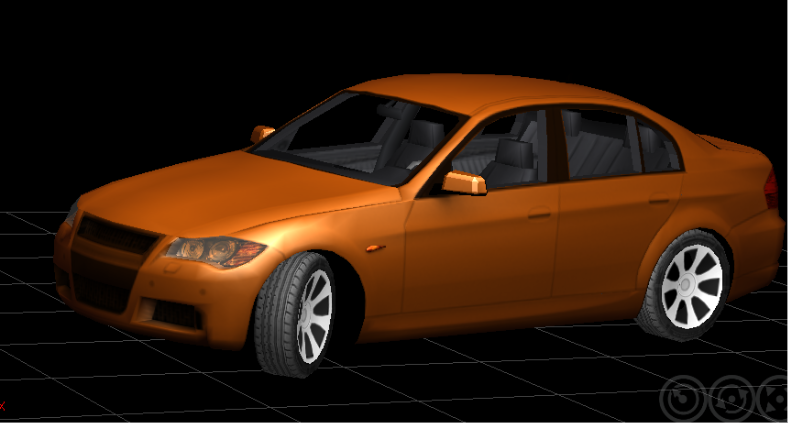
Therefore it is necessary that a script from the root node of the car communicates with all four wheels. But as we have already learned it's absolutely necessary that each node we want to find also has a script component. So before we start to get access to the child nodes we equip all four wheels with a script. As front wheels and back wheels have different behaviors (steering lock) create two different scripts called "Wheel_back" and "Wheel_front":
Wheel_back Script:
Get the current rotation of the wheel and set the new rotation with a modified x-value. In this case we add the 'rotationSpeed' value from the public table to the current x-rotation. Afterwards the public value 'rotationSpeed' will get set by the root script.
    local function Update(self, id)
        local pitch, yaw, roll =Candera.GetRotation(id)
        Candera.SetRotation(id,  pitch+self.rotationSpeed, yaw, roll)
    end

    return {
      Init = Init,
      Update = Update,
      GetName = GetName,
      rotationSpeed =0.0
    }
To enable the root script to identify the wheel scripts it's also important that the wheel scripts get a value which contains a proper name. This value must not get changed by SceneComposer's GUI so we enable the access with a public function called GetName():
    local scriptName = "Wheel_back"
    local function GetName()
        return scriptName
    end
(don't forget to add the function to the public table: GetName = GetName, )
Wheel_front Script:
Just repeat the same steps for the front wheel with a modification in the update concerning the z-rotation which gets set to the steering lock angle.
    local function Update(self, id)
        local pitch, yaw, roll =Candera.GetRotation(id)
        Candera.SetRotation(id,  pitch+self.rotationSpeed, yaw, self.steerLock)
    end

    return {
      Init = Init,
      Update = Update,
      GetName = GetName,
      rotationSpeed =0.0,
      steerLock =0.0
    }
The GetName functions is nearly the same except a different value for the name (Wheel_front).
The next step is to drag and drop the scripts to the proper nodes.
Now we can concentrate on the root node:
CarRootController Script:
Switch back to the root script called "CarRootController". The first thing we have to do is to get the id of every script component which is attached to any child of the root and store it to a local variable which we will need later:
    local frontWheelScripts={}
    local backWheelsScripts={}
    local childIds = {}
    local function Init(self, id)
        childIds = Candera.GetChildScriptIds(id)
    end
Now it's possible to iterate through the array "childIds" (also in the Init-Function) to get their scripts and to look for a special script via its name. But to be able to call their GetName function and to use the scripts afterwards in the Update-Function we first have to get access to the scripts public table via Candera.IdToScriptComponent[childId]. Now as you have the script you can call the GetName function to search for the desired script name. Then insert each of them to a local array which got defined above the Init-Function (shown in the previous paragraph).
    for i, childId in ipairs(childIds) do
        local script = Candera.IdToScriptComponent[childId]

        if script and script.GetName() == "Wheel_front"  then

            table.insert(frontWheelScripts, script)
            --table.insert(value, array) inserts the element in the last position of the array

        elseif script and script.GetName() == "Wheel_back" then
            table.insert(backWheelsScripts, script)

        end

    end
Now we have access to each wheel script so we can also change their public values. Therefore scroll down to the Update-Function where you can iterate through the scripts and change the rotationSpeed and for the front wheels also the steer lock.
    local function Update(self, id)
        for i, frontWheelScript in ipairs(frontWheelScripts) do
            frontWheelScript.rotationSpeed = self.rotationSpeed
            frontWheelScript.steerLock = self.steerLock
        end

        for i, backWheelScript in ipairs(backWheelsScripts) do
            backWheelScript.rotationSpeed = self.rotationSpeed
        end

    end
Be sure that every node has its proper script and set the rotationSpeed and the steerLock of the root node to a proper value (20;30). If you start the execution of the script system the wheels will rotate.
Tip: Also check the Sample Solution for further information and scripts.