
Morphing
Description
This chapter briefly describes the morphing technique supported by Candera.
See also:
- Morphing Mesh in SceneComposer User Manual
Example Solutions
Refer to following solutions in folder cgi_studio_player/content/Tutorials/08_SpecialRenderTechniques/0801_Special3DRenderTechniques
- MorphSolution
- MultiMorphing_MultiMorphShader
- MultiMorphing_AnimationGroup
Introduction
Morphing
Morphing means transforming the 3D geometry of an object smoothly from one shape into another.
Morphing itself (smooth interpolation between vertices) is done in a shader (not on the CPU).
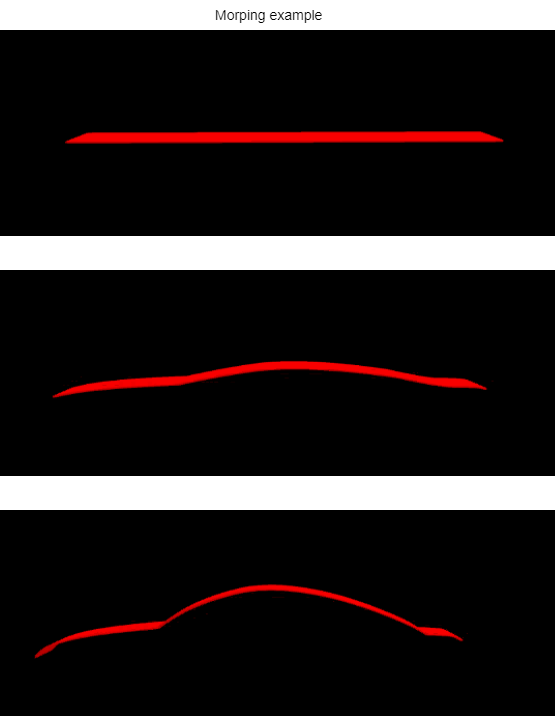
What you need for Morphing
Suitable content: "Morph targets" are different geometric states of the same object. The input vertices must correspond one-to-one between morph targets. This means, to morph between two shapes, you need two VertexBuffer with exactly the same number of vertices.
An instance of MorphingMesh: This is a Mesh that stores
- the spliced vertex buffer created from the vertex buffers to be morphed (see MorphingMesh::CreateSplicedVertexBuffer)
- weight values for each of the shapes, which are activated as shader uniforms at render time (see MorphingMesh::SetMorphWeight)
- The appearance of the MorphingMesh must define a suitable morphing shader, which matches the number of shapes to be morphed (see RefTransLight1Morph vertex shader for morphing two shapes)
Dynamics: Morphing is about change, so an application will have to set some morphing parameters (often depending on time). Use Animation::AllMorphWeightsPropertySetter to animation all the weight values of the MorphingMesh.
Morphing Examples
Morphing between 2 Morph Items
In below example solution, the reference shader RefTransLight1Morph_RefColor is used to morph between two morph items, by default having weight value 1,00 on the logo.
- MorphSolution from folder cgi_studio_player/content/Tutorials/08_SpecialRenderTechniques/0801_Special3DRenderTechniques
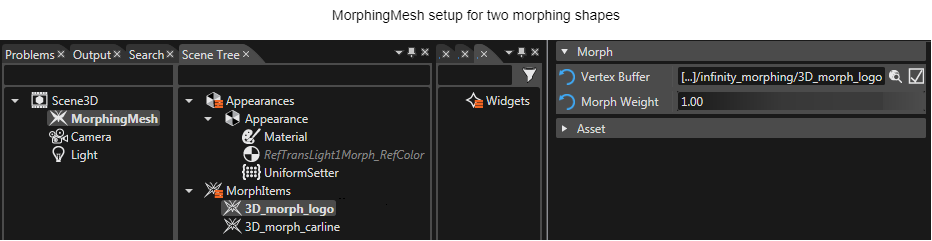
The animation part of this solution animates both weight values and also adds a rotation animation.
Morphing between Multiple Shapes using Shader
Since a MorphingMesh is capable of handling up to 8 different vertex buffers, a special morphing shader must be used for more than 2 shapes. A morphing shader handling 5 shapes is used in the example below:
- MultiMorphing_MultiMorphShader from folder cgi_studio_player/content/Tutorials/08_SpecialRenderTechniques/0801_Special3DRenderTechniques
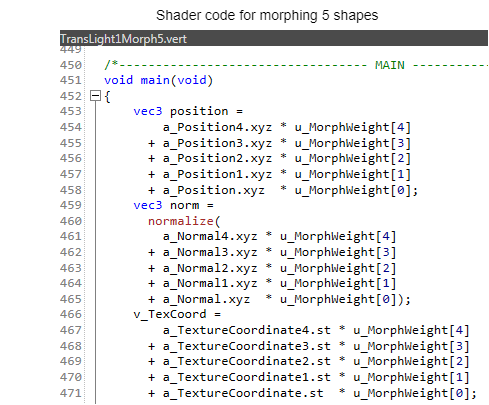
Morphing between Multiple Shapes using AnimationGroup
As an alternative to using a multi morph shader, multi-step morphing can also be realized by using an AnimationGroup, chaining separate morphing animations for each morphing shape pair. This approach is useful in case a specific target shader compiler has some restrictions regarding the maximum number of shader parameters.
- MultiMorphing_AnimationGroup from folder cgi_studio_player/content/Tutorials/08_SpecialRenderTechniques/0801_Special3DRenderTechniques