Multisample Anti-Aliasing Offscreen Render Targets
Description
This section describes how to set the multisample anti-aliasing (MSAA) property for offscreen render targets.
Anti-Aliasing and MSAA
Anti-Aliasing
In computer graphics, anti-aliasing is a technique used for improving image quality by smoothing sharp edges cause by aliasing. This usually occurs when rendering high-resolution signals at a lower resolution.
Multisample Anti-Aliasing
Multisample anti-aliasing is a method used for full-screen anti-aliasing by multisampling each pixel at multiple pixel locations. The fragment shader is run only once per pixel no matter the numbers of samples covered by the rendered polygon. Once the color buffer's samples are calculated, these colors are averaged per pixel to produce the final color. Depth and stencil values also make use of the multisample points which means that their buffer size will increase by the amount of samples per pixel.
The higher the number of additional samples per pixel will result in an increase in the amount of anti-aliasing which will generate even smoother edges. The application will noticeably suffer in terms of performance the more samples are used.
There are four modes for MSAA: 2x, 4x, 8x, and 16x, but out of these, 4x MSAA offers a good balance between performance and quality.
-
MSAA for offscreen render targets is only available on devices that support OpenGL ES 3.0 or higher. Even more, the number of supported samples differs from one device to another, some may not support more than 4x MSAA, which is the minimum defined by the OpenGL ES 3.0 standard. Using sample values higher than supported might lead to undefined behaviours or errors. It is recommended to check the device documentation for the number of supported samples.
MSAA Offscreen Render Targets
Setting MsaaSamples Property
Enabling of multisample anti-aliasing with a given number of samples is achieved by setting the MsaaSamples property of a framebuffer object to a value larger than 1 (default value).
The MsaaSamples property values is changed either using Candera::GlFrameBufferProperties::SetMsaaSamples method or by meta information.
The following snippets show how to set MsaaSamples using the methods described above:
Using Candera::DevicePackageInterface
- create an offscreen render target using Candera::DevicePackageInterface
    m_offscreenRenderTarget = Base::CreateGraphicDeviceUnit(DevicePackageDescriptor::OffscreenTarget3D);
    if (m_offscreenRenderTarget == 0) {
        return false;
    }
- access render target properties (including MsaaSamples) via MetaInfo
    const MetaInfo::GraphicDeviceUnitMetaInfo *meta = DevicePackageDescriptor::GetMetaInformation(m_offscreenRenderTarget->GetUnitType());
    meta->LookupItem("Width") && meta->LookupItem("Width")->Set(m_offscreenRenderTarget, m_rtProperties.m_width);
    meta->LookupItem("Height") && meta->LookupItem("Height")->Set(m_offscreenRenderTarget, m_rtProperties.m_height);
    meta->LookupItem("ColorFormat") && meta->LookupItem("ColorFormat")->Set(m_offscreenRenderTarget, m_rtProperties.m_colorFormat);
    meta->LookupItem("DepthFormat") && meta->LookupItem("DepthFormat")->Set(m_offscreenRenderTarget, m_rtProperties.m_depthFormat);
    meta->LookupItem("MsaaSamples") && meta->LookupItem("MsaaSamples")->Set(m_offscreenRenderTarget, m_rtProperties.m_msaaSamples);

    if(m_offscreenRenderTarget->Upload() != true){
        FEATSTD_LOG_ERROR("Offscreen render target upload failed\n");
        return false;
    }
Using Candera::iMX6FrameBufferObject
- declare an iMX6 framebuffer render target
            iMX6FrameBufferObject m_fbo;
            iMX6FrameBufferObject* m_frameBufferRenderTarget;
- access render target properties using their corresponding setter methods
    m_frameBufferRenderTarget = &m_fbo;
    m_frameBufferRenderTarget->GetProperties().SetHeight(c_fbHeight);
    m_frameBufferRenderTarget->GetProperties().SetWidth(c_fbWidth);
    m_frameBufferRenderTarget->GetProperties().SetMsaaSamples(c_msaaSamples);
    m_frameBufferRenderTarget->Upload();
Framebuffer Blit
These multisample renderbuffers cannot be directly bound to textures. A solution is provided by OpenGL ES 3.0 by using the framebuffer blit function, such that these renderbuffers are resolved to single-sample textures with the use of an intermediate framebuffer. The blit function is responsible to transfer a region defined by 4 screen-space coordinates of the read framebuffer to another region in the draw framebuffer, turning the multisample buffer into a 2D texture that could be further used for post-processing in the fragment shader.
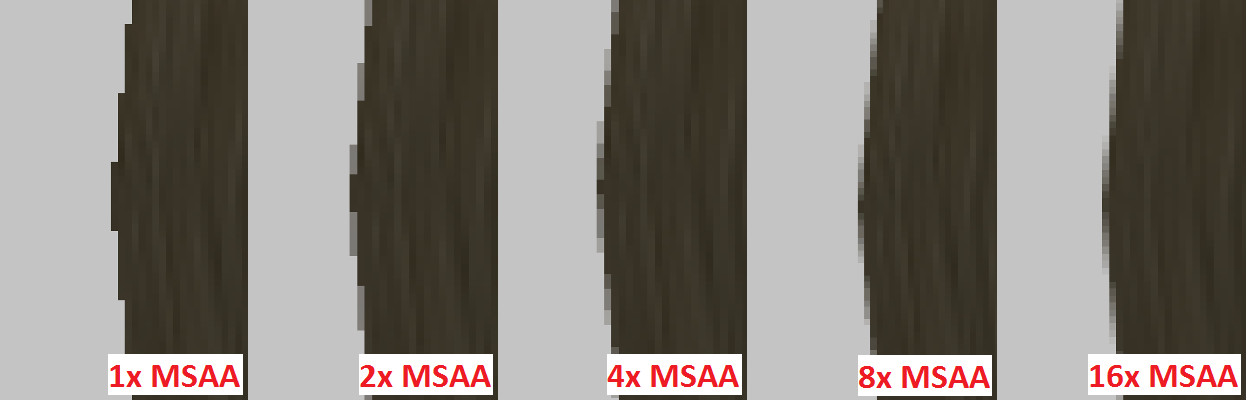
Example: MSAA result for different sample values
The results of multisample anti-aliasing for 1x - default, 2x, 4x, 8x and 16x sample rates can be seen in the image below.