
2D Shear Effect
Description
This chapter briefly describes how to use the 2D shear effect.
-
Ensure that this effect is supported by the device platform in use.
2D Configure a Shear Effect
Shear Effect
By using Candera::ShearBitmapBrushBlend, the effect shears the incoming surface horizontally and vertically using the given angles.
Following properties for shearing can be configured:
- Shear Angle X
- Shear Angle Y
Following is an example of a skewed bitmap, with the angles (in degree): X = 20 and Y = 30.
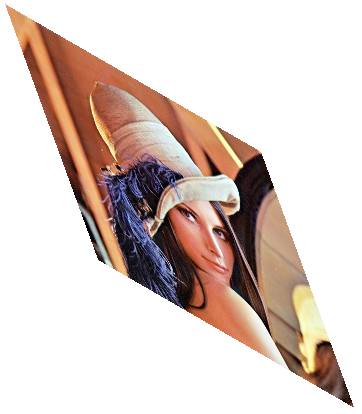
Refer to SceneComposer User Manual about how to configure a ShearBitmapBrushBlend effect in a 2D scene.
Modify 2D Shear Effect Properties
Set Shear Angles
Horizontal and a vertical skew can be modified by setting the ShearAngle to proper values. You can set both, horizontal and vertical skew, to values from -180 to 180.
Example:
    // Set Shear Angles X and Y
    shear.ShearAngleX().Set(30.0f);
    shear.ShearAngleY().Set(20.0f);
    // End Set Shear Angles X and Y