
Asset Library Verification (Optional)
Description
The optional Asset Library Verification feature allows asset version checks and provides means to verify the compatibility between an asset library file and an application.
Asset Version Information
The asset file contains the following data to support asset verification:
- Asset Version (Int32): Describes the version of the asset file format. This version must match the version of the Candera AssetLoader to be able to load the asset file.
- File Size (Int32): Size of the file in bytes.
- File Timestamp (Int64): Contains the creation time of the asset.
- Widget Hash (UInt32): Hash value generated from the available widgets and their properties.
- Widget Set Version (Int32): Version of the Widget Set.
- Candera Version (Int32[4]): Candera version used within SceneComposer.
- Solution GUID (Char[16]): Unique ID of the Solution.
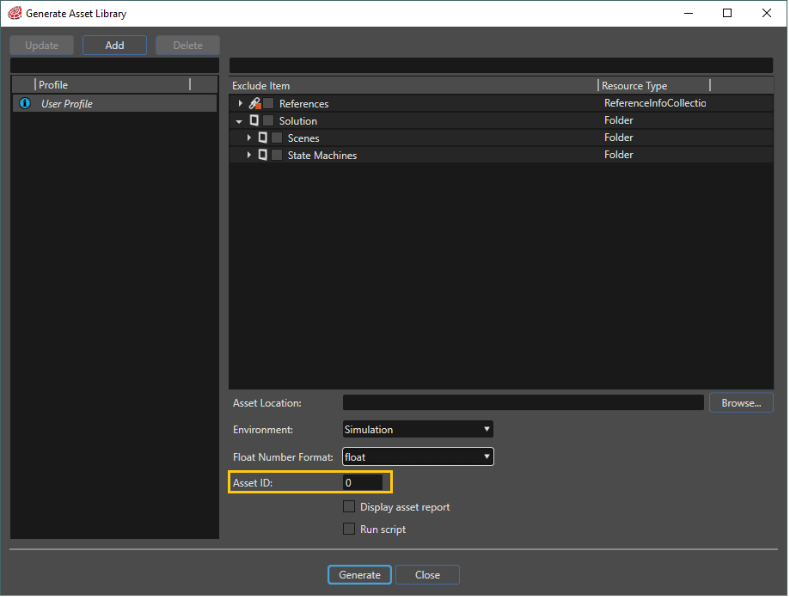
- Custom ID (Int32): Custom Id that can be set by the user upon asset generation.
- SceneComposer Version (Int32[4]): SceneComposer version used to generate the asset file.
Feature Comparison
Without the optional asset verification, only a limited set of information is available. The table below gives a comparison of asset information available by default in Candera, and asset information available with enabled asset verification feature.
Export of Asset Version Info
Automatic / User Defined Values
Most of the asset information is automatically generated by SceneComposer during asset export, but some can be controlled directly. The following table shows which properties can be set manually.
| User Defined | SceneComposer | |
|---|---|---|
| Asset Version | X | |
| File Size | X | |
| Time Stamp | X | |
| Widget Hash | X | |
| Widget Set Version | X | |
| Candera Version | X | |
| Solution GUID | X | |
| Custom ID | X | |
| Scenecomposer Version | X |
Set the WidgetSet Version Number
To set the user-defined WidgetSet version number the new macro CdaVersion can be used in the WidgetSet definition.
CdaWidgetSet(DemoWidgetSet)
    CdaDescription("Widget Set Demo")
    CdaVersion(1) // Sets the Widget-Set version
    CdaWidgets()

    CdaWidget(DemoWidget1)
    CdaWidget(DemoWidget2)

    CdaWidgetsEnd()
CdaWidgetSetEnd()
Set the Custom-Id
The Custom-Id can be set inside of the asset creation dialog of SceneComposer.
Asset Verification at Runtime
Read Asset Version Data from Asset
The following code example will show how to extract the asset version information from an Asset Repository.
    AssetData::AssetVersionInfo versionInfo;
    m_assetDescriptor->GetVersionInfo(versionInfo);
The information is now available in the versionInfo structure.
Get Runtime Version Info from Application
To compare asset version info from the loaded asset with the runtime values from the application, use following interfaces:
- Get Candera Version Number
- Get the Supported Asset Version
- WidgetSet verification
Get Candera Version Number
The version number of the currently used Candera can be found in the CanderaVersionGen.h file. This file is generated automatically by the build system and contains defines similar to this, describing the exact version of Candera.
#define CANDERA_VERSION_MAJOR 3
#define CANDERA_VERSION_MINOR 12
#define CANDERA_VERSION_PATCH 0
#define CANDERA_VERSION_TWEAK 0
And can be used for example like this:
    AssetData::AssetVersionInfo versionInfo;
    assetDescriptor->GetVersionInfo(versionInfo);
    FEATSTD_LOG_INFO("Current Candera version = %d.%d.%d.%d, asset generated with version =  %d.%d.%d.%d\n",
        CANDERA_VERSION_MAJOR, CANDERA_VERSION_MINOR, CANDERA_VERSION_PATCH, CANDERA_VERSION_TWEAK,
        versionInfo.m_canderaVersion[0],versionInfo.m_canderaVersion[1],versionInfo.m_canderaVersion[2],versionInfo.m_canderaVersion[3]);
Get the Supported Asset Version
The number of the asset file format that is supported by the asset loader is located in the AssetValidation.h file and can be accessed like this:
    if (versionInfo.m_fileVersion != Candera::AssetValidation::CURRENT_VERSION) {
        FEATSTD_LOG_ERROR("Asset version (%d) does not match supported asset file version (%d)\n", versionInfo.m_fileVersion, Candera::AssetValidation::CURRENT_VERSION);
    }
WidgetSet verification
To retrieve the currently used WidgetSet version number and WidgetSet hash value, the following code can be used.
    if (GetWidgetSet() != 0) {
        FEATSTD_LOG_INFO("Widget set version: %d, asset generated with version: %d",
            GetWidgetSet()->GetVersion(), versionInfo.m_widgetSetVersion);
        FEATSTD_LOG_INFO("Widget set hash: %d, asset generated with hash: %d",
            GetWidgetSet()->GetHash(), versionInfo.m_widgetHash);
    }
-
The
GetWidgetSet-Function is part of theWidgetMetaInfo.hfile.
Candera::AssetValidation
Another option of asset verification is to use Candera::AssetValidation during asset loading. In this case, specific asset validation flags will be evaluated during asset loading
Validation Attributes
Refer to Candera::AssetValidationAttributes for all attributes which can be used for asset validation during asset loading.
Validation Levels
Refer to Candera::AssetValidationLevels for the actions, which shall be taken after asset validation.
Asset Validation during Asset Loading
Candera::DefaultAssetProvider::Initialize method allows to specify asset validation flags as a parameter:
    if (!m_assetProvider->Initialize(&m_assetConfig, m_validationFlags)) {
        m_assetConfig.ClearRepositoryList();
        return false;
    }