
Communication between Children
How to find siblings
This chapter explains how to get access to sibling nodes via the id of their attached script. Because there is yet no direct way to get the ids of sibling nodes you have to use a workaround. The recommended way is to use a script on a root node which tells its child nodes the ids or even the scripts of their siblings. The diagram beneath shows the car node in the center. Its script "CarRootController" finds the door scripts of its childnodes and pass them in form of an array to the scripts of its child nodes. Now each door node has access to the other door nodes.
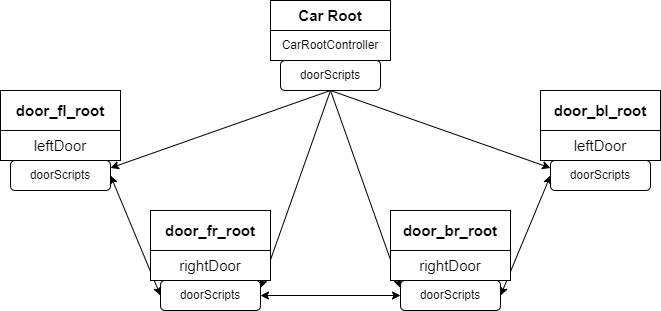
The following example is for the doors of the car. If one of them gets opened the other doors should get opened too.

Door Scripts
Therefore each door script has to know the other door scripts. So first attach a new script called "leftDoor" to the left doors and a new script called "rightDoor" to the right doors. The scripts will be nearly the same except the rotation value (a left door has to rotate in the opposite direction of a right door). As in the other example "Id Handling" the first step is to implement a name variable and a GetName() function so the parent node can identify them:
    local scriptName = "door"
    local function GetName()
        return scriptName
    end
Tip: Don't forget to add the new function to the public table! (see next step)
Next we need a public boolean which tells the script that the door should get opened. Afterwards this public value 'openDoor' will get modified by another door script.
    return {

        Init = Init,
        Update = Update,
        GetName = GetName,
        openDoor = false,
    }
Now switch to the Update-Function to add following lines of code:
local function Update(self, id)
    if self.openDoor == true then
        -- get the current x- and z-rotation of the door and change the y-rotation to a proper value
        local pitch, yaw, roll = Candera.GetRotation(id)
        Candera.SetRotation(id,  pitch, yaw, -30)

        -- now iterate over the array with the other door scripts stored in the public variable doorScripts
        --and change their openDoor boolean to true so they can get opened
        for i, otherDoorScript in ipairs(self.doorScripts) do

            otherDoorScript.openDoor = true

        end

      end
end
However yet the public array doorScripts will be nil as a root node has to find all door scripts and save them to the public array of each script. Therefore add a new array called doorScripts to the public table...
    return {

        Init = Init,
        Update = Update,
        GetName = GetName,
        openDoor = false,
        doorScripts ={}
    }
Lua uses 'nil' as a kind non-value, to represent the absence of a useful value.
Root Script
... and switch to the CarRootController script to the Init-Function . To find the door scripts iterate over the array childIds, get the script of each id and store it to a array. Therefore add a local array called "doorScripts" to your CarRootController script.
When all the door scripts are found iterate over the doorScripts array and store the local array of door scripts to the doorScripts array of each script:
    for i, childId in ipairs(childIds) do
        local script = Candera.IdToScriptComponent[childId]

        if script and script.GetName() == "door"  then

            table.insert(doorScripts, script)

        end
    end

    for i, doorScript in ipairs(doorScripts) do
        doorScript.doorScripts = doorScripts
    end
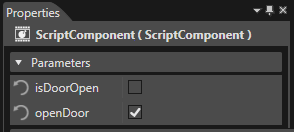
Don't forget to set the openDoor value in the properties panel to true at least for one door script to test if the other doors will get opened.
Global Variables
Another way to communicate between two sibling scripts is to use global variables. In Lua variables are automatically global if you declare them without an access modifier. But we would recommend you to set variables with a root script as explained above.