# Level of Detail (LOD)

#### <a class="anchor" id="bkmrk--16"></a>Description

This chapter briefly describes Level Of Detail techniques supported by [Candera](http://dev.doc.cgistudio.at/APILINK/namespace_candera.html "[DataBinding_RefTypeSample]").

#### <a class="anchor" id="bkmrk--18"></a>See also:

<div class="contents" id="bkmrk-level-of-detail-in-s"><div class="contents"><div class="textblock">- <span style="color: rgb(230, 126, 35);">[Level of Detail](https://doc316en.candera.eu/link/130#bkmrk-level-of-detail-%28lod-0)</span> in SceneComposer User Manual

</div></div></div>#### <a class="anchor" id="bkmrk--19"></a>Example Solution:

<div class="contents" id="bkmrk-lodsolution-from-fol"><div class="textblock">- LODSolution from folder *cgi\_studio\_player/content/Tutorials/08\_SpecialRenderTechniques/Special3DRenderTechniques*

</div></div>#### **Introduction** 

##### <a class="anchor" id="bkmrk--20"></a>Level of Detail

```
Level of detail (LOD) is a discipline of interactive computer graphics attempts 
to bridge complexity and performance by regulating the amount of detail used 
to represent the virtual world.
```

*(Level of Detail for 3D Graphics, David Luebke, Morgan Kaufmann Publisher, 2003)*

<div drawio-diagram="2415"><img src="https://doc316en.candera.eu/uploads/images/drawio/2023-02/drawing-4-1677219316.png" alt=""/></div>

##### <a class="anchor" id="bkmrk--22"></a>Motivation

Reduce render complexity in order to increase runtime performance with minimal or without visual penalty

##### <a class="anchor" id="bkmrk--23"></a>Detail Simplifications

<div class="contents" id="bkmrk-geometric%3A-meshes%2C-i"><div class="textblock">- Geometric: Meshes, Imposters, Shadow LOD, ...
- Non-geometric: Shader, Lighting, Textures (MipMapping), Material, ...

</div></div>#### **Level of Detail - Geometry Reduction Types**   


##### <a class="anchor" id="bkmrk--24"></a>Discrete LOD

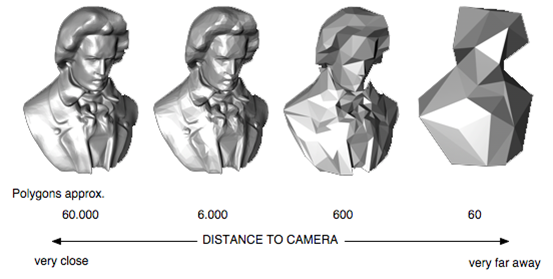
<div class="contents" id="bkmrk-creates-multiple-ver"><div class="contents"><div class="textblock">- Creates multiple versions of an object with different level of details. Often refered to as isotropic or view-independent LOD, as detail reduction is applied uniformly accross the object.

- Widely used in real time environments as LOD levels are generated during an offline preprocess. Supported by Candera.

</div></div></div>##### <a class="anchor" id="bkmrk--25"></a>Continuous or progressive LOD

<div class="contents" id="bkmrk-simplification-syste"><div class="contents"><div class="textblock">- Simplification system creates a data structure encoding a continuous spectrum of detail. The desired LOD is extracted from this structure at run-time. Supports LOD streaming and interruptible loading.

</div></div></div>##### <a class="anchor" id="bkmrk--26"></a>View-dependent LOD

<div class="contents" id="bkmrk-extends-continuous-l"><div class="contents"><div class="textblock"><div class="contents"><div class="textblock">- Extends continuous LOD by using view-dependent simplification criteria to dynamically select the most appropriate LOD for current view. Thus, view-dependent view is anisotropic.

</div></div></div></div></div><div class="contents" id="bkmrk--0"><div class="contents"><div class="textblock">  
</div></div></div><div drawio-diagram="2416"><img src="https://doc316en.candera.eu/uploads/images/drawio/2023-02/drawing-4-1677219426.png" alt=""/></div>

#### **Level of Detail - Chain**   


<div class="contents" id="bkmrk-a-lodnode-accomodate"><div class="contents"><div class="textblock">- A LodNode accomodates a node for each level of detail.
- Candera Nodes are e.g: Mesh, Billboard, Light, Group, etc.

</div></div></div>##### <a class="anchor" id="bkmrk--28"></a>Typical LOD Chain

<div class="contents" id="bkmrk--3"><div class="textblock">  
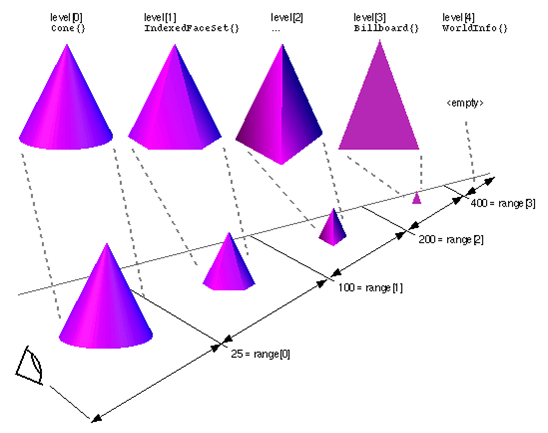
</div></div>The following figure depicts a typical LOD chain:

- Level 0 .. 2: Meshes.
- Level 3: Billboard.
- Level 4: null-Node

<div drawio-diagram="2417"><img src="https://doc316en.candera.eu/uploads/images/drawio/2023-02/drawing-4-1677219460.png" alt=""/></div>

#### **Candera - Discrete LOD Concept**   


##### <a class="anchor" id="bkmrk--30"></a>Candera::LodNode, LoD Level

The class [Candera::LodNode](http://dev.doc.cgistudio.at/APILINK/class_candera_1_1_lod_node.html "LodNode represents a Node which accommodates multiple nodes, each of them representing a certain...") implements discrete LOD technique. Any Candera class derived from class [Candera::Node](http://dev.doc.cgistudio.at/APILINK/class_candera_1_1_node.html "The class Node is an abstract base class for all scene graph nodes. Each Node defines a local coordin...") is accepted as LOD representation.

Each LOD level in [Candera::LodNode](http://dev.doc.cgistudio.at/APILINK/class_candera_1_1_lod_node.html "LodNode represents a Node which accommodates multiple nodes, each of them representing a certain...") defines:

- LOD level index,
- Node,
- Lower bound of its visibility range,
- Upper bound of its visibility range.

<div drawio-diagram="2418"><img src="https://doc316en.candera.eu/uploads/images/drawio/2023-02/drawing-4-1677219530.png" alt=""/></div>

##### <a class="anchor" id="bkmrk--32"></a>LOD Render Strategy

The LOD render strategy defines the transition between adjacent LOD levels.

<div class="contents" id="bkmrk-candera%3A%3Adiscretelod"><div class="contents"><div class="textblock">- [Candera::DiscreteLodRenderStrategy](http://dev.doc.cgistudio.at/APILINK/class_candera_1_1_discrete_lod_render_strategy.html "The class DiscreteLodRenderStrategy defines an interface to configure the LodNode's visual appearance..."): Stepwise transition.
- [Candera::BlendLodRenderStrategy](http://dev.doc.cgistudio.at/APILINK/class_candera_1_1_blend_lod_render_strategy.html "The class BlendLodRenderStrategy defines an interface to configure the LodNode's visual appearance ac..."): alpha-blended transition.

</div></div></div>##### <a class="anchor" id="bkmrk--33"></a>LOD Criterion

The LOD criterion delivers a source value to map onto the LOD nodes visibility boundaries.

<div class="contents" id="bkmrk-candera%3A%3Adistancetoc"><div class="textblock">- [Candera::DistanceToCameraLodCriterion](http://dev.doc.cgistudio.at/APILINK/class_candera_1_1_distance_to_camera_lod_criterion.html "The class DistanceToCameraLodCriterion returns the distance to camera."): distance from LOD node to camera.
- [Candera::GenericValueLodCriterion](http://dev.doc.cgistudio.at/APILINK/class_candera_1_1_generic_value_lod_criterion.html "The class GenericValueLodCriterion allows to manually set the criterion value for LOD level selection..."): Application defined value.

</div></div>#### **Candera - LOD Render Strategy**   


##### <a class="anchor" id="bkmrk--34"></a>Discrete LOD Render Strategy

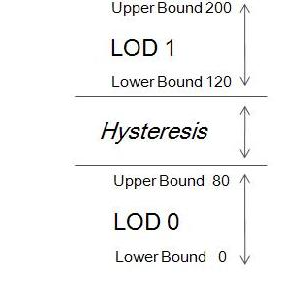
- Stepwise transition between LOD levels
- Non-adjacent boundaries between contiguous LOD levels define a Hysteresis.

<div drawio-diagram="2419"><img src="https://doc316en.candera.eu/uploads/images/drawio/2023-02/drawing-4-1677219620.png" alt=""/></div>

##### <a class="anchor" id="bkmrk--36"></a>Blend Transition LOD Render Strategy

<div class="contents" id="bkmrk--9"><div class="textblock">  
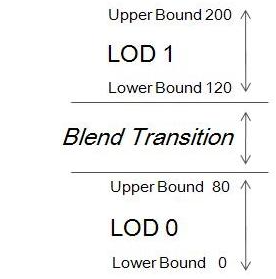
</div></div>- Alpha blended transitions between LOD levels
- Non-adjacent boundaries between contiguous LOD levels define transition phase.
- During blend transition one alternating LOD node is always opaque to avoid 'see-through' effects.

<div drawio-diagram="2420"><img src="https://doc316en.candera.eu/uploads/images/drawio/2023-02/drawing-4-1677219649.png" alt=""/></div>

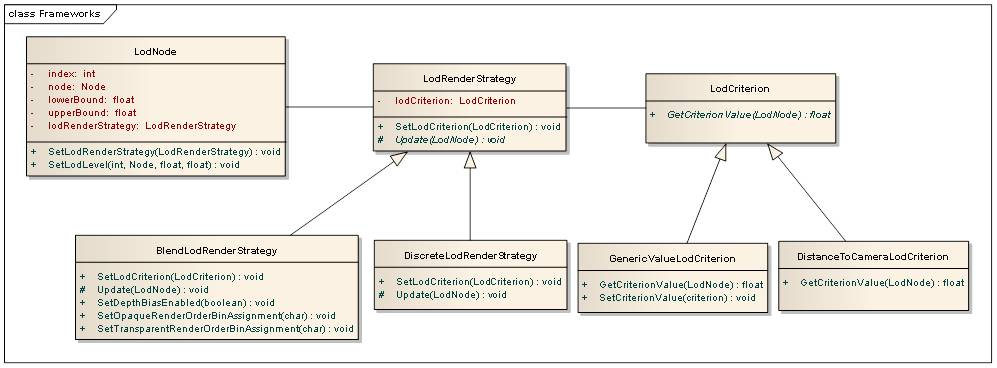
#### **Candera - LOD Architecture Overview** 

<div class="contents" id="bkmrk-a-candera%3A%3Alodnode-h"><div class="contents"><div class="textblock">- A [Candera::LodNode](http://dev.doc.cgistudio.at/APILINK/class_candera_1_1_lod_node.html "LodNode represents a Node which accommodates multiple nodes, each of them representing a certain...") has 0..1 associated LodRenderStrategy objects.
- A [Candera::LodRenderStrategy](http://dev.doc.cgistudio.at/APILINK/class_candera_1_1_lod_render_strategy.html "The abstract class LodRenderStrategy defines an interface to configure the LodNode's visual appearanc...") has 0..1 associated LodCriterion objects.
- According to use case LodRenderStrategy and LodCriterion objects are interchangeable arbitrarily.

</div></div></div><div drawio-diagram="2421"><img src="https://doc316en.candera.eu/uploads/images/drawio/2023-02/drawing-4-1677219708.png" alt=""/></div>

<div class="contents" id="bkmrk--12"><div class="textblock">  
</div></div>#### **Example - LOD in SceneComposer**   


##### <a class="anchor" id="bkmrk--39"></a>Example - Level of Detail in SceneComposer

This chapter shows a typical LOD use case and explains how the transition from two different LODs can be realized with CGI Studio SceneComposer.

To experiment with LOD transition, the following can be used:

<div class="contents" id="bkmrk-lodsolution-from-fol-0"><div class="contents"><div class="textblock">- **LODSolution** from folder *cgi\_studio\_player/content/Tutorials/08\_SpecialRenderTechniques/0801\_Special3DRenderTechniques*

</div></div></div>##### <a class="anchor" id="bkmrk--40"></a>Use Case

The example solution is based on following use case:

<div class="contents" id="bkmrk-the-tire-is-shown-fr"><div class="contents"><div class="textblock">- The tire is shown from a certain distance in sufficient resolution.
- The camera zooms in to the tire (animation).
- As the camera captures the tire from a close distance, the tire model shall be exchanged with a higher resolution model.
- The transition between the low- and the high-resolution tire model shall appear smooth.

</div></div></div>You can experiment with following node properties:

<div class="contents" id="bkmrk-%28lower-and-upper%29-bo"><div class="contents"><div class="textblock">- **(Lower and Upper) Boundary Values**: Modify boundary values of low and high node.
- **Criterion**: Set criterion 0:DistanceToCamera 1:Generic.
- **Strategy**: Set render strategy 0:Blend 1:Discrete.

</div></div></div>##### <a class="anchor" id="bkmrk--41"></a>See also:

<div class="contents" id="bkmrk-level-of-detail-in-s-0"><div class="textblock">- <span style="color: rgb(230, 126, 35);">[Level of Detail](https://doc316en.candera.eu/link/130#bkmrk-level-of-detail-%28lod-0)</span> in SceneComposer User Manual

</div></div>#### **Example - Blended LOD**   


##### <a class="anchor" id="bkmrk--42"></a>Blended LOD

<div class="contents" id="bkmrk-initialize-lod-node-"><div class="contents"><div class="textblock">- Initialize LOD node with 2 LOD objects.
- LOD is automatically changed by distance to camera criterion.
- Desired Behavior: 
    - LOD 0 is exclusively visible at camera distance 0 - 40 (in the LodNode set Lower Bound 0, and Upper Bound 40).
    - LOD 1 is exclusively visible at camera distance 60 - 100 (in the LodNode set Lower Bound 60, and Upper Bound 60).
    - Blend Transition between LOD 0 and LOD 1 is defined at camera distance 40 - 60 (in the LodNode select RenderStrategy 0:Blend).
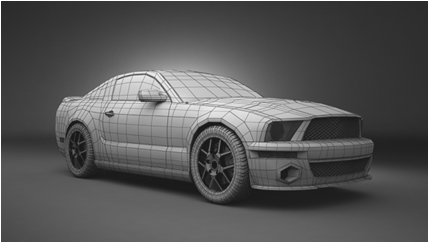
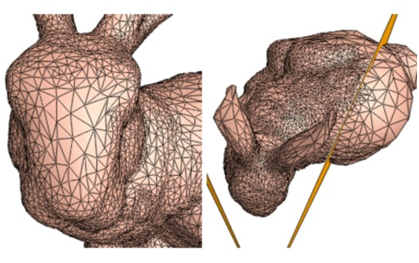
</div></div></div>Change CameraDistance or start CameraPosition animation to see the smooth transition.

In application code the LodNode is set up as follows:

Initializing the LodNode

```
    // init LodNode bounds
    static_cast<void>(lodNode->SetLodLevel(0, lodNode->GetLodLevel(0).node, m_lowBoundHigh, m_upBoundHigh));
    static_cast<void>(lodNode->SetLodLevel(1, lodNode->GetLodLevel(1).node, m_lowBoundLow, m_upBoundLow));
    // end init
```

Define Criterion and RenderStrategy

```
        // Define DistanceToCameraLodCriterion and BlendLodRenderStrategy

        static DistanceToCameraLodCriterion cameraLodCriterion; // LOD is automatically selected by distance to camera.
        static BlendLodRenderStrategy blendLodStrategy; // LOD is automatically blended between non-adjacent boundaries

        // End Define DistanceToCameraLodCriterion and BlendLodRenderStrategy
```

Link pieces together

```
        // Init BlendLodRenderStrategy and set to LodNode

        blendLodStrategy.SetLodCriterion(&cameraLodCriterion);
        lodNode->SetLodRenderStrategy(&blendLodStrategy);

       // End Init BlendLodRenderStrategy and set to LodNode
```

#### **Example - Step-wise LOD**   


##### <a class="anchor" id="bkmrk--43"></a>Step-wise LOD

<div class="contents" id="bkmrk-initialize-lod-node--0"><div class="contents"><div class="textblock">- Initialize LOD node with 2 LOD objects.
- LOD criterion value can be set by application directly. (in the LodNode set Criterion to 1:Generic).
- Desired Behavior: 
    - LOD 0 is exclusively visible at camera distance 0 - 40 (in the LodNode set Lower Bound 0, and Upper Bound 40).
    - LOD 1 is exclusively visible at camera distance 60 - 100 (in the LodNode set Lower Bound 60, and Upper Bound 60).
    - Hysterese is defined at 40 - 60. Thus, criterion values within that range do not lead to LOD level swaps. (in the LodNode select RenderStrategy 1:DiscreteLodRenderStrategy).

</div></div></div>Change CriterionValue property appropriate to see the transition.

In application code the LodNode is set up as follows:

Initializing the LodNode

```
    // init LodNode bounds
    static_cast<void>(lodNode->SetLodLevel(0, lodNode->GetLodLevel(0).node, m_lowBoundHigh, m_upBoundHigh));
    static_cast<void>(lodNode->SetLodLevel(1, lodNode->GetLodLevel(1).node, m_lowBoundLow, m_upBoundLow));
    // end init
```

Define Criterion and RenderStrategy

```
        // Define GenericLodCriterion and DiscreteLodRenderStrategy

        static GenericValueLodCriterion genericLodCriterion; // Application defined criterion value can be set.
        static DiscreteLodRenderStrategy discreteLodStrategy; // Stepwise LOD switch.

        // End Define GenericLodCriterion and DiscreteLodRenderStrategy
```

Link pieces together

```
        // Init DiscreteLodRenderStrategy and set to LodNode

        genericLodCriterion.SetCriterionValue(m_criterionValue); // Set application defined criterion value.
        discreteLodStrategy.SetLodCriterion(&genericLodCriterion);
        lodNode->SetLodRenderStrategy(&discreteLodStrategy);

        // End Init DiscreteLodRenderStrategy and set to LodNode
```

#### **Example - Set LOD directly** 

##### <a class="anchor" id="bkmrk--45"></a>Set LOD directly

<div class="contents" id="bkmrk-create-lod-node-with"><div class="contents"><div class="textblock">- Create LOD node with 2 LOD objects.
- LOD level index is set by application directly.
- Hint: Direct LOD level initialization is helpful, if first criterion value falls into hysteresis range, and no LOD is set active.

<div class="fragment">  
</div></div></div></div>```
// Create LodNode object with 2 empty LOD levels.
m_lodNode = <a class="code" href="http://dev.doc.cgistudio.at/APILINK/group___c_o_u_r_i_e_r___v_i_s_u_a_l_i_z_a_t_i_o_n.html#ggaf0e93dc4242f607c3c8d13dafd036af9aaabfa5309af24986d3111a092449f857">LodNode::Create</a>(2);
// Set LOD 0 active and deactivate LOD 1. No RenderCriterion is attached.
m_lodNode->GetLodLevel(0).node->SetRenderingEnabled(true);
m_lodNode->GetLodLevel(1).node->SetRenderingEnabled(false);
```