
Predefined Behaviors
This chapter gives an explanation of the Behaviors that come with CGI Studio.
Different types of Behaviors
Behaviors are sorted into different categories, which are:
- Actions: Example Behaviors are: Play Animation, Start Timer, Set Color, Set Image, Enable Rendering, ...
- Conditions: Example Behaviors are: Check Control State, Check Animation State, Check Timer, ...
- Control: Example Behaviors are: Control State Handler, Event Handler, ...
- Value Processing: Example Behaviors are: Map, Filter, Interpolate, Jump to Keyframe, Set Alpha, Set Rotation, ...
- Scripting and State Machine related
Visualization of Behaviors as Tree
When many behaviors are nested, the hierarchy of the behaviours is shown thorugh the visualization of the behaviours integral map ( = "tree") structure.
For example, if a conditional behavior is used together with another connected behavior, the later is displayed as a child of the conditional behavior. In this way, all behavior properties on behaviors are displayed as a tree view with item children of the owner behavior.
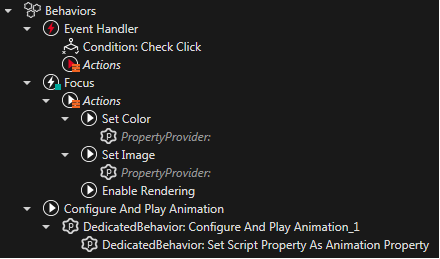
The drag and drop operations only allow behavior of the baseclass specified in the property to be assigned to the main (i.e. "parent") behavior. Any behavior that appears as a child of another behavior will not appears as a standalone behavior in the treeview. If a behavior is removed from all properties, that behavior will be shown again as a stand alone behavior in the tree.
Behaviors: Deep Copy/Paste Operation
If a behavior is just the reference of another (parent) behavior, the referenced behavior will be marked by a specific sign and a tooltip will become visible on it:
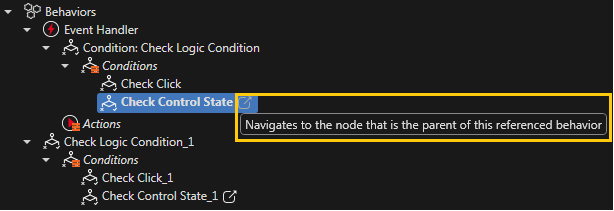
If a behavior which contains referenced behavior is copied, a new option will become available in the context menu: "Deep Paste".
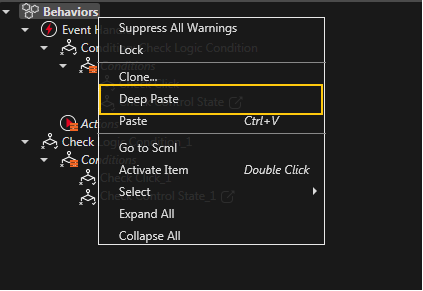
By using this option, referenced behaviors from other nodes will be duplicated, in the location of the original referenced behavior, and the reference will be updated to the duplicated behavior.
When copied, all behaviors will have the following behavior in the Scene extra-Tree:
A) Behavior that are referenced from the copied behaviors will now also get copied to the new location if they are from the same node as the copied behaviors. Behaviors from other nodes will remain as a reference to the same behavior.
- Group/B1
- ref: Group/B2
- ref: Camera/B3
When copying and pasting behavior B1 on Group, we will get the following structure:
- Group/B1_1
- ref: Group/B2_1
- ref: Camera/B3
When copying and pasting behavior B1 on Button, we will get the following structure:
- Button/B1
- ref: Button/B2
- ref: Camera/B3
B) When using the Deep Paste context menu option, referenced behaviors from other nodes will also be duplicated, in the location of the original referenced behavior, and the reference will be updated to the duplicated behavior.
- Group/B1
- ref: Group/B2
- ref: Camera/B3
When copying and pasting behavior B1 on Group, we will get the following structure:
- Group/B1_1
- ref: Group/B2_1
- ref: Camera/B3_1
When copying and pasting behavior B1 on Button, we will get the following structure:
- Button/B1
- ref: Button/B2
- ref: Camera/B3_1
Functional Categories of Behaviors
To differentiate the functionality of behaviors in the context of controls, there are two categories available: event handling and value processing.
Event Handling with Behaviors
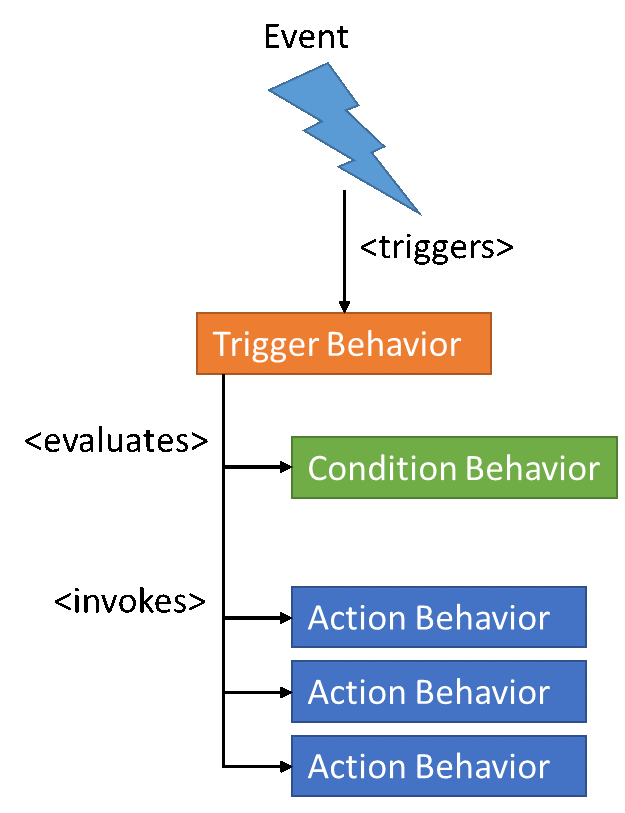
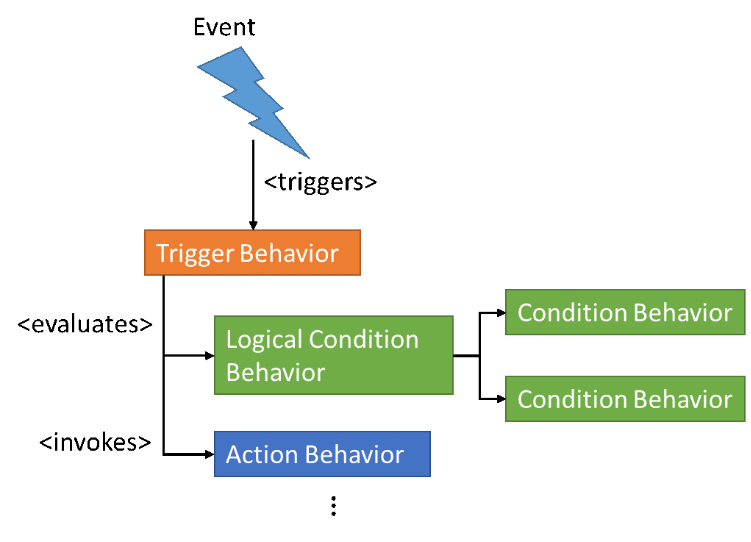
The Behaviors for Event-Handling work like the following pattern:
Upon <event> When <condition> Do <action>;
An input event is processed by a Trigger Behavior, which evaluates a condition (Condition Behavior). If the condition evaluates to true, then it invokes one or more Action Behaviors. The Trigger Behavior reacts on any input event. A filter on event type is achieved by specialized Condition Behaviors for these events. Event parameters are evaluated against Condition Behavior property values.
Specialized Logical Condition Behaviors enable complex conditions by combining Condition Behaviors.
Additionally there is a ConditionalActionBehavior which can be attached as an action. This can be used as a trigger with further conditions for other actions.
Value Processing with Behaviors
The second category is value processing. The Value Behavior provides a Variant data type which is bindable. A value change results in a processing of that value.
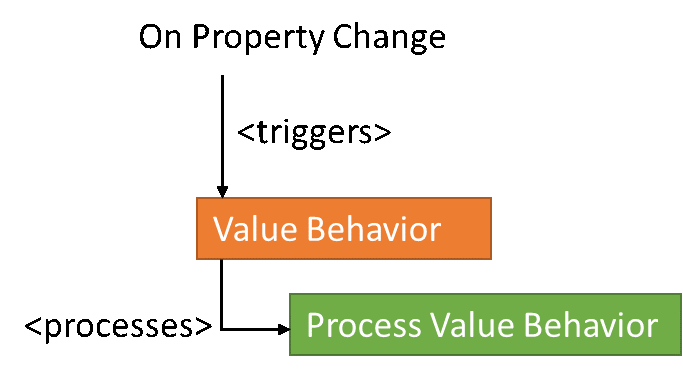
The value processing is realized in a data flow chain (including mapping to a limited value range and parallel data flow processing). As a result of this chain properties like position, scale … will be affected.
To trigger an ActionBehavior corresponding to a value the "Action on Value"-Behavior can be used. To check the value a "Value Condition" can be attached as a ConditionBehavior.
Bridges between Event Handling and Value Processing
An option is provided to bridge the Event Handling and Value Processing flows. The first bridge is from an event to Value Processing. A dedicated Value Event carrying the value is sent to the Value Behavior. The Value Behavior receives the Value Event and proceeds the Value Processing.
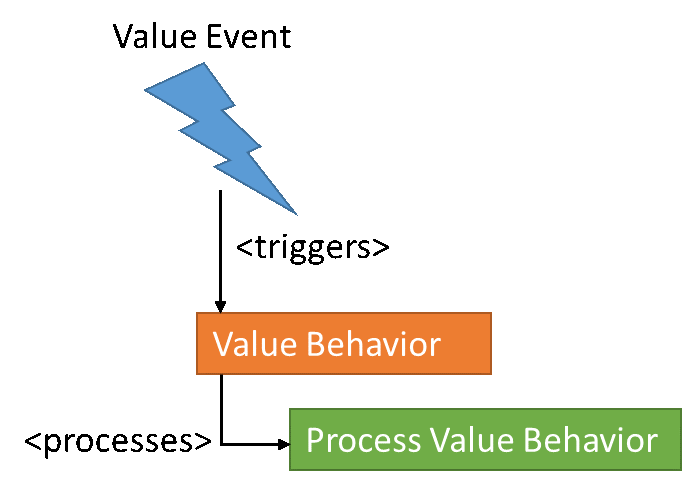
The second bridge is from a value change to Event Handling. A specialized Process Value Behavior – Send Value Process Value Behavior - dispatches directly a Process Value Event. Optionally a condition can be applied (Condition Behavior) to determine whether the Value Event shall be sent. The Process Value Event is handled by a Trigger Behavior.