
CGI-Studio Default Behaviors
CGI-Studio already provides multiple Behaviors by default which can already be used in projects. While they are also just Behaviors the follow a new concept for development which has been made possible by the new features of Behaviors.
Previously Widgets where rather self-contained blocks of functionality. For example a needle widget would receive an input value (e.g. Speed) map it to a rotation angle and apply this rotation to a node.

It would be possible to recreate this exact functionality as a behavior though the decision at Candera GmbH was to have multiple smaller behaviors which each implement only a small bit of functionality. Then combine these to achieve the desired results.
In the above sample this would result in a Value-Behavior which receives the value, a Map-Behavior which maps it to an angle and a Rotation-Behavior which applies the angle as a rotation on the node.
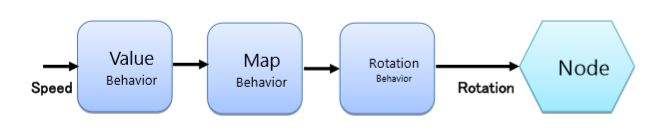
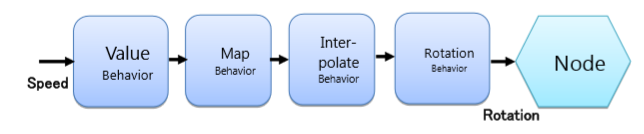
This approach has the advantage that it drastically improves the flexibility due to the modular design. For example if the rotation shouldn't happen instantly but slowly over time an interpolation behavior can be added.
If instead of rotating a needle, a pointer is just moved forward or back to indicate the value the Rotation-Behavior can be replaced with a Translation-Behavior.
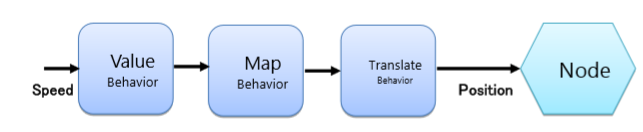
All this can be achieved by simply recombining existing behaviors without the need to code new ones.
Event Handler Behavior
When an Event-Handler Behavior receives an event it will pass this event to a number of Condition-Behaviors. The Condition-Behaviors can then decide if this event is "accepted" or not. In case the event is accepted all attached Action-Behaviors will be executed.
How to create a new Condition-Behavior
To create a custom Condition-Behavior a new Behavior derived from Candera::ConditionBehavior must be created.
In the OnEvent() method an EvaluateConditionEvent will be received which allows to get the original event via the GetTriggerEvent() method. Further the dispatchResult will be of the type ConditionEvaluationResult. To accept the event the Match() method of the result must be called.
...
void ClickConditionBehavior::OnEvent(const FeatStd::Event& event, Candera::EventDispatchResult& dispatchResult)
{
    const Candera::EvaluateConditionEvent* conditionBehaviorEvaluationEvent = Candera::Dynamic_Cast<const Candera::EvaluateConditionEvent*>(&event);

    if (0 != conditionBehaviorEvaluationEvent) {
        const ClickEvent* clickEvent =
              Candera::Dynamic_Cast<const ClickEvent*>(&(conditionBehaviorEvaluationEvent->GetTriggerEvent()));

        if (0 != clickEvent) {
            if (clickEvent->GetClickCount() == GetClickCount()) {
                Candera::ConditionEvaluationResult* conditionEvaluationResult = Candera::Dynamic_Cast<Candera::ConditionEvaluationResult*>(&dispatchResult);

                if (0 != conditionEvaluationResult) {
                    conditionEvaluationResult->Match();
                }
             }
        }
    }
}
...
How to create a new Action Behavior
To create a custom Action-Behavior a new Behavior derived from Candera::ActionBehavior must be created.
In the OnEvent() method an InvokeActionEvent will be received which indicates that the action should be executed.
...
void ChangeValueActionBehavior::OnEvent(const FeatStd::Event& event, Candera::EventDispatchResult& dispatchResult)
{
    FEATSTD_UNUSED(dispatchResult);
    const Candera::InvokeActionEvent* invokeActionEvent = Candera::Dynamic_Cast<const Candera::InvokeActionEvent*>(&event);

    if (0 != invokeActionEvent) {
        // Do something
    }
}
...
How to handle Touch-Events
To create a Behavior which reacts on Touch interaction a new Behavior derived from CgiStudioControl:: TouchableBehavior must be created. This class registers to the TouchSession and processes the incoming TouchSession-Events to perform a hit detection. If a hit is detected it is possible to react to Touch-Event in the behavior.
From the event the Touch-Info can be retrieved which contains important information about the Touch-State (Down, Move, Up), Pointer-Id (Multi-Touch), Source-Id (Multi-Display) and Touch-Coordinates.
...
    virtual void OnEvent(const FeatStd::Event& event, Candera::EventDispatchResult& dispatchResult)
    {
        const Candera::TouchEvent* touchEvent = Candera::Dynamic_Cast<const Candera::TouchEvent*>(&event);

        if (touchEvent != 0) {
            switch (touchEvent->GetTouchInfo().m_state) {
                case Candera::TouchInfo::Down:
                    //OnBeginDrag(event.GetTouchInfo().m_x, event.GetTouchInfo().m_y);
                    break;
                case Candera::TouchInfo::Move:
                    //OnDrag(event.GetTouchInfo().m_x, event.GetTouchInfo().m_y);
                    break;
                case Candera::TouchInfo::Up:
                    //OnEndDrag(event.GetTouchInfo().m_x, event.GetTouchInfo().m_y);
                    break;
                default: break;
            }
        }
        else {
            Base::OnEvent(event, dispatchResult);
        }
    }
...
Manual Touch handling
If a more customized processing of Touch-Events is required, instead of deriving from CgiStudioControl:: TouchableBehavior it is also possible to manually implement Touch-Handling. First the behavior must be marked as Touchable by implementing the "virtual bool IsTouchable() const" method or simply adding the following macro.
...
CGI_BEHAVIOR_IS_TOUCHABLE()
...
Next the Behavior must be registered/unregistered to the Touch-Session. This allows receiving TouchSession-Events.
...
void TouchableBehavior::Register()
{
    Deregister();
    Candera::TouchSession::GetInstance().Register(GetTouchable());
    m_touchSession = &Candera::TouchSession::GetInstance();
}

void TouchableBehavior::Deregister()
{
    if (0 != m_touchSession) {
        m_touchSession->Deregister(GetTouchable());
        m_touchSession = 0;
    }
}
...
The basic touch handling (object hit detection) must be manually implemented. This can be a bit more complicated but related code can be found in the TouchBehavior::OnEvent which can be used as basis for a custom implementation.
...
    void TouchableBehavior::OnEvent(const FeatStd::Event& event, Candera::EventDispatchResult& dispatchResult)
    {
        if (!TouchSessionEventHandler::Handle(*this, event, dispatchResult)) {
...
            Base::OnEvent(event, dispatchResult);
        }
    }
...
And the TouchSessionEventHandlerImpl::OnTouchSessionEvent.
...
    void OnTouchSessionEvent(const Candera::TouchSessionEvent& event, Candera::TouchSessionEventDispatchResult& dispatchResult)
    {
        if (m_intersectionTest) {
            if (m_behavior.GetNode().IsEffectiveRenderingEnabled()) {
                Courier::View* view = m_behavior.GetParentView();
                if (0 != view) {
                    const Candera::AbstractNodePointer& abstractNode = m_alternativeNode.IsValid() ? m_alternativeNode : m_behavior.GetNode();
                    const Candera::TouchInfo& touchInfo = event.GetTouchInfo();
#ifdef CANDERA_2D_ENABLED
                    Courier::ViewScene2D* viewScene2D = view->ToViewScene2D();
                    if (0 != viewScene2D) {
                        Candera::Node2D* node2D = abstractNode.ToNode2D();
                        if (0 != node2D) {
                            Courier::ViewScene2D::CameraPtrVector& cameras = viewScene2D->GetCameraPtrVector();
                            for (FeatStd::SizeType i = 0; i < cameras.Size(); ++i) {
                                Candera::Vector2 touchPosition(FeatStd::Float(touchInfo.m_x), FeatStd::Float(touchInfo.m_y));
                                if ((0 != cameras[i]) && node2D->IsPickIntersectingBoundingRectangle(*cameras[i], touchPosition)) {
                                     dispatchResult.SetTouched(true);
                                     dispatchResult.SetTouchUsage(m_touchUsage);
                                     return;
                                }
                            }
                        }
                 }
#endif
#ifdef CANDERA_3D_ENABLED
                      Courier::ViewScene3D* viewScene3D = view->ToViewScene3D();
                      if (0 != viewScene3D) {
                          Candera::Node* node = abstractNode.ToNode();
                          if (0 != node) {
                              Courier::ViewScene3D::CameraPtrVector& cameras = viewScene3D->GetCameraPtrVector();
                              for (FeatStd::SizeType i = 0; i < cameras.Size(); ++i) {
                                   Candera::Camera* camera = cameras[i];
                                   FeatStd::Float distance = Candera::Math::MaxFloat();
                                   if ((0 != camera) && camera->IsRenderingEnabled() && node->IsPickIntersectingGeometry(*camera, static_cast<FeatStd::Int>(touchInfo.m_x),
                                                                                        static_cast<FeatStd::Int>(touchInfo.m_y), distance)) {
                                        dispatchResult.SetTouched(true);
                                        dispatchResult.SetTouchUsage(m_touchUsage);
                                        return;
                                   }
                              }
                          }
                      }
#endif
                 }
             }
         }
         else {
             dispatchResult.SetTouched(true);
             dispatchResult.SetTouchUsage(m_touchUsage);
         }
     }
...
How to handle View-Activation-Events
View-Activation-Events are events send by the View to indicate if it has been activated or deactivated. To react to these events the Behavior must register at the View as an Event-Listener.
...
EventListenerAdapter m_eventListenerAdapter;
...
...
    CustomBehavior::CustomBehavior()
    {
        m_eventListenerAdapter.SetBehavior(this);
        Courier::View::GetEventSource().AddEventListener(&m_eventListenerAdapter);
    }

    CustomBehavior::~CustomBehavior ()
    {
        Courier::View::GetEventSource().RemoveEventListener(&m_eventListenerAdapter);
        m_eventListenerAdapter.SetBehavior(0);
    }
...
It is now possible to receive as Courier::ViewActivationEvent via the OnEvent() method.