
External Image Behaviour
Behaviour Overview
Feature Description
A new file resource manager called FileSystemResourceManager has been introduced. With this new resource manager, “FileSystem”, users can now use it with the external resource behaviours SetExternalBitmap and ExternalBitmapProvider.
Previously, these behaviours only supported the Android Resource Manager, where users had to provide a unique resource ID (e.g., Bitmap name), and it was limited to Android.
With the introduction of the FileSystemResourceManager, the use cases of these behaviours have been extended. Now, users can provide a file path from the project file system (outside the binary ExternalResourceManagerId and ExternalResourceId are configurable properties of the External Resource behaviour.
When the ExternalResourceManagerId is set to Filesystem, the behaviour enables dynamic image loading from the file system at runtime to Vram.
Users can specify a relative image path in the ExternalResourceId property to load image files such as PNG and JPEG without embedding them directly into the binary file. These behaviours internally use the lodepng and IJG (libjpeg) libraries to decode, encode, and compress image data as needed.
A relative path refers to a path that is defined relative to the application’s working directory or a configured asset root.
For example:
- Logos\400x150\CGI-Studio-Translator-final.png
- Logos\400x150\CGI-Studio-Translator-final.jpg
The Filesystem resource manager enables the management of image resources without the need to import them into the Scene Composer. Images can be accessed and loaded directly from the application’s file system at runtime.
Supported Platforms
It supports all platforms.
Limitations:
-
These behaviours are used to set images on 2D bitmap nodes and cannot be used to set textures for 3D objects.
-
There is no dropdown list available in the ExternalResourceManagerID property to select between FileSystem and Android system — the user must set it manually.
-
The FileSystemResourceManager supports loading and displaying only PNG and JPG images. It does not support file paths of other formats.
Using External Resource Behaviours
External Bitmap Provider
-
Drag and drop the [ Node 2D > Bitmap Node ] from the toolbox onto the scene editor, or the scene tree.
-
Attach [ Behavior > External Resource > Value Processing > External Bitmap Provider ] in the Toolbox to the Behavior in the Extra Scene Tree of the placed bitmap node by drag-and-drop operation.
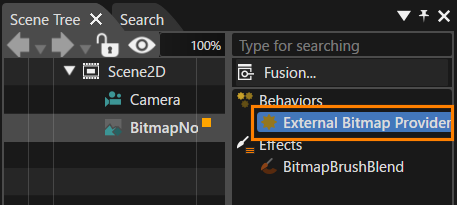
-
Click External Bitmap Provider, and in the properties panel that opens, change ExternalResourceManagerId from Android to FileSystem (default: Android).
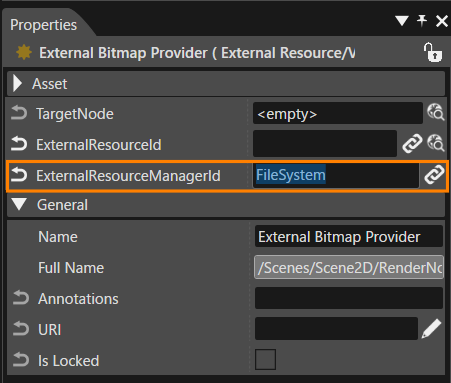
-
Next, set the relative path to the external image in the ExternalResourceId property.
For example: <trunk>\cgi_studio_content\Resources\cgi_studio\Logos\400x150\CGI-Studio-Translator-final.png.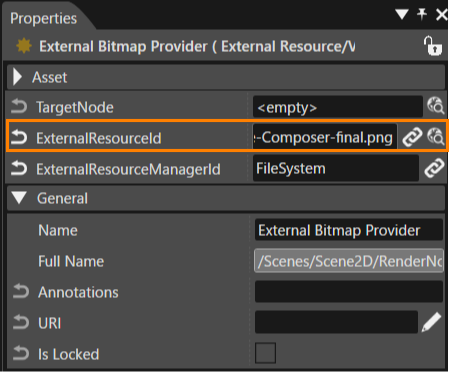
-
The image will be loaded into the solution, and the image from the given relative path will be displayed on the screen.

Set External Bitmap
-
Drag and drop the [ Node 2D > Bitmap Node ] from the toolbox onto the scene editor, or the scene tree.
-
Drag and drop the [ Controls > Touchable > TextButton ] from the toolbox onto the scene editor, or the scene tree. Take place this operation twice (add two button control nodes).
-
Attach [ Behavior > External Resource > Action > Set External Bitmap ] in the Toolbox to the Actions in the Extra Scene Tree of the placed Text Button control nodes by drag-and-drop operation.
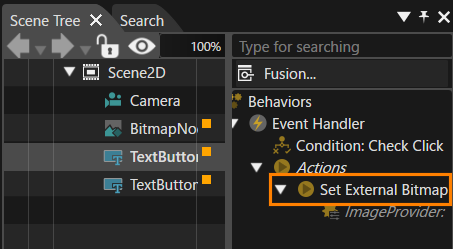
-
Change the ExternalResourceManager ID to FileSystem to make the behavior support file system resources.
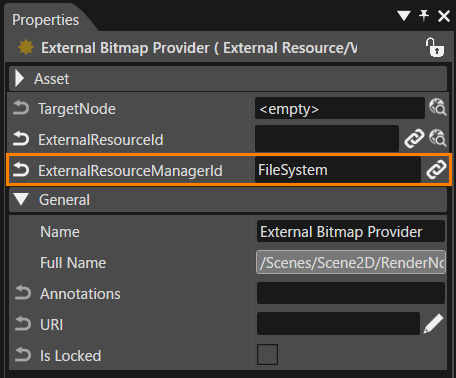
-
Click the select item button on the Image Provider in the properties panel that appears and select the External Bitmap Provider connected to the BitmapNode (this operation is performed for the two Text Button controls).
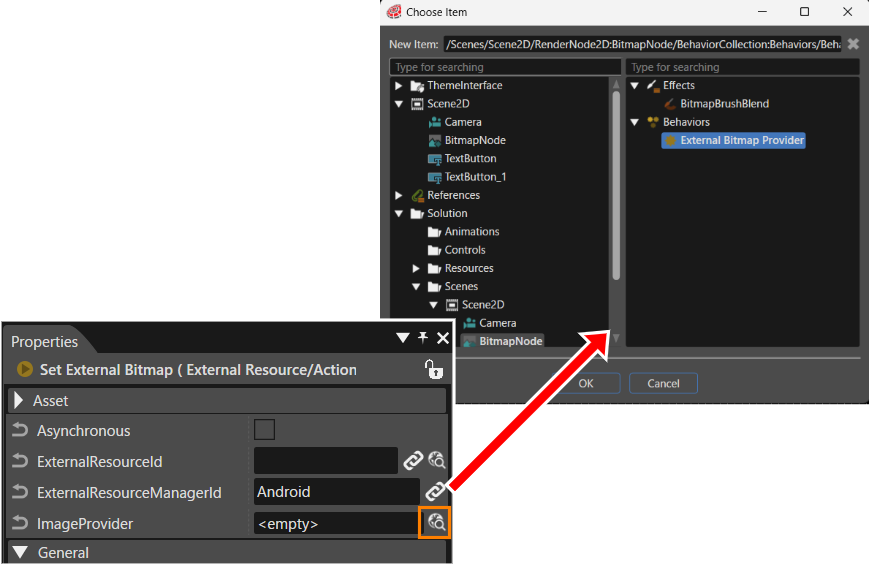
-
Set the relative image path to the ExternalResourceID property of the Set External Bitmap behavior in the button’s actions.(This operation is performed for both button controls that use the Set External Bitmap behavior.)
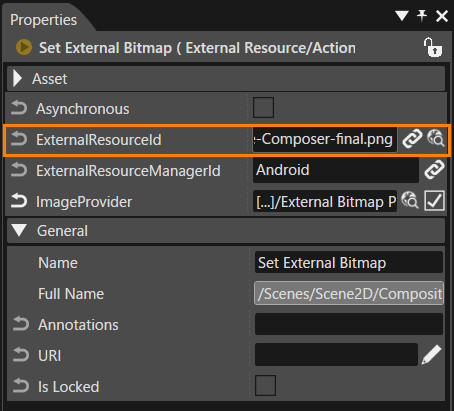
-
Run the player and press the text buttons. When each button is pressed, the image at the specified path will be loaded by the Set External Bitmap behaviors and displayed on the screen.
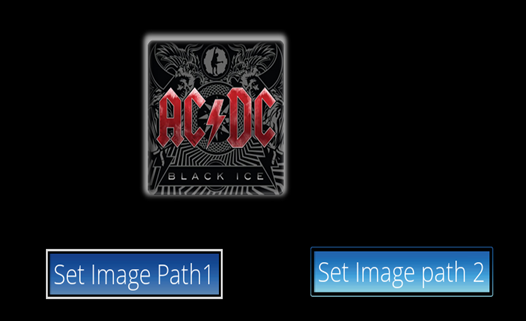
External Resource Behaviour
Set External Bitmap Behavior
Sets ExternalResourceId and ExternalResourceManagerId properties of an associated ExternalBitmapProvider when its action is triggered. For details on the property items, please refer to the Action External Resource Resource.
External Resource Provider Behavior
Sets an image on a render node based on the ExternalResourceId. For details on the property items, please refer to the Value Processing External Resource Behavior.
-
If the ID is Android, it retrieves an external bitmap using the ExternalResourceId from the external resource provider specified by the ExternalResourceManagerId, and provides the bitmap to the associated bitmap node.
-
If the ID is FileSystem, it retrieves the image from the specified file, converts it to a bitmap using the FileSystemResourceManager, and provides it to the associated bitmap node.
Implementation Structure
-
Included the IJG Library in the project to decode JPEG images and convert them into pixel data.
-
The library source files are located in the cgi_studio_3psw\ src\ijg
-
Both LodePNG (for PNG) and IJG (for JPEG) are compiled as static libraries.
-
-
The SetExternalBitmap and External Behaviour functionalities already supported the Android Resource Manager.
- Bitmaps are loaded at runtime based on the configured ExternalResourceManagerId, which determines whether to use the File System or Android Resource System.
-
Added two new files: FileSystemResourceManager.cpp and FileSystemResourceManager.h in the trunk.
- DefinedaclassnamedFileSystemResourceManager, derived from ExternalResourceManager.
-
The ExternalResourceManagerId determines which resource manager handles the request (e.g., FileResourceManager or FileSystemResourceManager).
-
The FileSystemResourceManager class allows loading PNG and JPEG images directly from file paths and interacts with the IJG and lodepng libraries.
- An instance of this class is created when the user sets the ExternalResourceManager Property ID to Filesystem.
-
The External Resource Manager handles resources (such as images and bitmaps) that exist outside the project’s asset binary file.
-
Resource managers are registered by calling the DefaultSetup() function in . in the applications.
- The definition of this function is located in src\CanderaPlatform\Device\Common\Base\DefaultSetupExternalResourceManagers.cpp
-
When Default Setup() is executed, two static objects are created —
-
One in FileResourceManager for Android resources
-
Another in FileSystemResourceManager for file system resourcesBoth classes are derived from the common base class ExternalResourceManager.
-
-
The objects of these classes are registered using the Register() function of ExternalResourceManager, and are inserted into a global map for access during runtime.
-
A new class named ImageLoader has been defined in the newly introduced file ImageLoader, located in featstd\src\FeatStd\Platform.The ImageLoader class acts as a platform-independent interface for loading, decoding, and storing image files in various formats. It ensures consistent usage across different systems and simplifies image handling for the resource manager across multiple operating systems.
-
Each platform directory contains a file named PlatformImageLoader, which defines the platform-dependent implementation corresponding to the ImageLoader interface. The PlatformImageLoader implementation ensures that image handling is optimized and compatible with the target operating system (e.g., Windows, Linux, Android, RTOS, etc.).
Other Changes
- Modification in IdentifierHelper Structure
- File: IdentifierHelper.cpp
- Why: The resource ID (e.g., ExternalResourceId) is not a plain string but an object that can be converted to a string using IdentifierHelper::GetStringByIdentifier.
- Purpose: This change allows the resource manager to handle hierarchical and structured resource paths efficiently and safely.
- Replaced Name with Identifier Data Type
- The data type Name has been replaced with Identifier in all external resource management classes.
- Reason for Change:
- Name represents a single, non-hierarchical string label (e.g., "Logo" or "Scene1") and is suitable only for flat resources such as bitmap names or unique IDs obtained from ExternalResourceId.
- Identifier supports hierarchical resource paths, improving the flexibility of resource management — mainly for the FileSystemResourceManager.
- Files Modified:
- ExternalBitmapProviderBehavior.cpp
- ExternalBitmapProviderBehavior.h
- ExternalResourceChangeConditionBehavior.cpp
- ExternalResourceChangeConditionBehavior.h
- SetExternalBitmapActionBehavior.cpp
- SetExternalBitmapActionBehavior.h
- ExternalBitmapProviderTest.cpp
- ExternalResourceChangeConditionTest.cpp
- SetExternalBitmapActionTest.cpp
- Update in GetBitmapResource Member Function (ExternalResourceManager Class)
- The GetBitmapResource member function definition in ExternalResourceManager has been updated.
- Reason for Change:
To retrieve a bitmap resource from a registered external resource manager using a Manager ID and a Resource ID (both as Name::SharedPointer). - The function converts the resource name to an Identifier, then delegates the actual bitmap retrieval to the selected resource manager.This design enables flexible and modular access to bitmap resources from different managers.
Display Bitmap from File Path
- The Candera framework uses the LodePNG and IJG libraries to decode image files:
LodePNG handles PNG images.
IJG handles JPEG images.
During decoding, the compressed data is converted into raw bitmap data (e.g., RGBA for PNG or RGB for JPEG).
- When the ExternalBitmapProvider behavior properties are configured with an External Resource Manager ID and a full file path,
The OnChanged() function of the behavior is triggered,
Which then calls updateImage() inside the function
-
ExternalResourceManager::GetBitmapResource (const FeatStd::Internal::Identifier::SharedPointer& resourceId)
-
The GetBitmapResource() function retrieves the corresponding Resource Manager object based on the Resource Manager ID and reads the user-configured properties from ExternalBitmapProvider.
-
Depending on the ID, it invokes the LoadBitmapResource() function:
-
If the Resource ID is set to FileSystem,
-
the LoadBitmapResource() function defined inside the FileSystemResourceManager class is called.
-
LoadBitmapResource() takes the resource ID (image file path) as input and processes it based on the file extension (e.g., .png or .jpg).
-
It then calls the LoadImage() function with the file path and detected format.
-
This function is defined in ImageLoader.h and implemented in GenericImageLoader.cpp.
-
The GenericImageLoader class uses two specialized loaders:
GenericJpegLoader (GenericJpegLoader.cpp/h)
GenericPngLoader (GenericPngLoader.cpp/h) -
When the Load() function of either loader is called:
The lodepng library loads PNG files.
The IJG (libjpeg) library loads JPEG files. -
The image data is decoded and converted into raw pixel data, stored in a structure containing image properties (height, width, pixel info).
-
The decoded bitmap is then returned from LoadBitmapResource() to the updateImage() function of ExternalBitmapProviderBehavior, where:
-
The bitmap effect is applied.
-
The image properties are updated for display on the screen.
-
When the SetExternalBitmapActionBehavior is triggered (for example, by an event or property change), it sets the Resource Manager ID and Resource ID on the ExternalBitmapProviderBehavior,
-
after which the process continues as described above.
For example:
Call Stack (Reference): Demonstrates how a relative image file path is converted into pixel data using the lodepng library during bitmap creation.
Courier::ViewScene::Update(renderHint)
CgiStudioControl::ExternalBitmapProviderBehavior::UpdateImage()
ExternalResourceManager::GetBitmapResource(resourceManagerId, resourceId)
FileSystemResourceManager::LoadBitmapResource(resourceId)   // when Manager ID = FileSystem
FeatStd::Internal::ImageLoader::LoadImage(filename, format, output)
FeatStd::Internal::Generic::GenericImageLoader::LoadImage(filename, format, output)
FeatStd::Internal::Generic::GenericPngLoader::Load(filename, output)
lodepng_decode32_file(out, w, h, filename)
FileSystemResourceManager Overview:
The FileSystemResourceManager class, defined in FileSystemResourceManager.h/cpp, provides functionality to load bitmap images from external files. It handles image format detection, error reporting, and seamless integration with the existing resource management system.
This class is derived from the ExternalResourceManager base class and serves as a common parent for both the AndroidResourceManager and FileSystemResourceManager classes. It defines a shared interface and common functionality for managing and loading external resources, enabling consistent handling of bitmap images across different platforms and resource types.
Class Overview
The FileSystemResourceManager class includes the following member functions
| FileSystemResourceManager(const FeatStd::Internal::Name::SharedPointer&resourceManagerId | Initializes the resource manager with a unique identifier(FileSystem). Stores the provided resourceManagerId in the member variable m_resourceManagerId. |
| ~FileSystemResourceManager() | |
| Bitmap::SharedPointer LoadBitmapResource(const FeatStd::Internal::Identifier::SharedPointer& resourceId) |
Loads a bitmap image from the file system using the provided resource identifier. This function is called from ExternalBitmapProvider when the ExternalResourceManagerID is set to FileSystem. Path Extraction: Converts the identifier to a file path string using IdentifierHelper::GetStringByIdentifier. Format Detection: Determines the image format (PNG, JPEG) by checking the file extension or reading the file header. Opens the file using FileStream. If the format is unknown, reads the header to detect PNG/JPEG signatures. Uses ImageLoader::LoadImage to read the image data into a RawImageData structure. Calls Bitmap::Create to construct a bitmap object from the raw image data, pixel format, and other properties. Returns the created bitmap as a shared pointer
|
| bool RegisterFileSystemResourceManager(const FeatStd::Internal::Name::SharedPointer& name) |
Registers a new instance of FileSystemResourceManager with the global ExternalResourceManager registry. Creates a new manager and calls ExternalResourceManager::Register with the provided name and manager instance. |
| bool UnregisterFileSystemResourceManager(const FeatStd::Internal::Name::SharedPointer& name |
: Unregisters an existing FileSystemResourceManager from the global registry. : Unregisters an existing FileSystemResourceManager from the global registry.
|
| GetPixelFormat() | Converts an internal image format (e.g., RGBA, RGB) to the corresponding Bitmap::PixelFormat used by the Candera engine. |
| GetFileExtension() | Extracts the file extension from a file path (e.g. image path) string. Iterates through the string to find the last dot (.) and returns the substring after it, which is the extension. |
Dependent Classes of FileResourceManager for Converting File Path to Bitmap.
New files have been introduced to serve as a common, platform-independent interface. The files listed below have been added to the project and act as a common interface for handling different image formats. Based on the file format (PNG or JPEG), the lodepng and IJG (libjpeg) libraries are used to convert the image from the file system into pixel data
The following C++ files have been introduced:
|
GenericImageLoader.cpp/h GenericJpegLoader.cpp/h |
Details about the classes defined above these files.
| ImageLoader |
|
| GenericImageLoader |
|
| GenericJpegLoader |
|
| GenericPngLoader |
|
Filesystem vs. Android Resource Manager ID
Resource managers in CGI Studio abstract the way external resources (such as images) are loaded and managed. Two commonly used managers are the FileSystem Resource Manager and the Android System Resource Manager. Each is designed for different platforms and use cases.
FileSystem Resource Manager
Purpose:
The FileSystem Resource Manager (FileSystemResourceManager) is designed to load resources directly from the device’s filesystem. It is platform-agnostic and works on desktop, embedded, and other systems where resources are stored as files.
Uses file paths or hierarchical identifiers to locate resources (e.g., images) on disk.
Supports common image formats like PNG and JPEG, with automatic format detection.
Reads files using standard file I/O operations and Convert to bitmap with help of Loadepng and ijg Opensource libraries.
Android System Resource Manager
Purpose:
The Android System Resource Manager is tailored for Android platforms, leveraging the Android resource system to access images and other assets packaged within the APK or available via Android’s resource APIs.
How It Works:
Uses Android resource IDs (not file paths) to locate resources.
Resources are typically bundled with the application and managed by the Android OS.
The resources read from the
- May have limitations on dynamic resource updates, as resources are often static once packaged.
Benefits of FileSystem Resource Manager :
- Platform Flexibility:
Works across multiple platforms, not limited to Android.
- Dynamic Resource Updates:
Resources can be updated, replaced, or added at runtime without rebuilding the application.