
Usage example (Importing and assigning Control)
In this section describes the Control assignment procedure when importing a PSD file with the layer structure described in the previous chapter. The file to be imported on Scene Composer is the IVI sample attached to this document.
- From the menu bar on Scene Composer, select Import > Smart Importer... on the menu bar and select a Photoshop file (IVI sample.psd).
- Smart Importer dialog box appears.
- Click on the group in the tree for which you want to set Control. In this example case, select TextButton_Car to assign TextButton Control.
- Since its layer structure in Photoshop follows the structure of Textbutton Control, Smart Importer's AI detects "TextButton" Control.
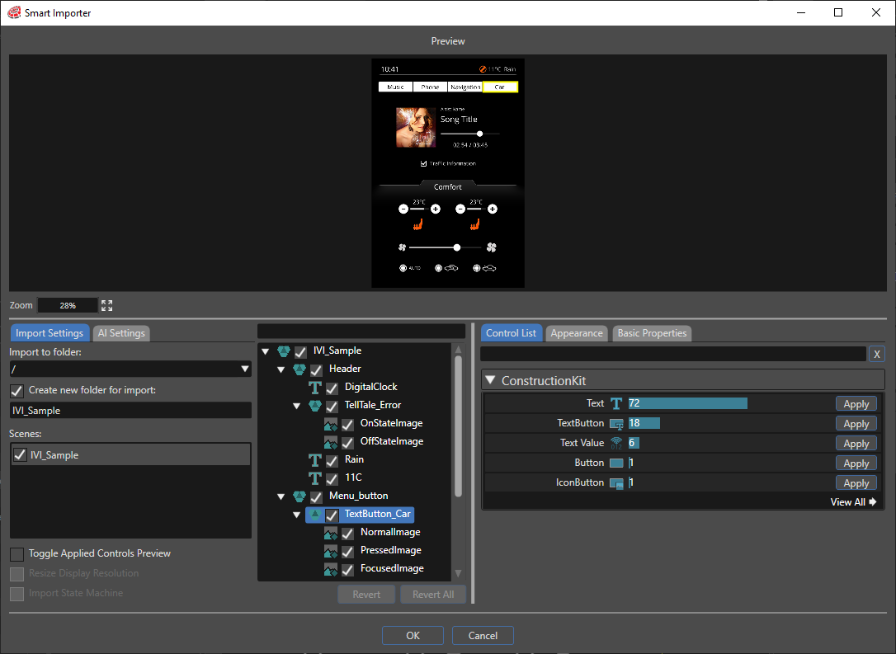
- From the ControlList, click Apply button on the far right of the TextButton control to assign that Control.
-
-
- Depends on its Control usage and/or Solution to be created, will set on "Appearance" and "Basic Properties" tabs.
-
As described above, you can efficiently import operations in Scene Composer by configuring the layer structure in Photoshop according to Controls you want to use.