# Usage example (Importing and assigning Control)
In this section describes the Control assignment procedure when importing a PSD file with the layer structure described in the previous chapter. The file to be imported on Scene Composer is the IVI sample attached to this document.
1. From the menu bar on Scene Composer, select Import > Smart Importer... on the menu bar and select a Photoshop file (IVI sample.psd).
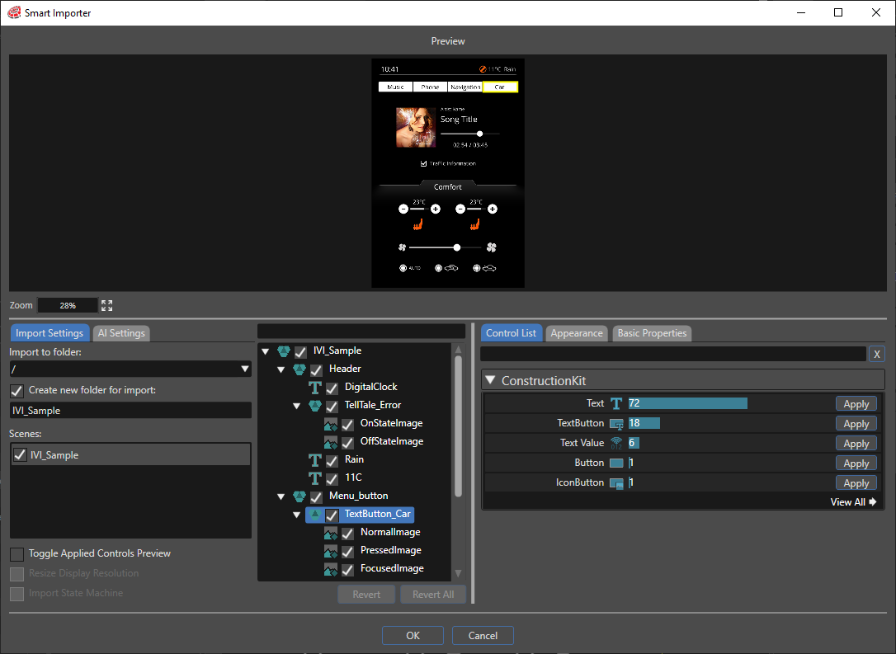
2. Smart Importer dialog box appears.
3. Click on the group in the tree for which you want to set Control. In this example case, select TextButton\_Car to assign TextButton Control.
4. Since its layer structure in Photoshop follows the structure of [Textbutton](https://doc316en.candera.eu/link/1156#bkmrk-textbutton) Control, Smart Importer's AI detects "TextButton" Control.
5. From the ControlList, click Apply button on the far right of the TextButton control to assign that Control.
- - - Depends on its Control usage and/or Solution to be created, will set on "Appearance" and "Basic Properties" tabs.
As described above, you can efficiently import operations in Scene Composer by configuring the layer structure in Photoshop according to Controls you want to use.