
View ticket
Once a ticket has been reported it can be viewed. If the status has not been set yet it will be set to “new.” This means that one way to find the ticket is to click on “View Issues” in the menu and sort the issued by “Status.” The newly created ticket can be found in the list.
The following figure shows the possible states of a ticket and how they depend among each other.
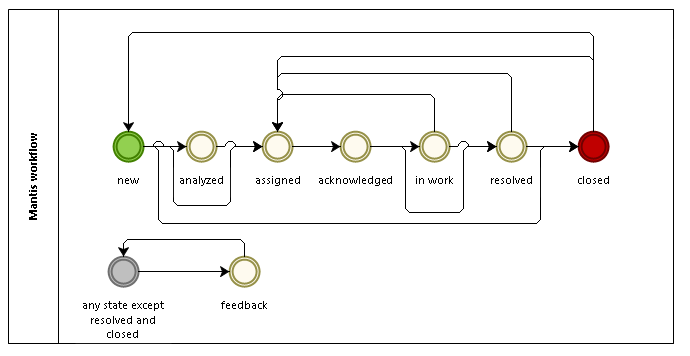
The view of a ticket contains some sections:
- View Issue Details: The fields that were filled at the creation time can be viewed here.
- Relationships: Tickets can be parented. The relations of the current ticket to its parent or children are shown here. Further wise it is also shown if a ticket is a duplicate of another one.
- Users monitoring this issue: Users can monitor an issue to see its history being changed. The monitoring users are listed here.
- Activities: Contains additional information if a comment has been added. Also, if a file has been added after creating the ticket it will be shown here.
- Add note: A note can be added which will afterwards be shown in “Activities.”
- Issue History: The changed of the issue can be tracked here.