
Create a New Scene
Create a New Scene
There are several options how to create a scene:
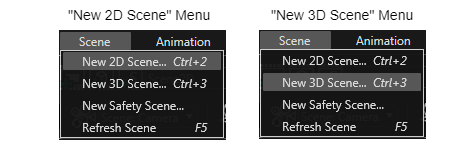
Use the toolbar button "Add a new scene":

Add a new scene via shortcut:
> Use "Ctrl+2" for a new 2D scene.
> Use "Ctrl+3" for a new 3D scene.
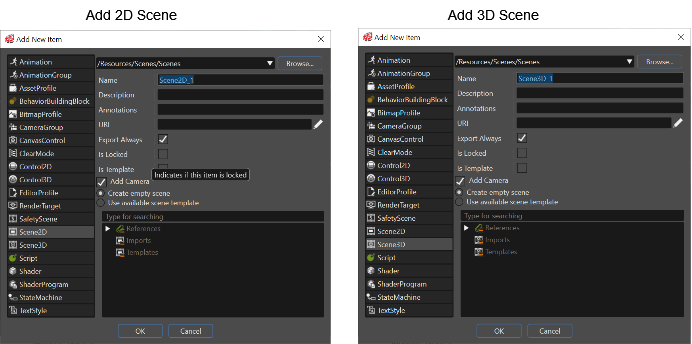
Left click in the Solution Explorer and use the context menu: Select "Add" > "New Item".
Scene Templates
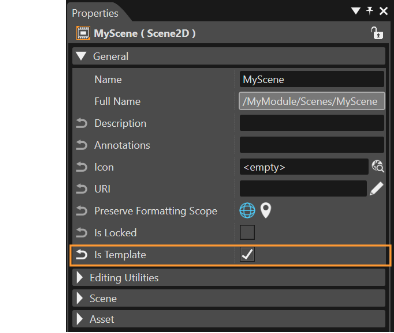
Scene templates are supported in SceneComposer. A scene created by the user can be made template by checking its IsTemplate property. This property is available as a check-box in the Properties panel. The dialogue used to create new scenes allows the user to select an existing template or import.
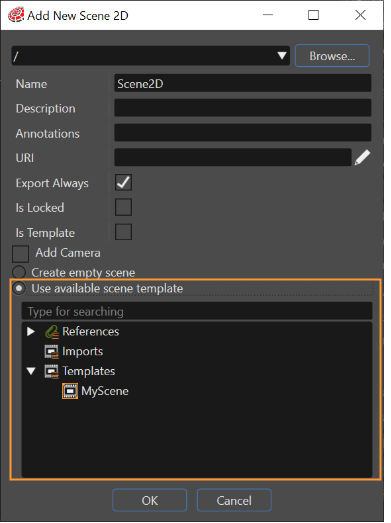
The dialogue used to create new scenes allows the user to select an existing template or import. If there are many scenes - 2D or 3D - created as templates, any of them can be selected and used as a template.
If necessary, it is possible to save a new perspective layout, which will be based on the current perspective. Also the possibility to delete a perspective was added.
Scene Properties
Following properties must be specified for a new Scene:
- "Location": The folder which will contain the new scene within the solution.
- "Name": Scene name
- "Export Always": If this option is ticked, the scene will always be exported to the asset during asset generation.
These properties can be modified in the Properties panel, when the scene is selected in the Solution Explorer or in the Scene Tree.
Create a Scene from Template
A new 3D Scene can also be created from template via the "Add Scene From Template" context menu of the imported scene from the "Imports" panel or in the Solution Explorer:
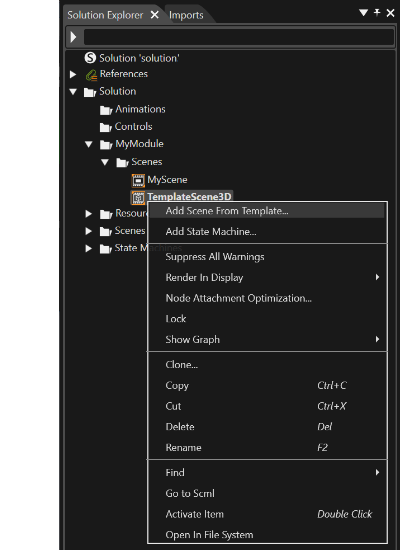
A new scene named after the template scene is created, which can be edited as a user-defined scene.
Scenes List
All the scenes part of a solution are listed in the Scenes List.
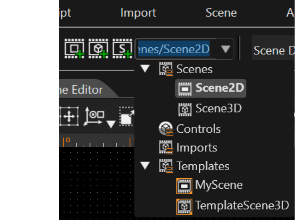
Select a scene from this list to open the scene in the Scene Editor.
- Template scenes are listed in the Imports category
- And user defined scenes in the Scenes category.
-
Only user-defined scenes can be edited in SceneComposer.