
Concept and Use Cases
Transitions Concept
Generally speaking, the concept of "transition" indicates the edge between two different states. In our case, the very notion of transition indicates the visual dynamics involved in displaying the content of a scene which is replacing another scene. Using a transition provides continuity so that the scene change is not quite so abrupt.
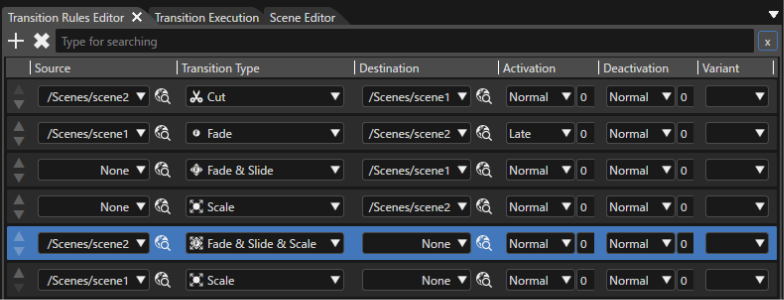
The rules editor panel allows the definition of transitions on a per scene basis and test these transitions directly in SceneComposer's display preview. The designer can use the editor to set the transitions to (="Destination") or from a scene (="Source") just by selecting effects (="Transition Types") on the scene list.
Types of Transitions
The rules editor features a toolbox where both "built in" transitions and "custom" transitions are available, a configurable default behavior, two scrollable lists ("Source" and "Destination") of all scenes in the solution, a "Variant" scrollable list, and a properties panel. To create a rule it is mandatory, first, to select the source and the destination, a specific type of that transition and, finally, to set the transition properties. After all these steps are done, the transition can be executed in the "Transition Execution" panel.
The available simple transitions are the following:
- Cut
- Fade
- Slide
- Scale
The available combined transitions are the following:
- Fade & Slide
- Fade & Scale
- Slide & Scale
- Fade & Slide & Scale
Transition Type Animation
The Transitions framework has a special build-in transition type – Animation. By using this transition type, it is possible to trigger animations or group animations within transitions. The Variant holds three Additional optional parameters:
- AnimationId – Candera::Id of the animation that will be executed by the Transitions framework.
- AnimationTimeline - specifies the time when the animation will start. The end time of the animation depends on the selected playback mode.
- IsAnimationTimeRelative - defines the playback mode for the animation:
- TransitionTime - default (false) - The animation speed is adapted such that the end time of the transition, specified by the AnimationTimeline parameter, will match the end time of the animation.
- AnimationTime (true) - The animation duration is given by the animation itself.
The animation specific parameters can be specified in the properties panel once the corresponding transition type has been selected:
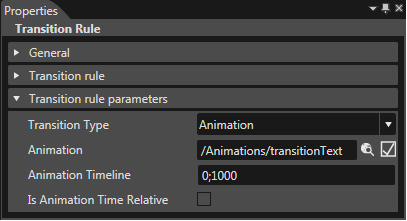
The animations can be triggered through a Request using the corresponding Variant name.

Sequential Execution of Transitions
The Transitions framework furthermore allows the sequential execution of transition fragments. One or multiple activation or deactivation fragments can be executed before or after fragments of the respective opposite fragment type. Therefore, the rules editor offers the option to set the "Activation" and "Deactivation" strategy.
The strategy types are:
- Normal
- Early
- Late
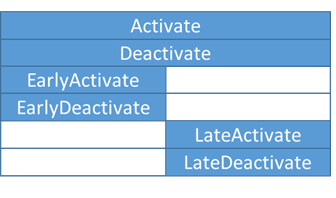
The combination of "Early" and "Late" will cause a sequential execution of the involved transition fragments. Any other combination results in a default transition behavior. "Early" fragments are executed before "Late" fragments.
For example: Scene_1 has a rule to perform a transition with a Fade to Scene_2. Scene_2 (activation fragment) should fade in completely before Scene_1 (deactivation fragment) begins to fade out. For this rule, the "Activation" strategy would be "Early" and the "Deactivation" strategy would be "Late". The opposite result can be achieved by swapping the fragments' strategy.
However, it is important to note that multiple "Early" or "Late" fragments will be executed in parallel and that "Late" fragments will only be executed once all "Early" fragments have finished first.
Early and Late Transition Delays
Sequential Transitions furthermore offer the possibility to customize the moment, when "Late" fragments are executed after the "Early" fragments are finished. Next to the strategy type, a delay value (in milliseconds) can be set for "Activation" and "Deactivation" fragments. During a transition, the delay values are applied after the respective fragment.
The following shows the resulting sequence:
Early (Source) -> Delay -> Late (Destination) -> Delay
If the transition is bidirectional, the sequence is reversed (more on bidirectional transitions further below):
Delay -> Late (Destination) -> Delay -> Early (Source)
Reverse Transitions
The Transitions framework offers the possibility of reversing transitions. If a reversible fragment has been identified, the already running TransitionFragment shall go backwards, from its current state to the original one.
-
This option shall be used, for example, when a second transition request is posted which contains a fragment that goes from Deactivate(B) - Activate(A), while the previous fragment - from Deactivate(A) to Activate(B) - is still running. In this case the already running transition will be reversed from the current state to the beginning.
This feature is optional and can be specified via an optional flag "Is Reversible" in the Properties associated to the selected rule. Default value is true.
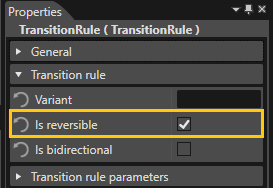
A reversible fragment is identified through a Variant that will match a Rule to its corresponding RequestFragment using the following conditions:
- the Variant of the already running TransitionFragment shall match the Variant of the current Request.
- the Source of the already running TransitionFragment shall match the Destination of the matching Rule.
- the Destination of the already running TransitionFragment shall match the Source of the matching Rule.
-
There are special cases: a transition with AllowReverse==true might consist of fragments that are not found in the already running transitions. In this case these fragments shall be executed normally.
Bidirectional Transitions
The "bidirectional" feature allows to define only one transition rule that matches as well the forward as the backwards direction from two request fragments.
-
Bidirectional transitions will not support playing reverse AnimationGroups, only Animations.
The image below shows how two "symmetrical" transition rules can be replaced with only one if the "Is bidirectional" property is enabled:
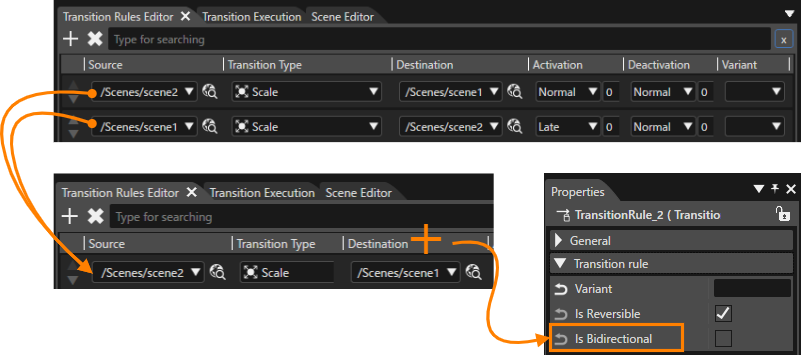
Bidirectional rules will be applied in the other direction whenever it would be the first match in the ruleset.
-
To preserve backwards compatibility, on solution conversion, the "Is Bidirectional" property is set to false if it didn't exist in the old Solution.