
Prerequisites
CMake GUI
For building, the tool cmake-gui is needed. Navigate to https://cmake.org/download/ and download the latest stable version for your PC, 64bit etition and install it.
Ninja build tool
For building android applications, yet another build tool is required.
- Navigate to https://ninja-build.org/ and download the ninja binary (yes, it’s only ninja.exe)

- Save it at C:\Programs\Ninja\ and add this path to your PATH environment variable.
Android Studio
- Download the latest stable version of Android-Studio from Google and install it.
- Next, a special version of the Android-NDK is required because the newer ones are broken:
Navigate to: https://developer.android.com/ndk/downloads/older_releases and download the android-NDK-r17c as shown below.
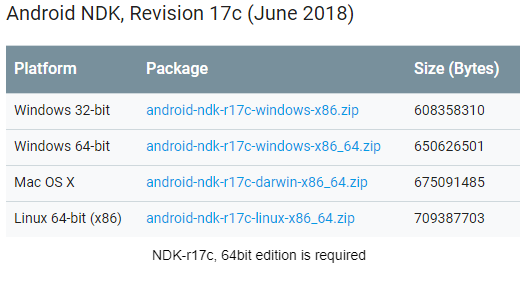
- Extract the downloaded zip file, rename the unpacked folder to ndk-r17c and move it to:
%USERPROFILE%\AppData\Local\Android\Sdk\
This way, the NDK-r17c exists in parallel to the delivered one and will not be affected by updates. - Set the environment variable ANDROID_NDK to the path where you saved ndk-r17c:
here it is: %USERPROFILE%\AppData\Local\Android\Sdk\ndk-r17c\
This is mandatory for the toolchain file. - Finally extend the PATH environment variable to the platform tools directory:
Here, this is %USERPROFILE% \AppData\Local\Android\Sdk\platform-tools\
This makes tools like adb available on CMD, which makes live a lot easier.