Setup
Build
To use the Frame Debugger, build the application with these CMake flags enabled:
| FEATSTD_MONITOR_ENABLED | Enables basic Monitor features. |
| MONITOR_FRAME_DEBUGGER_ENABLED | Enables basic frame debugger (frame timeline capture, single step mode, no OpenGL specific features). |
| MONITOR_FRAME_DEBUGGER_OPENGL_CAPTURE_ENABLED | Enables OpenGL specific Frame Debugger features. |
| COURIER_RENDERING_MONITOR_ENABLED | Additional flag required for Courier apps to enable monitor. |
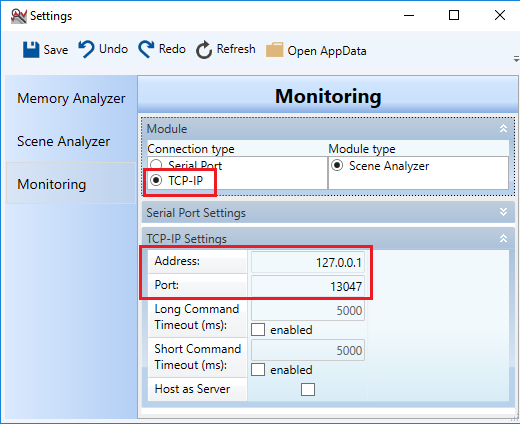
Also make sure MONITOR_COM_TYPE is set to FEATSTD_COM_TYPE_TCPIP and MONITOR_TCPIP_ADDRESS and MONITOR_TCPIP_PORT are set to appropriate values.
Additional CMake flags: The flag MONITOR_SINGLE_STEP_INTERVAL can be used to set the time in milliseconds that is used when incrementing the animation time in single-step mode.
Render loop
When using an application with a custom render loop (anything else than Player) add these macros to the beginning and end of the loop (defined in Candera/System/Monitor/MonitorPublicIF.h):
- MONITOR_MARKER_BEGIN_FRAME();
- MONITOR_MARKER_END_FRAME();
CGI Analyzer
To start the Frame Debugger, configure the connection settings in CGI Analyzer and then connect to the running application: