
Configure Source Control
Configure Source Control
It is necessary to configure an external tool when you're working with a solution from repository, using the source control offered by SceneComposer.
To do this open the Preferences dialog (from "File" > "Preferences") where you can specify the external tool that will be used and specific commands for "Merge" and "Diff" operations. Before any of these operations, the merge tool has to be enabled by using the available check-box.
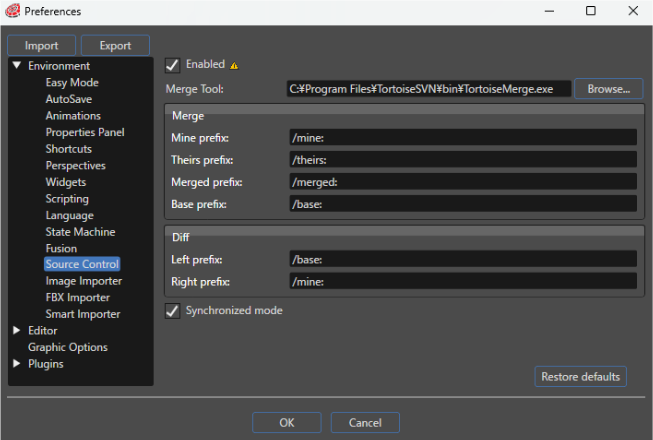
| Enabled | If enabled, the use of a merge tool is enabled. |
| Merge Tool | Sets the merge tool to use. |
| Merge | Specifies the command for merge operations. |
| Diff | Specifies the command for diff operations. |
| Synchronized mode | If enabled, will assure that the solution status is always retrieved from the server by default. Communication with the server is a time consuming operation that's why you can also decide not to use this option and perform an explicit "Refresh status" operation from the source control context menu (only if necessary). |
The value of the check-box is evaluated only when a solution is opened or created.