
Builds
When a build is started the Build-Window will be shown and the build will be automatically started.
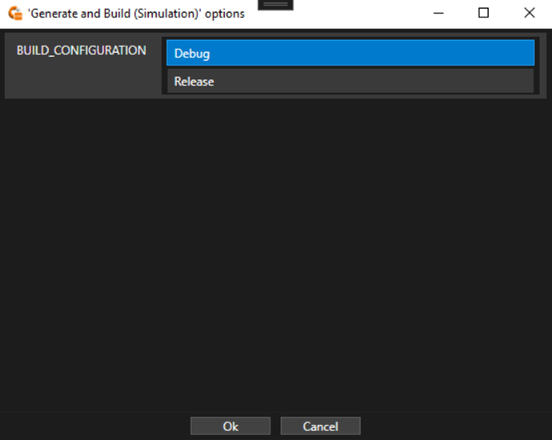
If the build contains some Option-Values an additional dialog will be displayed before the actual Build-Window, which allows the user to configure the build. Depending on the option, the user can either select from a set of predefined values or needs to enter a custom value.
A build is commonly separated into multiple steps each corresponding to a separate script file that is executed from the specified build-script folder.

The top row shows the current build state. It indicates the progress or if the build has finished/failed. On the right side the combined information about all build steps is shown. It displays the total amount of info, warning and error messages from the output. The second row provides information about the current executed step.
When enabling the details, by checking the option in the bottom right, the output of the build scripts can be seen, grouped by the step. This output is also saved into a log-file into the specified build folder.
Build Settings
When a build is started, the builds specific options defined in the related Build Project are set (See Build Projects for more information). Further the following settings are applied by the Connector.
Root-Paths:
| Argument | Description |
| CONNECTOR_ROOT |
Path to the Connector binary |
| PROJECT_ROOT | Path to the Connector project file |
| CGI_ROOT | Path to the CGI packages |
Variables:
| Argument | Description |
| CONNECTOR_EXECUTABLE_PATH | Path to the Connector binary |
| CONNECTOR_PROJECT_FILE | Connector project file |
| CONNECTOR_PROJECT_PATH | Path to the Connector project file |
| CONNECTOR_PROJECT_NAME | Connector project Name |
| CONNECTOR_PROJECT_DESCRIPTION | Connector project Description |
| CONNECTOR_PROJECT_ICON_FILE | Connector project icon file |
| CONNECTOR_INTERFACE_DEFINITION_FILE | Interface definition file |
| CONNECTOR_COMPLEXTYPE_DEFINITION_FILE | Complex-Type definition file |
| CONNECTOR_NATIVEFUNCTION_DEFINITION_FILE | Native-Function definition file |
| CONNECTOR_ENABLE_GENERIC_TOOL | Indicates if ‘Generic Tool’ is enabled |
| CONNECTOR_ENABLE_MATLAB_TOOL | Indicates if ‘MATLAB Tool’ is enabled |
| CONNECTOR_CGISTUDIO_ROOT_PATH | Path to CGI Studio root folder |
| CONNECTOR_CGISTUDIO_PLATFORM | CGI Studio Platform (e.g. Android, RCar,..) |
| CONNECTOR_CGISTUDIO_PLATFORM_CONFIG | CGI Studio Platform Configuration (x86/x64) |
| CONNECTOR_SCENECOMPOSER_EXECUTABLE_FILE | Scene-Composer executable file |
| CONNECTOR_SCENECOMPOSER_EXECUTABLE_PATH | Scene-Composer executable path |
| CONNECTOR_SCENECOMPOSER_SOLUTION_FILE | Scene-Composer solution file |
| CONNECTOR_COURIER_XCDL_DEFINITION_FILE | XCDL root definition file |
| CONNECTOR_COURIER_XCDL_INCLUDE_PATHS | XCDL include paths (separated by ‘;’) |
| CONNECTOR_COURIER_XCDL_RESOLVED_INCLUDE_PATHS | Resolved XCDL include paths using available root paths |
| CONNECTOR_CODE_GENERATION_COMPILER | Compiler used for code generation/build |
| CONNECTOR_CODE_GENERATION_ARCHITECTURE | Architecture used for code generation/build |
| CONNECTOR_CODE_GENERATION_BUILD_PROJECT_FILE | Default Build-Project file |
| CONNECTOR_MATLAB_ENABLE_LEGACY_OPTIONS | Indicates if MATLAB legacy options are enabled |
| CONNECTOR_MATLAB_BUILD_PROJECT_FILE | MATLAB Build-Project file |
| CONNECTOR_EDIT_COMPLEX_TYPES_SCRIPT_FILE | Script for ‘Edit Complex-Type definition’ |
| CONNECTOR_EDIT_NATIVE_FUNTIONS_SCRIPT_FILE | Script for ‘Edit Native-Function definition’ |
| CONNECTOR_EDIT_SC_SOLUTION_SCRIPT_FILE | Script for ‘Edit Scene Composer solution’ |
| CONNECTOR_EDIT_XCDL_SCRIPT_FILE | Script for ‘Edit Courier Definition’ |
| CONNECTOR_EDIT_BUILD_PROJECT_SCRIPT_FILE | Script for ‘Edit Build-Project’ |
| CONNECTOR_SHOW_CONSOLE_WINDOW | Indicates if console window is shown when running scripts. |
| CONNECTOR_SHOW_CODE_SCRIPT_FILE | Script for triggering editor from Build details |
The same environment variables are also set when any other script is executed (such as ‘Edit Scene-Composer solution’)
Close on Success
If a build contains the CONNECTOR_BUILD_CLOSE_ON_SUCCESS variable and sets a value of ‘1’ then the Build-Window will be automatically closed when the build is finished successfully.
This can feature is very useful if Builds are used to just perform simple tasks or open other programs.
Note that some programs do ‘block’ the command script execution until closed even when started using the START command. To workaround this problem the provided ‘ProcRun’ tool found in ‘cgi_studio_connector\BuildScripts\Common\ProcRun‘ can be used. The syntax to use it is:
ProcRun <Executable> [“<Arguments>”]