
Useful Hints and Recommendations
Setting for tasks
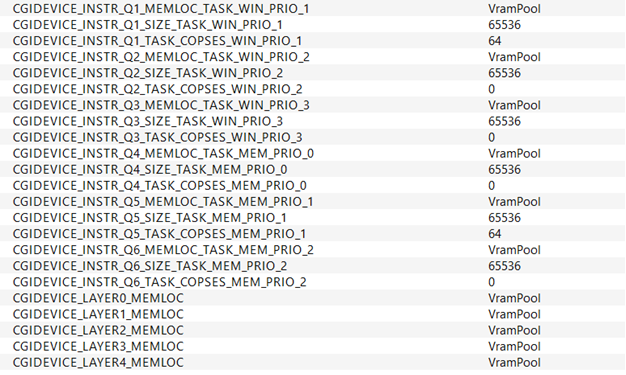
In CMake you have the possibility to set the size and the location of the memory for the command queues and also the COPSes reserved for that task.
Additionally, you can set the memory location for the frame buffers (in case they exist in the solution) for the layers.
Disable unused tasks by setting the size to 0. (This has to be in correlation with the solution which you want to execute on the target)
EXTRAM support
By default, all the frame buffers for the layers, the instruction buffers, and the bitmaps (if they are not stored in Client memory) are stored in the VRAM.
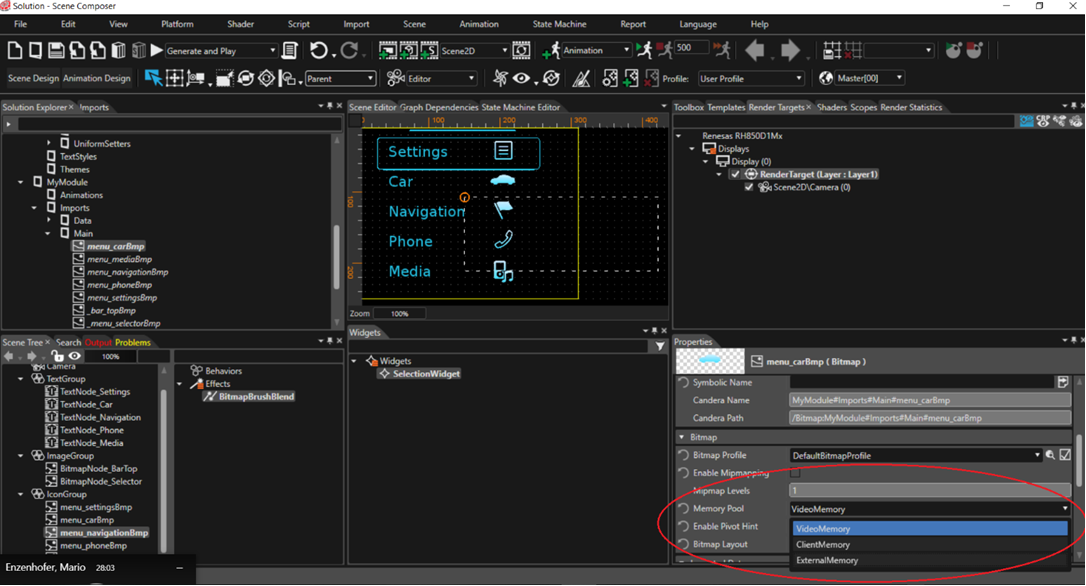
However, it is possible to configure the memory location to EXTRAM (HyperRAM) instead. The memory location of the frame buffers and instruction buffers is configured via CMake (see Figure 2).
The memory location of the bitmaps is selected via Scene Composer (refer to Figure 3).
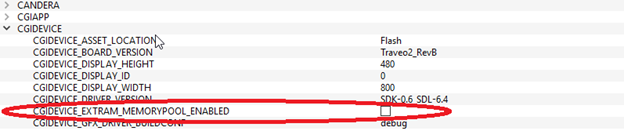
For target build, please keep in mind to check (enable) CGIDEVICE_EXTRAM_MEMORYPOOL_ENABLED in CMake in case you want to store images in external RAM.
Without that check it is not possible to allocate memory in the HyperRAM and the VRAM will be used instead.
Limitations
Each OTF layer (window) must use different TaskPrio ID.
OTF window surface height is minimum two slices (16 lines) and maximum (2 * window height - 1).
Maximum width for LBO blit area: 1600 (Maximum width for OTF layer (window) is 1600)
Supported values for OTF lines: 16, 32, 64, 128, 256
Supported CGI Studio samples for this target are:
LightPlayer
Empty
2DBasic
2DEffects
AdvancedCluster
Layouter
Transition
CourierSampleAppLight
Default CSALight’s solution
New Traveo2Sample (covers few Traveo2 specific features)