
Memory Pool Configuration
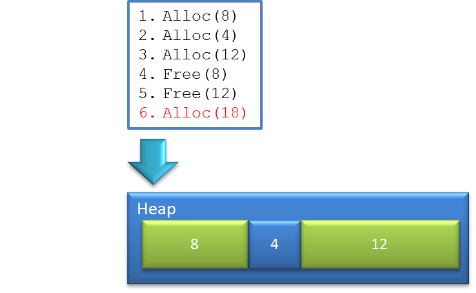
Fragmentation
- A heap will fragment, when buffers with different lifetimes get allocated
- Fragmentation endangers system stability over run time
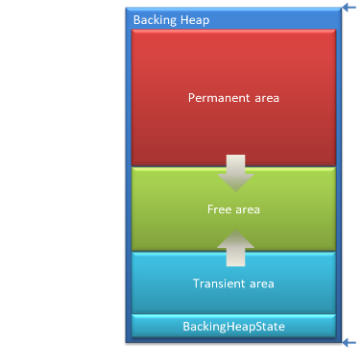
Heap Areas
- Permanent Allocation
- will never return the allocated block to the backing heap
- will be managed by the associated bin (bin free list)
- will never return the allocated block to the backing heap
- Transient Allocation
- will immediately return the allocated block to the backing heap
- will immediately return the allocated block to the backing heap
- Two distinct memory areas
- The permanent area will never fragment
- The transient area can fragment
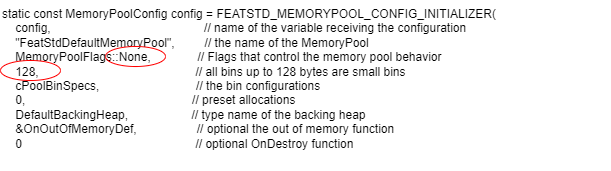
Default Memory Pool Example
Let’s have a look on an example:
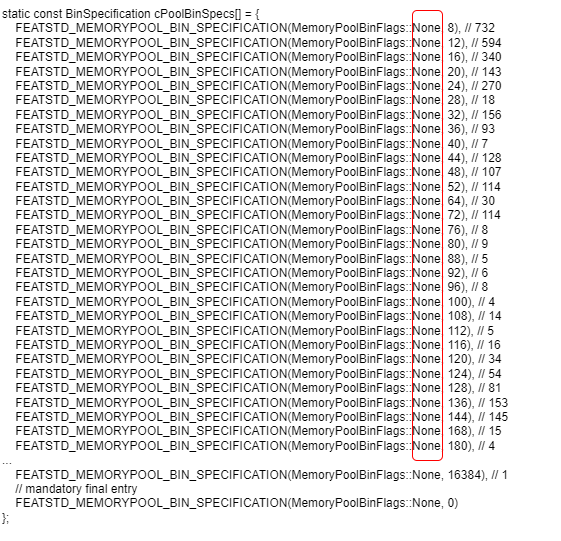
Memory Pool Example Outcome
- This configuration leads to fragmentation
- All flags (bin & pool) are set to None -> Allocations are always transient
- Transient allocations can fragment
- When all allocations are transient, fragmentation is certain
- Transient allocations can fragment
- Small Bin Limit is set to 128
- All allocations up to 128 take the best fit bin size + 4 Byte overhead
- All allocations > 128 take exactly the requested size + 8 Byte overhead
- The configured bins > 128 are not considered at all, they just consume their header memory
- All allocations up to 128 take the best fit bin size + 4 Byte overhead
Interpret MemoryPoolAnalysis.xlsx
When a permanent block with size 12800 Byte is used for 160 Byte allocation…
12800
C:\CGI-Studio_3.10\cgi_studio_candera\src\Candera\Engine2D\Core\RenderNode.cpp(66)
- The default behavior of Memory Pool for allocations is:
-
-
- Determine the bin according the requested buffer size
- Check the free list of the identified bin
- If no block is found in the free list, try to allocate a buffer from the backing heap.
- If the allocation from the backing heap fails, try to allocate from the next larger bins (overflow).
- Determine the bin according the requested buffer size
-
- In the example above, step 4 occurred -> Allocation of a new bin failed!
Proper Memory Pool Analysis
- A proper configuration for initial analysis…
- has a “small bin limit” of 4 Byte
- All allocations shall take the requested size
- All allocations shall take the requested size
- defines PermanentOnly flag on the pool
- Bins shall be reused (freed blocks are returned to bin free list)
- Bins shall be reused (freed blocks are returned to bin free list)
- defines additionally NoOverflow flag on the pool
- inhibit overflow allocations
- If specified, allocation requests from a bin will never overflow to a larger bin
- Note: a test run with this flag might fail (Out of memory…) due to many unused blocks -> in this case remove the flag
- inhibit overflow allocations
Proper Memory Pool Configuration
- A proper final Memory Pool configuration…
- has a “small bin limit” in the upper area (where allocations are rarely)
- Keep number of transient allocations to a minimum
- Keep number of transient allocations to a minimum
- uses Flags on bins instead of the pool
- defines PermanentOnly flag on small bins
- Defines one bin with None flag, uses transient allocations for large blocks, which are rarely used (no reuse intended)
- defines PermanentOnly flag on small bins
- uses few bins
- balance wasted space vs. unused (rarely used) blocks
Wasted Space vs. Unused blocks
- Many permanent bins leads to many unused blocks
- free blocks in bin free list
- free blocks in bin free list
- Few permanent bins leads to memory “waste” in blocks
- Allocation request smaller than block size
- Allocation request smaller than block size
- The memory “waste” of few bins is smaller than free blocks from too many bins.
- Free bin blocks are reused more often
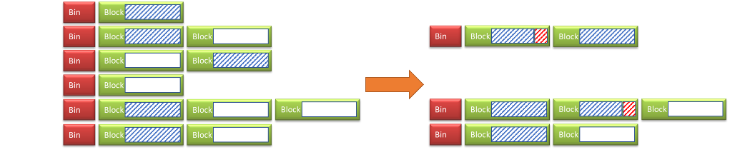
Process of Configuration
- Take dumps with proper configuration for analysis
- Play more than one use case to get better data
- Play more than one use case to get better data
- If it is not possible to run with flag NoOverflow …
- Remove the flag
- Analysis is still valid, most overflows come from low size bins which are anyway “dense”
- Remove the flag
- Based on the results
- Reduce the number of bins drastically
- Choose a “small bin limit” where allocations are temporary requests Release of temporary memory vs. fragmentation
- Reduce the number of bins drastically
Reduce Number of Bins
Reduce the number of bins generously
Too many bins -> many free blocks not used
“Wasted Space” < Not used blocks!
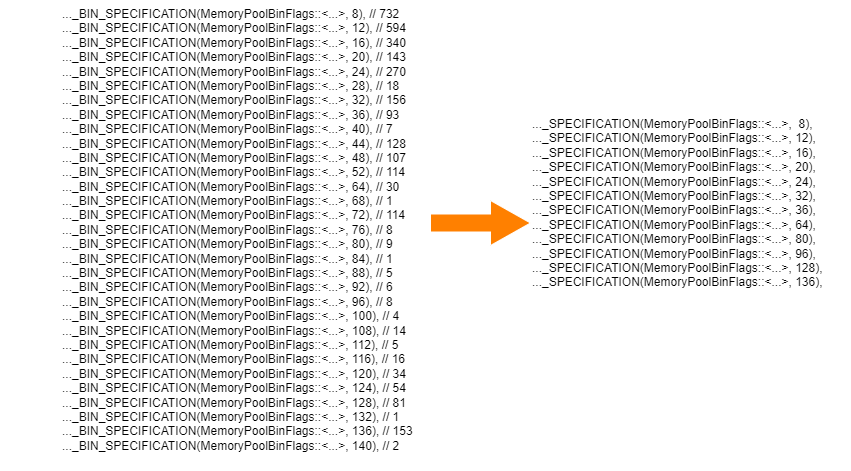
Choose “Small Bin Limit”
- Remember: Avoid non used blocks!
- Summarize bins to small bins as far as possible
- “Small Bin Limit” shall start where allocations are temporary requests and fragmentation is more unlikely
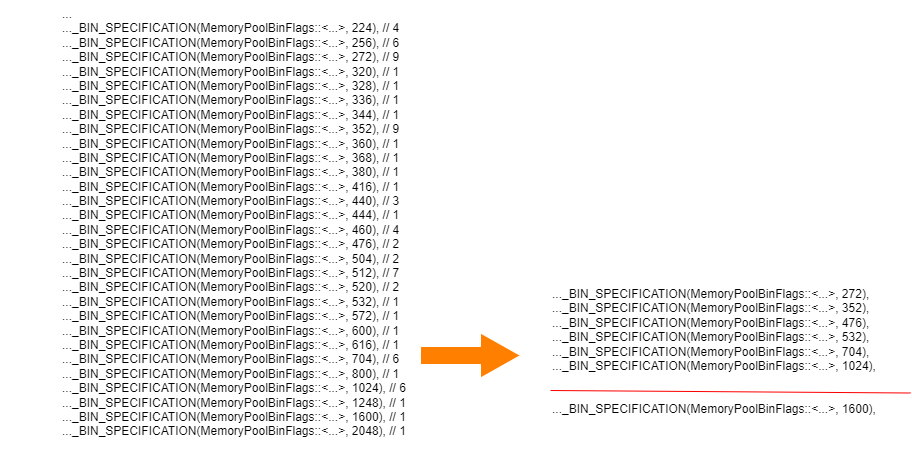
Result

Advanced Topics
- Pre-Allocation
- Define how many permanent blocks shall be pre-allocated in each bin
- Define how many permanent blocks shall be pre-allocated in each bin
- Combine with OverflowPreferred flag on bins
- first try to overflow and then allocate from the backing heap
- Limit overflows by adding flag OverflowBarrier to bin configuration
- Such a configuration might improve the memory layout
- first try to overflow and then allocate from the backing heap
- A sophisticated out of memory function could trigger the release of unneeded memory
- Return value controls if the allocation request will be repeated or abandoned