
glTF Files
This section provides additional information on the use of glTF files.
Animations
There is a working sample available showing the usage of glTF animations. For this, please refer to Physically Based Rendering Solution
Interpolation animation is available, however Morphing and the channel path "weights" are not available.
Animation of:
- translation
- rotation
- scale is available.
Also, the following Interpolation strategies are available:
- linear
- step
- cubicspline
In glTF rotation angles are specified in quaternions, for usage in CGIStudio, the values are converted to Euler-angles.
For a more detailed description on animations please refer to the Khronos website: animations. For a more detailed description on interpolation types please refer to the Khronos website: animation sampler.
SDK version
The glTF importer uses the Microsoft glTF-SDK in version v1.9.1.0. It can be downloaded from Github.
Reference models
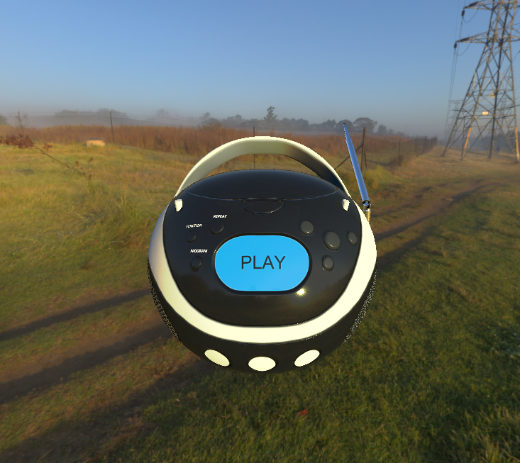
A reference model that is being used is the boombox. The glTF file is available at the folder cgi_studio_content/3D/glTF/. Available reference models can be found at: The Khronos website: glTF Sample Models.
Supported glTF Extensions and Multi UV
Scene Composer’s glTF import supports the following glTF 2.0 extensions as well as multiple UV sets (Multi UV).
| KHR_lights_punctual | Imports point, spot, and directional lights defined in the glTF file as lights in Scene Composer. |
| KHR_materials_anisotropy | Reproduce materials with anisotropic highlights, such as brushed metal. |
| KHR_materials_clearcoat | Reproduces materials that have a clear-coat layer (clear paint). |
| KHR_materials_ior | Specifies the Index of Refraction (IOR) and improves refraction for materials such as glass. |
| KHR_materials_iridescence | Represents iridescence effects where the color changes depending on the viewing and incident angles. |
|
KHR_materials_specular |
Supports materials that independently control the intensity and color of specular reflection. |
| KHR_materials_unlit |
Supports “unlit” materials that are not affected by lighting calculations.
|
| KHR_texture_transform |
Interprets UV transforms such as offset, scale, and rotation per texture.
|
| KHR_materials_emissive_strength |
This extension scales the emissive color or texture by a scalar emissiveStrength factor, allowing materials to represent much brighter emission, especially in HDR rendering environments.
|
| KHR_materials_sheen |
This extension adds a sheen layer on top of an existing PBR material to simulate soft, fabric-like highlights caused by fine microfibers such as cloth or velvet.
|
Even when UV sets other than `uv0` are specified in these extensions, Scene Composer imports multiple UV sets (Multi UV) and assigns them to the corresponding textures.
Limitations
-
In ES 2.0 environments, due to the limitations of ES 2.0, importing some sample glTF files that use these extensions may not produce the expected visual results.
-
Some extensions, such as KHR_materials_anisotropy, KHR_materials_iridescence, KHR_materials_specular, KHR_materials_ior, KHR_materials_emissive_strength and KHR_materials_sheen cannot be used together with KHR_materials_unlit by design.
- Meshes that use KHR_materials_anisotropy must have normal and tangent attributes, or the base material must have a normal map. If these conditions are not met, the anisotropy effect may not be rendered correctly.
For details on the properties and parameters of each extension, refer to the glTF 2.0 extension specifications provided by Khronos.
Pyhsically Based Shading (PBS)
On the imported 3d model the metal roughness material model is applied. If no IBL textures are defined a default material is applied. The shaders are provided for OpenGL ES 2.0 and 3.0.
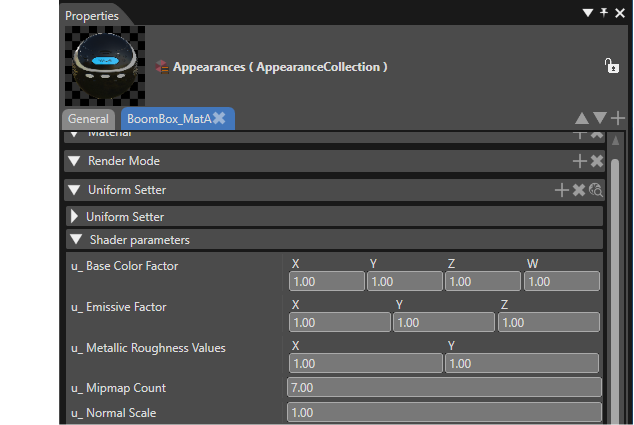
In SceneComposer the properties are called differently from the glTF standard:
- the standard property baseColor is called u_Base Color Factor
- the standard property metallic is determined by the X value in the u_Metallic Roughness Values
- the standard property roughness is determined by the Y value in the u_Metallic Roughness Values
The following properties of the appearance and shader are automatically set by the Importer, but can also be configured manually:
Uniforms:
- "u_MetallicRoughnessValues" holds the metallic factor in X, and roughness factor in Y. These values are multiplied with the metallic and roughness values from the metallic-roughness texture on a per pixel basis. If there is no such texture, the values from the uniform are used instead.
- "u_BaseColorFactor" (RGBA) is multiplied with the value from the albedo texture on a per pixel basis. If there is no such texture, the values from the uniform are used instead.
- "u_MipmapCount" The number of mipmaps (excluding level 0) from the specular/radiance texture.
- (Optional) "u_NormalScale" is a factor that is multiplied with the X and Y component of the normal. This uniform is only available if HAS_NORMALMAP has been defined in the fragment and vertex shader.
- (Optional) "u_OcclusionStrength" is a factor for the linear interpolation between the color and the color times ambient occlusion. This uniform is only available if HAS_OCCLUSIONMAP is defined in the fragment and vertex shader.
- (Optional) "u_EmissiveFactor" (RGB) is multiplied with the value from the emissive texture on a per pixel basis. This uniform is only available if HAS_ HAS_EMISSIVEMAP is defined in the fragment and vertex shader.
Textures:
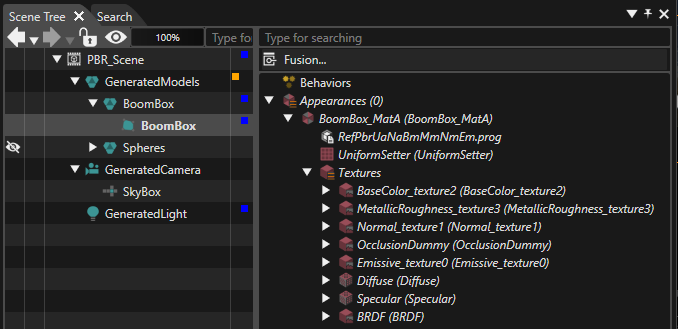
- (Optional) The albedo texture (RGBA) must be set at texture unit 0, and HAS_BASECOLORMAP must be defined in the fragment shader.
- (Optional) The metallic-roughness texture (GB) must be set at texture unit 1, and HAS_METALROUGHNESSMAP must be defined in the fragment shader. The metallic values must be stored in blue channel. The roughness values must be stored in the green channel of the texture.
- (Optional) The tangent-space normal (RGB) texture must be set at texture unit 2, and HAS_NORMALMAP must be defined in the fragment and vertex shader.
- (Optional) The occlusion texture (R) must be set at texture unit 3, and HAS_OCCLUSIONMAP must be defined in the fragment and vertex shader. The occlusion values are stored in the red channel of the texture.
- (Optional) The emissive texture (RGB) must be set at texture unit 4, and HAS_EMISSIVEMAP must be defined in the fragment and vertex shader.
- (Optional) IBL textures. The following textures must be present for IBL to work correctly.
- The diffuse/irradiance cubemap (RGB) must be set at texture unit 5, and USE_IBL must be defined in the fragment shader.
- The specular/radiance cubemap (RGB) must be set at texture unit 6, and USE_IBL must be defined in the fragment shader. The specular pre-convolved environment must be built into the mipmaps. The number of mipmaps (excluding level 0) is set in the shader uniform "u_MipmapCount" automatically by the importer, or must be configured manually if this cubemap is set manually.
- The BRDF texture (RG) must be set at texture unit 7, and USE_IBL must be defined in the fragment shader.
Details of the imported appearance are shown in the scene tree:
Mesh:
- Position is mandatory.
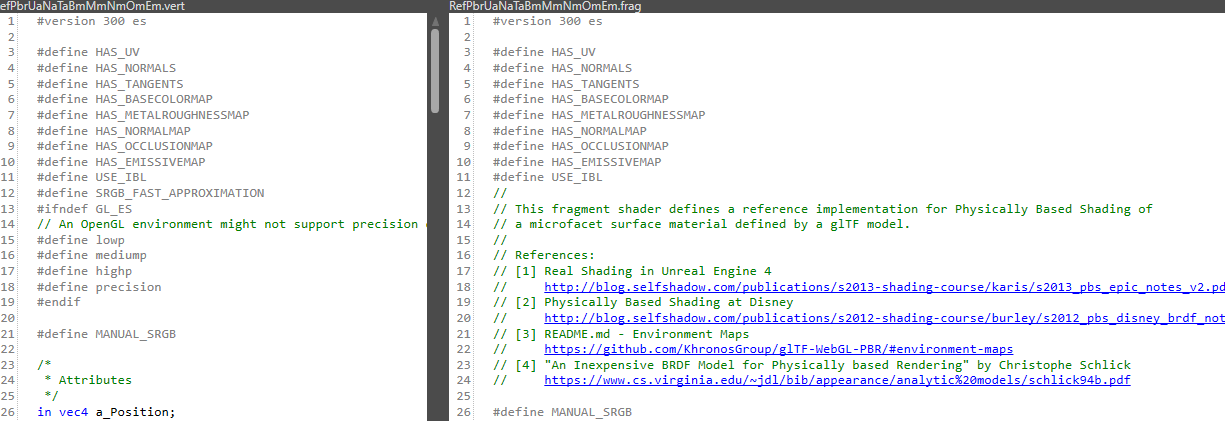
- (Optional) If the mesh has normals, HAS_NORMALS must be defined in the fragment and vertex shader.
- (Optional) If the mesh has tangents, HAS_TANGENTS must be defined in the fragment and vertex shader.
- (Optional) If the mesh as a uv set, HAS_UV must be defined in the vertex shader.
Uniform Setter:
- Model View Projection matrix is mandatory.
- Model matrix is mandatory.
- Normal model matrix is mandatory if HAS_NORMALS and HAS_TANGENTS are defined in the shader.
Optimization tips:
- Use one texture for occlusion, roughness, and metallic values, stored as an RGB texture.
- Providing tangents in the mesh avoids calculating the tangent space matrix on a per pixel basis.
For a more detailed description on Pysically Based Rendering please refer to the Khronos website: metallic roughness.
Useful links
Khronos References
- glTF Overview (https://www.khronos.org/gltf/)
- glTF 2.0 Specification (https://github.com/KhronosGroup/glTF/tree/master/specification/2.0)
- glTF 2.0 Sample Models (https://github.com/KhronosGroup/glTF-Sample-Models/tree/master/2.0)
Khronos Specification
- Specification (https://github.com/KhronosGroup/glTF)
Viewers
- BabylonJS Sandbox (https://sandbox.babylonjs.com/)
- donmccurdy glTF viewer (https://gltf-viewer.donmccurdy.com/)
- Khronos glTF Sample Viewer (https://github.khronos.org/glTF-Sample-Viewer-Release/)