# glTF Files

This section provides additional information on the use of glTF files.

<div class="contents" id="bkmrk--4"><div class="contents">  
</div></div>#### <a class="anchor" id="bkmrk--38"></a>Animations

There is a working sample available showing the usage of glTF animations. For this, please refer to <span style="color: rgb(230, 126, 35);">[Physically Based Rendering Solution](https://doc316en.candera.eu/books/sample-solutions/page/physically-based-rendering-solution "Physically Based Rendering Solution")</span>

Interpolation animation is available, however Morphing and the channel path "weights" are not available.

Animation of:

<div class="contents" id="bkmrk-translation-rotation"><div class="contents"><div class="textblock">- translation
- rotation
- scale is available.

</div></div></div>Also, the following Interpolation strategies are available:

<div class="contents" id="bkmrk-linear-step-cubicspl"><div class="contents"><div class="contents"><div class="textblock">- linear
- step
- cubicspline

</div></div></div></div><p class="callout info">In glTF rotation angles are specified in quaternions, for usage in CGIStudio, the values are converted to Euler-angles.  
</p>

For a more detailed description on animations please refer to<span style="color: rgb(230, 126, 35);"> [the Khronos website: animations](https://github.com/KhronosGroup/glTF/tree/master/specification/2.0#animations)</span>. For a more detailed description on interpolation types please refer to <span style="color: rgb(230, 126, 35);">[the Khronos website: animation sampler](https://github.com/KhronosGroup/glTF/tree/master/specification/2.0#reference-animation-sampler)</span>.

<div class="contents" id="bkmrk--15"><div class="contents"><div class="textblock">  
</div></div></div>---

#### <a class="anchor" id="bkmrk--39"></a>SDK version

The glTF importer uses the Microsoft glTF-SDK in version v1.9.1.0. It can be downloaded from <span style="color: rgb(230, 126, 35);">[Github](https://github.com/microsoft/glTF-SDK)</span>.

<div class="contents" id="bkmrk--17"><div class="contents"><div class="textblock">  
</div></div></div>---

#### <a class="anchor" id="bkmrk--40"></a>Reference models

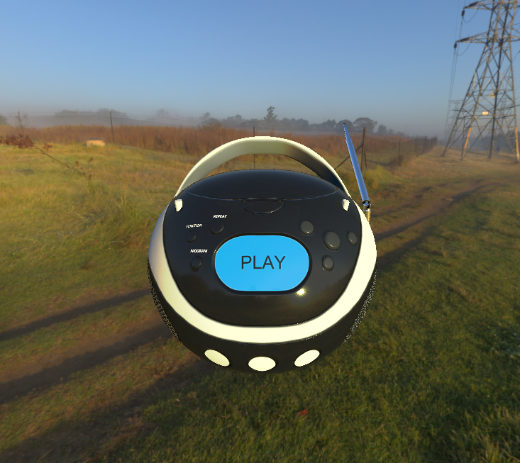
A reference model that is being used is the boombox. The glTF file is available at the folder cgi\_studio\_content/3D/glTF/. Available reference models can be found at: [<span style="color: rgb(230, 126, 35);">The Khronos website: glTF Sample Models</span>](https://github.com/KhronosGroup/glTF-Sample-Models).

<div class="contents" id="bkmrk--19"><div class="contents"><div class="contents"><div class="textblock"><div drawio-diagram="291"><img src="https://doc316en.candera.eu/uploads/images/drawio/2023-02/drawing-4-1676342296.png" alt=""/></div>

</div><div class="textblock">  
</div></div></div></div>#### Supported glTF Extensions and Multi UV

Scene Composer’s glTF import supports the following glTF 2.0 extensions as well as multiple UV sets (Multi UV).

<table border="1" id="bkmrk-khr_lights_punctual-" style="border-collapse: collapse; width: 800px; height: 444.617px; border-width: 0px;"><colgroup><col style="width: 239px;"></col><col style="width: 561px;"></col></colgroup><tbody><tr style="height: 63.3097px;"><td style="height: 63.3097px; border-width: 0px;">KHR\_lights\_punctual</td><td style="height: 63.3097px; border-width: 0px;">Imports point, spot, and directional lights defined in the glTF file as lights in Scene Composer.</td></tr><tr style="height: 46.5057px;"><td style="height: 46.5057px; border-width: 0px;">KHR\_materials\_anisotropy</td><td style="height: 46.5057px; border-width: 0px;">Reproduce materials with anisotropic highlights, such as brushed metal.</td></tr><tr style="height: 46.5057px;"><td style="height: 46.5057px; border-width: 0px;">KHR\_materials\_clearcoat</td><td style="height: 46.5057px; border-width: 0px;">Reproduces materials that have a clear-coat layer (clear paint).</td></tr><tr style="height: 46.5057px;"><td style="height: 46.5057px; border-width: 0px;">KHR\_materials\_ior</td><td style="height: 46.5057px; border-width: 0px;">Specifies the Index of Refraction (IOR) and improves refraction for materials such as glass.</td></tr><tr style="height: 46.5057px;"><td style="height: 46.5057px; border-width: 0px;">KHR\_materials\_iridescence</td><td style="height: 46.5057px; border-width: 0px;">Represents iridescence effects where the color changes depending on the viewing and incident angles.</td></tr><tr style="height: 46.5057px;"><td style="height: 46.5057px; border-width: 0px;">KHR\_materials\_specular

</td><td style="height: 46.5057px; border-width: 0px;">Supports materials that independently control the intensity and color of specular reflection.</td></tr><tr style="height: 45.5966px;"><td style="height: 45.5966px; border-width: 0px;">KHR\_materials\_unlit</td><td style="height: 45.5966px; border-width: 0px;">Supports “unlit” materials that are not affected by lighting calculations.

</td></tr><tr style="height: 45.5966px;"><td style="height: 45.5966px; border-width: 0px;">KHR\_texture\_transform</td><td style="height: 45.5966px; border-width: 0px;">Interprets UV transforms such as offset, scale, and rotation per texture.

</td></tr><tr style="height: 28.7926px;"><td style="border-width: 0px; height: 45.5966px;">KHR\_materials\_emissive\_strength</td><td style="border-width: 0px; height: 28.7926px;">This extension scales the emissive color or texture by a scalar *emissiveStrength* factor, allowing materials to represent much brighter emission, especially in HDR rendering environments.

</td></tr><tr style="height: 28.7926px;"><td style="border-width: 0px; height: 28.7926px;">KHR\_materials\_sheen</td><td style="border-width: 0px; height: 28.7926px;">This extension adds a sheen layer on top of an existing PBR material to simulate soft, fabric-like highlights caused by fine microfibers such as cloth or velvet.

</td></tr></tbody></table>

Even when UV sets other than `uv0` are specified in these extensions, Scene Composer imports multiple UV sets (Multi UV) and assigns them to the corresponding textures.

##### Limitations

- In ES 2.0 environments, due to the limitations of ES 2.0, importing some sample glTF files that use these extensions may not produce the expected visual results.
- Some extensions, such as **KHR\_materials\_anisotropy**, **KHR\_materials\_iridescence**, **KHR\_materials\_specular**, **KHR\_materials\_ior**, **KHR\_materials\_emissive\_strength** and **KHR\_materials\_sheen** cannot be used together with KHR\_materials\_unlit by design.
- Meshes that use **KHR\_materials\_anisotropy** must have normal and tangent attributes, or the base material must have a normal map. If these conditions are not met, the anisotropy effect may not be rendered correctly.

For details on the properties and parameters of each extension, refer to the <span style="color: rgb(241, 196, 15);">[glTF 2.0 extension specifications](https://github.com/KhronosGroup/glTF/tree/main/extensions/2.0/Khronos)</span> provided by Khronos.

---

#### <a class="anchor" id="bkmrk--42"></a>Pyhsically Based Shading (PBS)

On the imported 3d model the metal roughness material model is applied. If no IBL textures are defined a default material is applied. The shaders are provided for OpenGL ES 2.0 and 3.0.

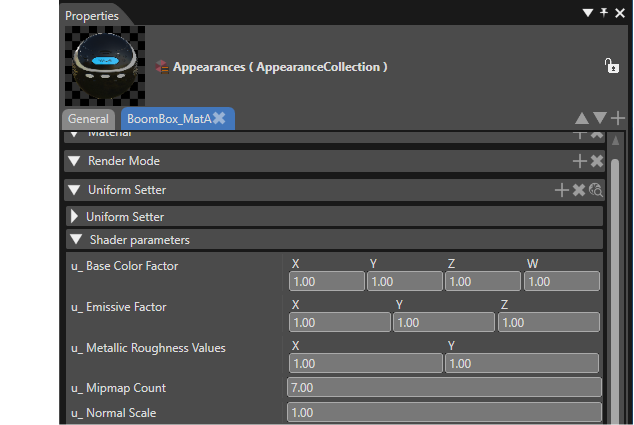
In SceneComposer the properties are called differently from the glTF standard:

<div class="contents" id="bkmrk-the-standard-propert"><div class="contents"><div class="textblock">- the standard property baseColor is called u\_Base Color Factor
- the standard property metallic is determined by the X value in the u\_Metallic Roughness Values
- the standard property roughness is determined by the Y value in the u\_Metallic Roughness Values

</div></div></div>The following properties of the appearance and shader are automatically set by the Importer, but can also be configured manually:

##### Uniforms:

<div class="contents" id="bkmrk-%22u_metallicroughness"><div class="contents"><div class="contents"><div class="textblock">- "u\_MetallicRoughnessValues" holds the metallic factor in X, and roughness factor in Y. These values are multiplied with the metallic and roughness values from the metallic-roughness texture on a per pixel basis. If there is no such texture, the values from the uniform are used instead.
- "u\_BaseColorFactor" (RGBA) is multiplied with the value from the albedo texture on a per pixel basis. If there is no such texture, the values from the uniform are used instead.
- "u\_MipmapCount" The number of mipmaps (excluding level 0) from the specular/radiance texture.
- (Optional) "u\_NormalScale" is a factor that is multiplied with the X and Y component of the normal. This uniform is only available if HAS\_NORMALMAP has been defined in the fragment and vertex shader.
- (Optional) "u\_OcclusionStrength" is a factor for the linear interpolation between the color and the color times ambient occlusion. This uniform is only available if HAS\_OCCLUSIONMAP is defined in the fragment and vertex shader.
- (Optional) "u\_EmissiveFactor" (RGB) is multiplied with the value from the emissive texture on a per pixel basis. This uniform is only available if HAS\_ HAS\_EMISSIVEMAP is defined in the fragment and vertex shader.

</div></div></div></div><div drawio-diagram="6818"><img src="https://doc316en.candera.eu/uploads/images/drawio/2024-09/drawing-5-1726241135.png" alt=""/></div>

#####  Textures:

<div class="contents" id="bkmrk-%28optional%29-the-albed"><div class="contents"><div class="textblock">- (Optional) The albedo texture (RGBA) must be set at texture unit 0, and HAS\_BASECOLORMAP must be defined in the fragment shader.
- (Optional) The metallic-roughness texture (GB) must be set at texture unit 1, and HAS\_METALROUGHNESSMAP must be defined in the fragment shader. The metallic values must be stored in blue channel. The roughness values must be stored in the green channel of the texture.
- (Optional) The tangent-space normal (RGB) texture must be set at texture unit 2, and HAS\_NORMALMAP must be defined in the fragment and vertex shader.
- (Optional) The occlusion texture (R) must be set at texture unit 3, and HAS\_OCCLUSIONMAP must be defined in the fragment and vertex shader. The occlusion values are stored in the red channel of the texture.
- (Optional) The emissive texture (RGB) must be set at texture unit 4, and HAS\_EMISSIVEMAP must be defined in the fragment and vertex shader.
- (Optional) IBL textures. The following textures must be present for IBL to work correctly. 
    - The diffuse/irradiance cubemap (RGB) must be set at texture unit 5, and USE\_IBL must be defined in the fragment shader.
    - The specular/radiance cubemap (RGB) must be set at texture unit 6, and USE\_IBL must be defined in the fragment shader. The specular pre-convolved environment must be built into the mipmaps. The number of mipmaps (excluding level 0) is set in the shader uniform "u\_MipmapCount" automatically by the importer, or must be configured manually if this cubemap is set manually.
    - The BRDF texture (RG) must be set at texture unit 7, and USE\_IBL must be defined in the fragment shader.

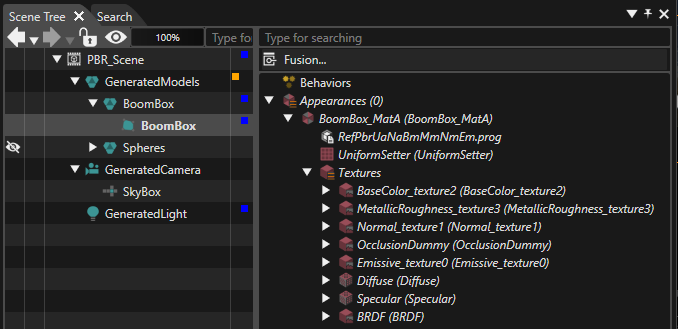
</div></div></div>Details of the imported appearance are shown in the scene tree:

<div drawio-diagram="7576"><img src="https://doc316en.candera.eu/uploads/images/drawio/2024-11/drawing-5-1732892596.png" alt=""/></div>

<div class="contents" id="bkmrk--24"><div class="contents">  
</div></div>##### Mesh:

<div class="contents" id="bkmrk-position-is-mandator"><div class="contents"><div class="contents"><div class="textblock">- Position is mandatory.
- (Optional) If the mesh has normals, HAS\_NORMALS must be defined in the fragment and vertex shader.
- (Optional) If the mesh has tangents, HAS\_TANGENTS must be defined in the fragment and vertex shader.
- (Optional) If the mesh as a uv set, HAS\_UV must be defined in the vertex shader.

</div></div></div></div><div class="textblock" id="bkmrk--25"></div>[![glTF_shader_variants.png](https://doc316en.candera.eu/uploads/images/gallery/2023-02/scaled-1680-/gltf-shader-variants.png)](https://doc316en.candera.eu/uploads/images/gallery/2023-02/gltf-shader-variants.png)

<div class="textblock" id="bkmrk-different-shader-var" style="padding-left: 40px;">*different shader variants (Click to enlarge image)*  
</div><div class="textblock" id="bkmrk--27"></div>##### Uniform Setter:

<div class="contents" id="bkmrk-model-view-projectio"><div class="contents"><div class="textblock">- Model View Projection matrix is mandatory.
- Model matrix is mandatory.
- Normal model matrix is mandatory if HAS\_NORMALS and HAS\_TANGENTS are defined in the shader.

</div></div></div>##### Optimization tips:

<div class="contents" id="bkmrk-use-one-texture-for-"><div class="contents"><div class="textblock">- Use one texture for occlusion, roughness, and metallic values, stored as an RGB texture.
- Providing tangents in the mesh avoids calculating the tangent space matrix on a per pixel basis.

</div></div></div>For a more detailed description on Pysically Based Rendering please refer to [the Khronos website: metallic roughness](https://github.com/KhronosGroup/glTF/tree/master/specification/2.0#reference-pbrmetallicroughness).

<div class="textblock" id="bkmrk-">  
</div>---

#### <a class="anchor" id="bkmrk--45"></a>Useful links

Khronos References

<div class="contents" id="bkmrk-gltf-overview-%28https"><div class="contents"><div class="textblock">- glTF Overview ([https://www.khronos.org/gltf/](https://www.khronos.org/gltf/))
- glTF 2.0 Specification ([https://github.com/KhronosGroup/glTF/tree/master/specification/2.0](https://github.com/KhronosGroup/glTF/tree/master/specification/2.0))
- glTF 2.0 Sample Models ([https://github.com/KhronosGroup/glTF-Sample-Models/tree/master/2.0](https://github.com/KhronosGroup/glTF-Sample-Models/tree/master/2.0))

</div></div></div>Khronos Specification

<div class="contents" id="bkmrk-specification-%28https"><div class="contents"><div class="textblock">- Specification ([https://github.com/KhronosGroup/glTF](https://github.com/KhronosGroup/glTF))

</div></div></div>Viewers

<div class="contents" id="bkmrk-babylonjs-sandbox-%28h"><div class="textblock">- BabylonJS Sandbox ([https://sandbox.babylonjs.com/](https://sandbox.babylonjs.com/))
- donmccurdy glTF viewer ([https://gltf-viewer.donmccurdy.com/](https://gltf-viewer.donmccurdy.com/))
- Khronos glTF Sample Viewer ([https://github.khronos.org/glTF-Sample-Viewer-Release/](https://github.khronos.org/glTF-Sample-Viewer-Release/))
</div></div>