
Default Render Target
The default render target is the render target that new cameras are attached to by default. Visually, the default render target is identifiable by the "(default)" text near it's name or by the "Is Default" property which is checked. Also, its tooltip displays additional information.
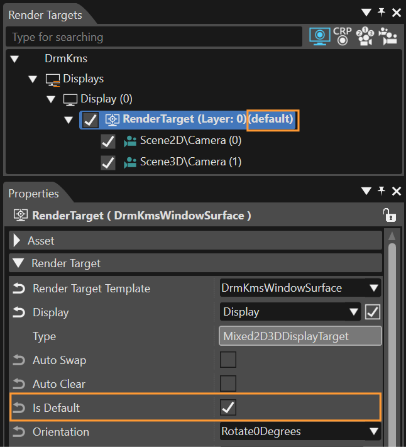
Default Render Target Example
The default render target works with Camera, Reflection Camera and Stereo Camera.
Manually Setting
Setting the default render target can be done in one of the following ways:
- via context command using the "Set As Default Render Target" option
- by enabling the property "Is Default" from the Property panel
- via [ Solutions Options > Default Render Target Configuration ] window
Automatically Setting
The default render target is set automatically in one of the following two situations:
- when adding a new render target if there is no other
- when deleting the current default render target, if another one is available