
Manage Render Targets
Manage Render Targets dialog allows you to view and edit the various settings of the render targets included in solution.
Open the Manage Render Targets dialog
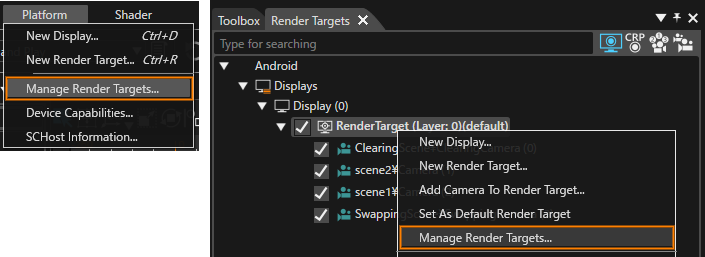
The Manage Render Targets dialog can be opened in two ways:
- From the [ Platform > Manage Render Targets… ] menu on the menu bar
- The context menu of any render target in the Render Targets panel
Manage Render Targets dialog details
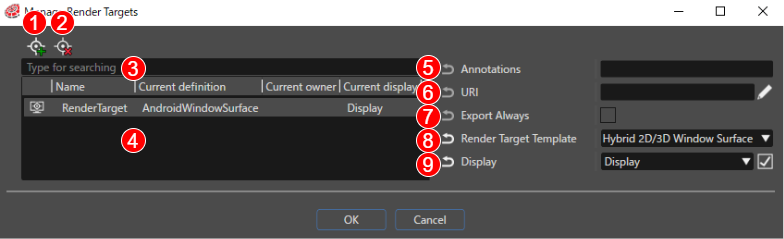
| (1) |
Create Render Target |
Create a new Render Target. |
| (2) |
Delete Render Target |
Delete a Render Target. |
| (3) |
Search |
If multiple Render Targets are set, you can enter a search term to narrow the number of results. |
| (4) |
Render Target list |
A list of Render Targets included in the solution is displayed. |
| (5) |
Annotations |
The Render Target Annotations |
| (6) |
URI |
The Render Target URI |
| (7) |
Export Always |
If enabled, the Render Target selected at the time of asset generation is always exported to the asset. |
| (8) |
Render Target Template |
The Render Target type |
| (9) |
Display |
The display that is linked to the Render Target |