
Warp Image Bounds
Warp image bounds comprise upper left corner point of the bitmap image area, its width, and height (normalized to the range [0..1]).
They are used to specify to Candera which part of the rendered display image shall be mapped to the warping mesh computed from the warp matrix. If not specified, then the complete display image will be mapped.
The following code snippet shows how to retrieve the warp image bounds from the Warping library. These can be further passed to Candera through the public interface of Candera::Display class using Candera::Display::SetWarpImageBounds.
    WRP_SFLOAT textureOriginX;
    WRP_SFLOAT textureOriginY;
    WRP_SFLOAT textureWidth;
    WRP_SFLOAT textureHeight;

    // retrieve warpTextureBounds
    ComputeWarpImageBoundsFromConfig(&stcWarpConfigParams, &textureOriginX, &textureOriginY, &textureWidth, &textureHeight);
    Candera::Rectangle warpTextureBounds(textureOriginX, textureOriginY, textureWidth, textureHeight);

    // set the bounds of the warping texture
    display->SetWarpImageBounds(warpTextureBounds);
Example
| Warping is disabled Display Area: 480x240 BitmapArea: 408x190 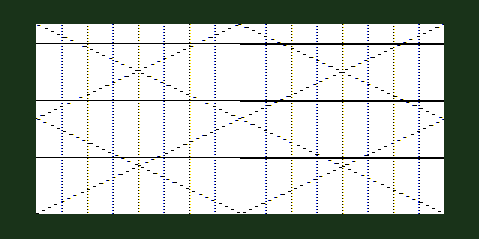 |
|
| Warping is enabled, image bounds are not specified Display Area: 480x240 BitmapArea: 408x190 | Illuminated Area: 480x240 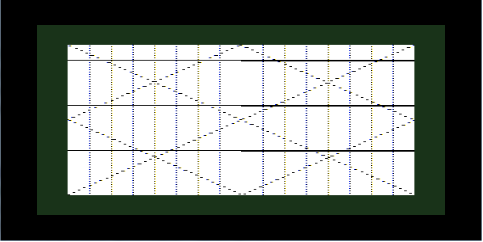 |
Warping is enabled, image bounds are specified Display Area: 480x240 BitmapArea: 408x190 | Illuminated Area: 480x240 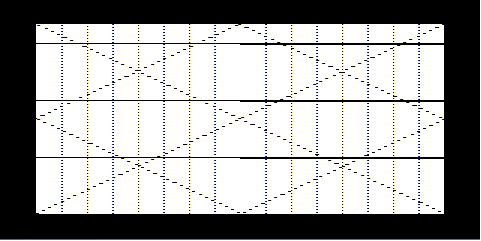 |