
Overview
The system view shows the location of the warping library in the system as well as connections to other components.
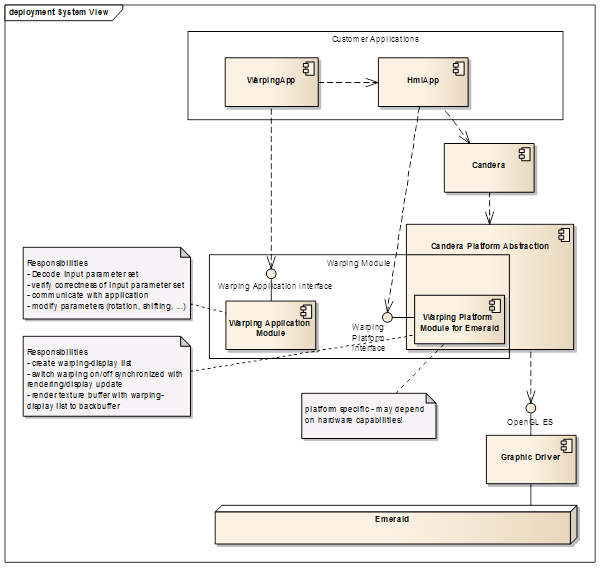
Globally, the warping library consists of two parts, the warping application module and a warping platform module. The platform module is platform dependent – a version for Windows host platform and a version for iMX6 target hardware are available. Responsibility of each part is described in the system view model.
Directory Overview
The directory structure of the delivery package consist of the code code and the document doc sub directory.
The code directory structure in detail:
- bin: Output directory for the host and target "WarpingLibrary" library file (sub directory WarpingLibrary) and the executable file for the "WarpSample" application (sub directory WarpSample).
- build: This sub directory contains the build scripts for all supported host and target variants for "WarpingLibrary" (sub directory WarpingLibrary) and the "WarpSample" application (sub directory WarpSample).
- sample: Storage of the "WarpSample" application source code files.
- src: Contains matrix calculation source code needed for the warping library (sub directory \3rdParty) and the source code for the warping library (sub directory WarpingLibrary).
The doc directory structure in detail: - UserDocumentation: Location of this user’s guide.
- ReferenceMaterial (optional): This sub directory contains the product requirement document (versions) being the base for the software requirements.
Integration Overview
Integration of the Candera Warping Library is performed in the following steps:
- Apply Delivery: Copy the delivery contents to the installation directory of the CGI Studio base release package on your hard disk (for further reference, we call the path to this directory warp_base_path). The warp_base_path should reside on the same level as the folder cgi_studio_candera, containing the Candera source code, to make CMake auto-detecting of related Candera source code work. Besides Candera, also cgi_studio_3psw and featstd folders are needed. The build scripts delivered expect the Candera sources in these directories – in case on your machine these locations are different, please adapt the paths in the build scripts accordingly.
- Create Warping Library: Building the Candera independent Warping Library needs to be done in a first step as this is not integrated into the Candera build scripts. For detailed instruction about this step please refer to chapter 2. Note that in case of binary delivery of Warping Library, there are pre-built libraries provided for all supported host and target variants.
- Build and Run Sample: To build the Candera Warping sample application, follow the instructions described in 3. For running the sample application in the host environment, please make sure that your machine satisfies Candera’s hardware and software requirements (especially concerning graphic hardware and graphic drivers).