
Text engine: Shaping
Shaping
Stored texts are ordered by the reading flow. This means that every text is placed from left to right within the memory. It does not matter which language it is. There is also no other information stored besides the text itself. Therefore, the memory representation of text has only logical information but no visual representation information.
The goal of shaping is to find the correct representation of the given text. For example Arabic letters differ in their visual representation depending on their position. Therefore, characters usually have four different forms: Isolated, Final, Medial and Initial. Additionally, there are many more tasks for a shaper to handle: Diacritics, ligatures, kerning...
All different languages have their own characteristics when it comes to shaping. Even Latin has some shaping cases.
For more detailed information about shaping:
WT-Shaper, HarfBuzz as well as different sources, e.g. Unicode.org and w3.org provides abundant information.
Supported shaper
Candera supports different shaper:
- No shaping
- Complex Script
- HarfBuzz (in combination with FreeType)
- WorldType Shaper WorldType-Shaper (in combination with iType)
To see, which versions of shapers are currently supported, please have a look at the [3rd Party Software section].
WorldType Shaper
Integration of WT-Shaper
The integration is based on the same approach iType uses. (Reference to iType)
CMake Integration
In CMake WT-Shaper can only be selected when Monotype is set as CANDERA_FONTENGINE.
To switch to the shaper the following CMake flag has to be set:
| Flag | Value |
|---|---|
| CANDERA_FONTENGINE | Monotype |
| CANDERA_TEXTSHAPER | WorldType-Shaper |
If Freetype + HarfBuzz is slected, the flag CANDERA_TEXTSHAPER will automatically change to WorldType-Shaper.
Using prebuilt binaries or not is bound to the same CMake flag as The font engine: iType iType.
The flag MONOTYPE_USE_BINARIES can be used to switch between the different building modes.
Build process: WT-Shaper as source code
For this mode, MONOTYPE_USE_BINARIES has to be disabled.
- MONOTYPE_WTSHAPER_SRC_PATH - This path defines the location where to find the source code for WT-Shaper. By default this will be cgi_studio_3psw/src/Monotype/WTShaper and the folder structure may look like the following:
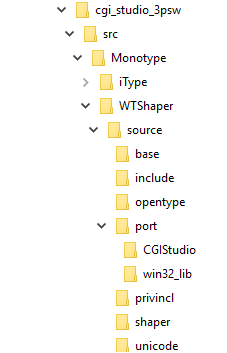
The FileList.txt which defines all the files should contain the following three Lists:- WTSHAPER_ALL_HEADERS
- WTSHAPER_ALL_SOURCES
- WTSHAPER_INCLUDE_PATHS
-
It does not matter how the source code is distributed on the first two lists. Only the names should be in use. The third list shall include the directories of WT-Shaper to add them to the linking system.
- MONOTYPE_FEATSTD_PORT_ENABLED - This flag toggles the port API implementation between a CGIStudio version and the default win32_lib including the settings which are required for Candera. The win32_lib represents a default implementation of the framework, separated from any Candera relations. This enables an easy possibility to build WT-Shaper in a separated environment and link it to Candera. This flag is shared between iType and WT-Shaper.
- MONOTYPE_WTSHAPER_PORT_PATH - This path is directly links to the port API which shall be used for the build. By default it links to the default location of the default CGIStudio implementation: cgi_studio_3psw/src/Monotype/WTShaper/source/port/CGIStudio However, this can be changed to different implementations, too. If MONOTYPE_FEATSTD_PORT_ENABLED is false, this will link to the win32_lib definition.
Build process WT-Shaper as prebuilt library
For this mode, MONOTYPE_USE_BINARIES has to be enabled.
In general using the prebuilt library is similar to the source code version.
The flags MONOTYPE_FEATSTD_PORT_ENABLED, MONOTYPE_WTSHAPER_PORT_PATH and MONOTYPE_WTSHAPER_SRC_PATH are equal in usage as in the source code version. The only difference is, that the prebuilt library only requires header files.
The port files and header have to match with the build settings of the prebuilt library.
MONOTYPE_WTSHAPER_LIBRARY_FILEPATH is the path to the prebuilt library. And has to be defined by the user.