
Focus Management
Focus Navigation on Computer
The user of the created HMI wants to move the focus from one control to another. When using the computer, usually a keyboard is used for focus navigation.
On a computer, the user can use the following keys to move the focus from one control to the other:
| - TAB | move the focus to the next control |
| - CTRL + TAB | move the focus to the previous control |
On targets without a keyboard, different input methods can be used for changing the focused control. Automotive targets use the rotary for focus navigation. Therefore, focus navigation is only loosely coupled with a keyboard.
Focus Navigation in CGI Studio
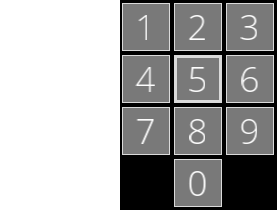
This section uses a phone keypad like the one below to demonstrate the focus changes.

Next/Previous Navigation in CGI Studio
-
If no focusable control has the focus and a key that navigates the focus (e.g. a key of the cursor control pad or the TAB key) is pressed, the focusable control that has the lowest TAB-order gets the focus.
Geometrical Navigation in CGI Studio
The following describes the focus change that happens when repeatedly clicking the noted navigation key in the example keypad above. Initally, for every noted navigation key, the focus is on the fifth focusable control as in the image of the keypad above.
|
|
|
|
|
|
|
|
|
|
|
|
|


Managing the Focusable Nodes
Each keyboard focusable behavior notifies the KeyboardFocusManager about its view getting activated or deactivated.
Concept of the Next/Previous Navigation
The logical order of the focusable nodes is defined by the following criteria:
- The tab order of its scene: This order is stored as a dynamic property and can be set by a KeyboardFocusTabOrderBehavior.
- The asset order of its scene: This order is defined by the order in which the scene is stored in the asset.
- Its tab order: This order is stored as a dynamic property and can be set by a KeyboardFocusTabOrderBehavior.
- Its tree order: The tree order in pre-order tree traversal.
KeyboardFocusTabOrderBehavior
The tab order of a node is defined as relative or absolute. The default order is relative.
- relative considering the parent inherited tab order
- absolute will stop the inherited tab order
The next/previous navigation updates the logical order for each next/previous navigation event and sorts the focusable nodes, finds the currently focused node in that list and transfers the focus to the next/previous entry in the list.
Concept of the Geometrical Navigation (Left, Right, Up, Down, Up Left, Up Right, Down Left, Down Right)
For each geometrical navigation event the bounding box in the display of the node is calculated per camera in the scene. Each keyboard focusable node has one entry in the lookup list for each camera.
The keyboard focused node is extended by the camera that is responsible for the focus. A scene may have several cameras and the focus will be caused by one of them.
The following events may trigger a change of the keyboard focus:
|
|
|
|
|
|
|
|
|
|
|
|
|

 |
Navigate to the Left: |
1. Find the nearest node of the nodes that are at least partially within the top and the bottom boundary of the keyboard focused node. The distance of the right node boundary to the left boundary of the keyboard focused node is minimal. Limit the right node boundary to the left boundary of the keyboard focused node. For multiple matches use the same order criteria as for the previous/next navigation and take the first one.
2. If no node was found, find the nearest node (where the corner to corner distance is minimal) of the nodes that intersect the left sectors:
- corner to corner distance for nodes in the top left sector: take the node's bottom right corner (limit that corner to the left boundary of the keyboard focused node) and the keyboard focused node top left corner and calculate the square distance.
- corner to corner distance for nodes in the bottom left sector: take the node's top right corner (limit that corner to the left boundary of the keyboard focused node) and the keyboard focused node bottom left corner and calculate the square distance.
- All other sectors are not on the left of the keyboard focused node.
- For multiple matches use the same order criteria as for the previous/next navigation and take the first one.
|
|
Navigate to the Right: |

|
|
Navigate Up: |

|
|
Navigate Down: |

|
|
Navigate to the UpLeft direction: |

Find the nearest node (corner to corner distance is minimal) of the nodes the intersect the top left sector:
- corner to corner distance: take the node's bottom right corner (limit that corner to the left and top boundary of the keyboard focused node) and the keyboard focused node top left corner and calculate the square distance.
- For multiple matches use the same order criteria as for the previous/next navigation and take the first one.
|
|
Navigate to the UpRight direction: |

The same as UpLeft navigation but left is right, right is left, top is top and bottom is bottom in the description. Imagine a mirrored image.
|
|
Navigate to the DownLeft direction: |

The same as UpLeft navigation but left is bottom, right is top, top is left and bottom is right in the description. This is a rotation by 90° counter clock wise.
|
|
Navigate to the DownRight direction: |

The same as UpLeft navigation but left is top, right is bottom, top is right and bottom is left in the description. This is a rotation by 90° clock wise.