
Top Node
The Fusion node diagram configured in the Fusion panel always starts atwith the top node. AThe Top Node isserves theas root node in the Fusion Diagram.diagram and is fixed, meaning it cannot be deleted from the Fusion Editor.
The topTop nodeNode iscorresponds to the node selected in the scene treetree. andIf Fusion is thelaunched rootfrom node ofwithin the FusionState diagram.Machine Editor, it represents the State Machine Element (such as a State or Transition) that was selected when starting Fusion.
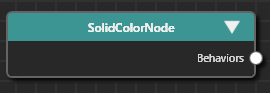
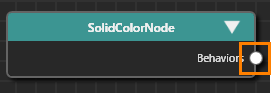
Top Node Connector
The Top Node has a single connector on its right side, which is fixedused to create and cannotconnect be deleted (from theother Fusion Editor)Nodes.
For details on connecting Fusion Nodes, see Basic Operations.

Selecting a Top Node
The following types of nodes that can be usedserve as topthe nodesTop areNode asin follows.a Fusion diagram:
- Predefined CGI Control
templatesTemplates - Custom
userUsercontrolControls/and Instantiatedcontrol(thiscontrolsonewithcan have it’s own propertiesuser definedby user)
properties - Behavior
buildingBuildingblockBlocktemplateTemplates - State
machineMachineelementsElements (States/Transitionse.g.etc)States, Transitions) Any of2D/3DsceneScenenodesNodes- Behavior
groupGroups
To select a Top Node,Node:

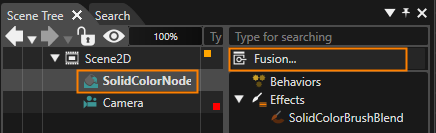
If the Fusion Editor is already currently visible,open, selecting any node in the Scene Tree will automatically showupdate the Fusion DiagramEditor ofto thatdisplay the Fusion diagram for the corresponding node.
The selectionchoice of a Top Node depends on eachthe specific use case. For example,example:
Essentially, the Top Node is the nodeelement whichthat isacts as the source or recipient of events or values to be processed.
Fusion Node Categories
The Topfollowing Nodetype onlyof has a connector at the right side, from which all other fusion nodes can stem from. See Basic Operations on how to connect Fusion nodes.

Behaviors as Fusion nodes thatbehaviors can be connected connected to the top node arein divided into the following categories. Fusion:
- Action Fusion Node
- Condition Fusion Node
- Behavior Fusion Node
- Behavior Group Fusion Node (BehaviorBuildingBlock)
In addition to these, reference Fusion nodes thatwithin canAction, beCondition, connected other than those listed above include the referenceBehavior Fusion node incan thealso Action/Condition/Behaviorbe Fusion node.connected.
The color of each Fusion node category (- including the topTop node)Node Fusion- nodeas ondisplayed in the Fusion panelEditor can be setcustomized in the Preferences.