
Type of Values
Types of Values: Absolute or Relative
Animation values can have two different types:
- Absolute: Configured animation values are absolute to the current value of the animated property.
- Relative: Configured animation values are relative to the current value of the animated property.
The main benefit of relative animations is that they can be saved as templates and reused for other properties very easily.
By default animation values are considered absolute. To change to relative values, use the context menu "Types of Values" on an animated property in Animation Timeline or Animation Values panel and switch to "Relative":
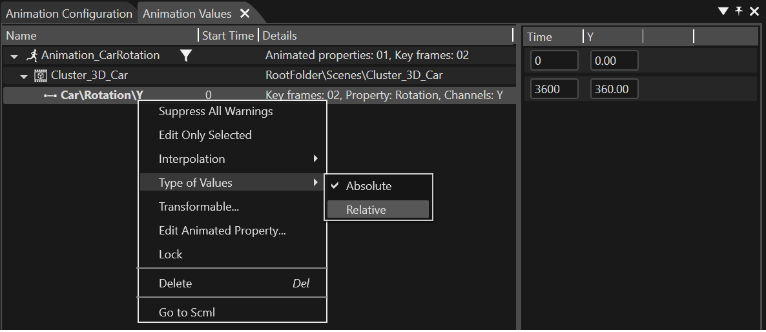
Switch from Absolute to Relative Animations
When an absolute animation is switched to a relative animation, the values of the first key frame are reset to zero and the remaining key frames' values are modified by subtracting the original values of the first key frame from their current value.
Example:
Consider a simple animation of channel Y with two key frames:

After choosing the option "Type of Values/Relative" the absolute values are reset to relative like following:

When a relative animation is switched to an absolute animation, the new values will be obtained by adding the value of the animated object property to the current values.
Boolean Values
For animated properties of type Boolean, the operation performed when transforming them to relative animations is negation.