
Default Render Mode
Default Render Mode Settings
You can open the Solution Options dialog from [ File > Solution Options ] in the menu bar to configure various rendering properties under [ Default Render Mode ]. These properties are automatically applied by SCHost unless another render mode is explicitly set for the object.
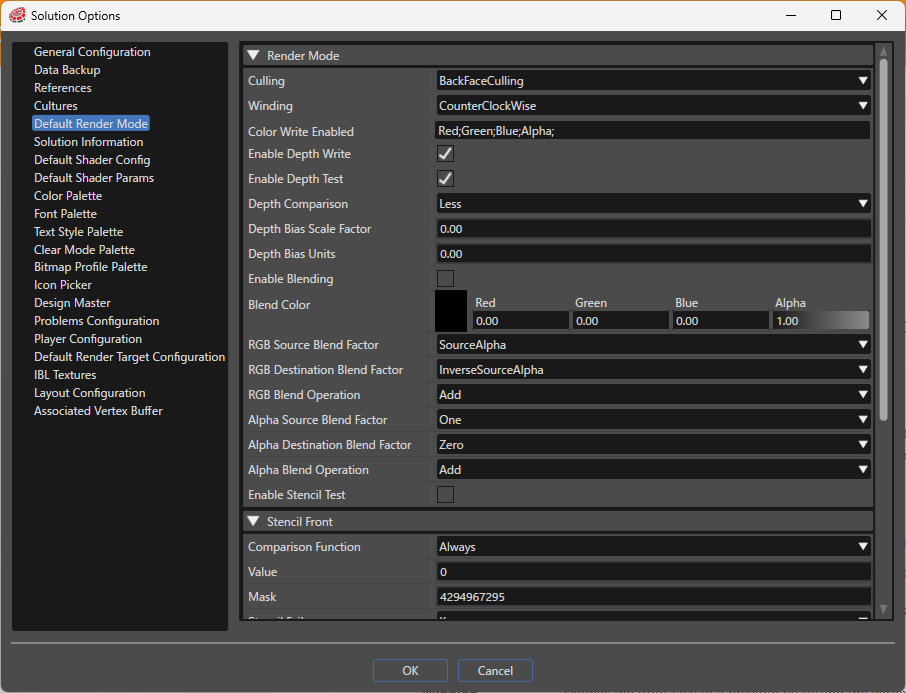
If there is a render mode associated with an object, Scene Composer compares these property values with the default render mode settings and includes a bitmask used by the Candera engine within the asset to optimize rendering.
Render Mode
| Setting | Description |
|---|---|
| CullMode | Configure culling (excluding surfaces from rendering) according to the selected setting. Applying front or back culling optimizes rendering.
|
| Winding | Defines the front face of a polygon by setting the vertex drawing order to clockwise or counterclockwise.
|
| Color Write Enabled | Enables or disables writing fragment color values to the color buffer, configurable per RGBA channel. |
| Enable Depth Write | Enables or disables writing to the depth buffer during rendering. When enabled, depth information is recorded in the depth buffer during rendering. |
| Enable Depth Test | Enables or disables depth testing. When enabled, the depth buffer is used to control rendering based on depth. If disabled, depth writing is also disabled. |
| Depth Comparison | Sets the comparison function used to determine if a depth value passes the depth test. The source pixel's depth is compared with the destination pixel using the specified function.
|
| Depth Bias Scale Factor | Specifies the scale factor to determine how much bias to apply to primitives, mainly used to avoid z-fighting (depth conflicts). |
| Depth Bias Units | Specifies a constant depth offset value used together with the scale factor to adjust and avoid z-fighting. |
| Enable Blending | Enables or disables blending (color composition). When enabled, the source color is blended with the destination color in the framebuffer. |
| Blend Color | Defines the constant blend color used when a constant color blend factor is selected. |
| RGB Source Blend Factor | Sets the blend factor applied to the source color in the RGB channels.
|
| RGB Destination Blend Factor | Sets the blend factor applied to the destination color in the RGB channels. Available values are the same as RGB Source Blend Factor. |
| RGB Blend Operation | Specifies the operation used for blending RGB values.
|
| Alpha Source Blend Factor | Specifies the blend factor for the source alpha channel, with the same available values as RGB Source Blend Factor. |
| Alpha Destination Blend Factor | Specifies the blend factor for the destination alpha channel, with the same available values as RGB Source Blend Factor. |
| Alpha Blend Operation | Specifies the operation for blending alpha values, using the same options as RGB Blend Operation. |
| Enable Stencil Test | Enables or disables stencil testing on the stencil buffer, allowing control of rendering based on stencil buffer conditions (area control, masking, etc.). |
Stencil Front / Stencil Back
| Setting | Description |
|---|---|
| Comparison Function | Sets how the source (new) data is compared to the destination (existing) data before storing in the stencil buffer, using the same options as Depth Comparison.
|
| Value | Specifies the reference value used with the comparison function for stencil testing. |
| Mask | Specifies the mask value applied to the source and destination data during stencil testing, useful for targeting specific bits during comparison. |
| StencilFail | Sets the stencil buffer operation if the stencil test fails.
|
| DepthFail | Sets the operation if the stencil test passes but the depth test fails. Options are the same as StencilFail. |
| DepthPass | Sets the operation if both the stencil and depth tests pass. Options are the same as StencilFail. |
| WriteMask | Specifies the mask value used when writing values to the stencil buffer, allowing control over which bits are written. |