
Plugin Options
Plugins Available
Available plugins are displayed under [ Plugins ] in the Preferences dialog.
All available plugins are displayedenabled inby "Preferences"default. >To "Plugins"disable ona plugin, click the button to the right sideof its properties. When the button displays "Enable," the plugin is disabled.
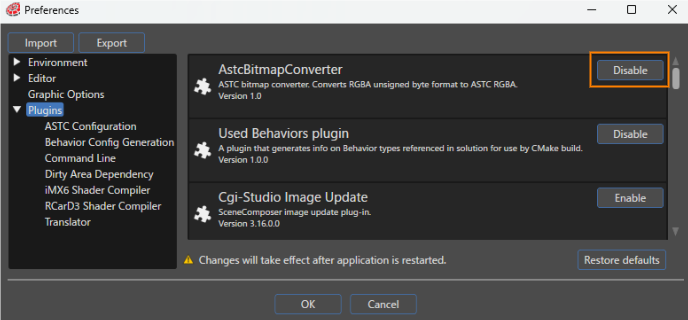
The following plugins are available for Scene Composer:
This is a plugin for the List Editor. The List Editor can be used with controls such as BarGraph and LineGraph.
Details SpecificationPluginThis is a plugin for Define application specification. Define application specification is required to link data binding sources with Scene Composer.
Details DataBindingEditorPluginThis is a plugin for the Data Binding bind icon and Live Preview panel.
Details Dirty Area Dependency Plugin This is a plugin for Dirty Area Management (DAM). Details ExecutableGenerationPluginThis is a plugin for executing scripts when generating assets.
Details ExternalResourceContainerPlugin This is a plugin for the Referencing external resource function.Details iMX6 Shader Compiler This is a shader compiler for iMX6. Details RCarD3 Shader Compiler This is a shader compiler for RCarD3. ー RZA1HBitmapConverter This is a bitmap converter for RZA1H. ー Cgi-Studio Transrator This is a plugin for Localization. Details Traveo2BitmapConverter This is a custom bitmap converter for Traveo2. ー
Enabling/disabling the plugin will take effect after restarting Scene Composer.
Plugin-Specific Settings
Some plugins have their own settings. You can configure these settings in the Preferences dialog.
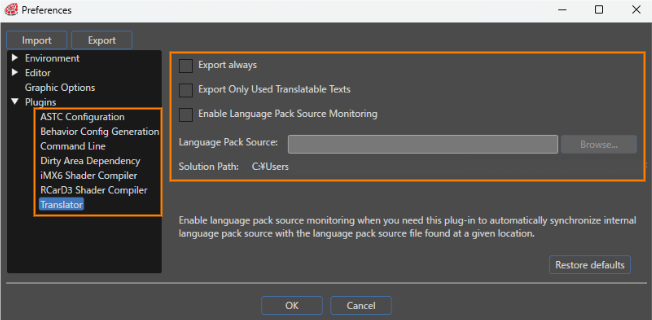
Details of plugin-specific settings are listed below.
ASTC Configuration
The Compression Speed can be set to one of five levels.
Behavior Config Generation
If enabled, a Behavior configuration will be generated.
Destination pathSet the path to the CMake file in the CMake flag "CONTROLS_USED_BEHAVIORS_CONFIG_PATH".
Commnad Line
Sets the command to be executed when generating assets.
Dirty Area Dependency
If enabled, information about Dirty Area Management will be output to the asset.
iMX6 Shader Compiler
Select the output format from three options (Text, Binary, or Binary program).
Custom command line stringEnter the tool or identifier to execute in command line format. This setting can only be set when the output format is Binary or Binary program.
RCarD3 Shader Compiler
Select the output format from three options (Text, Binary, or Binary program).
Custom command line stringEnter the tool or identifier to execute in command line format. This setting can only be set when the output format is Binary or Binary program.
Translator

to
Plugin Plugin-Specific Optionssettings will take effect after restarting Scene Composer.
Plugins can register option editor dialogs via SceneComposer SDK.
