
Dirty Area Management
Dirty Area Management (DAM) refers to an optimization measure to reduce draw calls to the render API and thus, improving frame times.
DAM benefits depend on factors such as how scenes overlap and the size of the intersection area. Typical use cases, conditions where the benefit is limited, and known limitations are explained in Use Cases and Notes.
By defining so called invalidation dependencies between scenes and cameras, views are not re-rendered continuously, but only upon changes in the view itself or in one of its dependents. An invalidation dependency additionally defines an intersection rectangle, which determines where views and cameras are intersecting each other. Visual changes in this intersection area will trigger the re-rendering of the affected cameras.
Invalidation dependencies are automatically computed and stored in the asset during export. The rendering engine extracts this information from the asset and processes it accordingly. When exporting an asset from Scene Composer (GUI), no additional configuration is typically required. However, when generating an asset with FTCCmd.exe, disabled plugin settings are not carried over automatically, so specify the Scene Composer settings file via /Config.
Currently, all scenes and cameras are invalidated continuously while the asset is rendered in the player. Thus, the continuous invalidation must be turned off in the panel for improving frame times with the newly introduced DAM method.
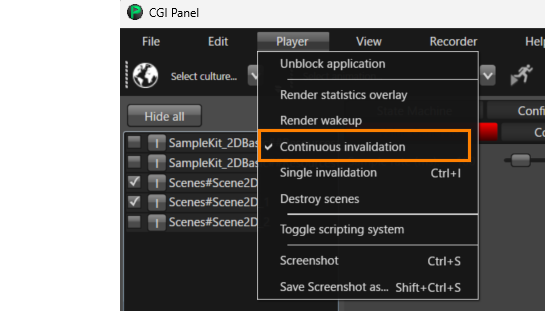
If you want to disable the dirty area management, disable the Dirty Area Dependency Plugin in Scene Composer preferences in section "Plugins". After disabling the plugin, restart Scene Composer.
Current limitations
- The auto-calculated invalidation dependencies only refer to views and cameras in the same render target.
Notes when generating assets with FTCCmd.exe
FTCCmd.exe does not automatically inherit plugin settings that were disabled in Scene Composer. When generating assets with FTCCmd.exe, specify the Scene Composer settings file via /Config.
Use Cases and Notes
Typical Cases Where DAM Is Effective
DAM defines Invalidation Dependencies based on the Intersection Rectangle between scenes/cameras, with the goal of minimizing the redraw region. Therefore, DAM can be beneficial especially in configurations where scenes overlap and the intersection area remains limited, such as:
-
A static background scene with a small, frequently updated overlay scene on top (e.g., HUD/widgets)
-
Multiple scenes partially overlapping, where changes can be confined to the intersection area
Cases Where DAM Provides Limited or No Benefit
Under the following conditions, DAM may not reduce redraws, or the benefit may be limited:
-
Scenes do not overlap
Since no Intersection Rectangle is generated, the effect of constraining the Dirty Area based on the intersection area is generally not achieved. -
The intersection area is large (e.g., close to full-screen)
If any calculated intersection effectively becomes full-screen, the Dirty Area for that camera becomes full-screen, and the entire screen will be re-rendered while resolving/rendering the dependencies. -
Multiple dependencies increase the union of intersection areas
If a camera has multiple Invalidation Dependencies, the rendering schedule treats the union of the related intersection areas as the Dirty Area. As a result, when the union is large, the Dirty Area grows and the redraw reduction benefit may be limited.
DAM benefits depend on the scene layout (how scenes overlap and the size of the intersection area), the frequency of invalidations, and the target environment. Therefore, this document does not provide generalized performance numbers.
Example Behavior with Overlapping Scenes (Static Background + Small Foreground)
As an example, if a small foreground scene (Scene A) overlaps a static background scene (Scene B), DAM detects the Intersection between the two scenes/cameras and adds Invalidation Dependencies based on the Intersection Rectangle. When Scene A is invalidated, Scene B is re-rendered only in the intersection area first, and then the entirety of Scene A is re-rendered as the foreground. In other words, in this example, it is not the case that both scenes/cameras are always re-rendered in full.
Handling Multiple Dependencies
With the current auto-detection, if a camera has multiple Invalidation Dependencies, the union of the relevant intersection areas is determined as the Dirty Area for render job scheduling. As the number or size of intersection areas increases, the Dirty Area grows and the benefit may become limited. If any calculated intersection is effectively full-screen, the resulting Dirty Area can become full-screen.
Limitations
Camera translation is not supported. Intersections/dependencies are calculated at export time and stored statically in the asset. If you need to update the Dirty Area dynamically at runtime, a manual setup using the legacy API is required. DAM auto-detection does not detect dependencies between scenes on different render targets (consider manual configuration if needed).