
Debugging Hints
Debugging Player
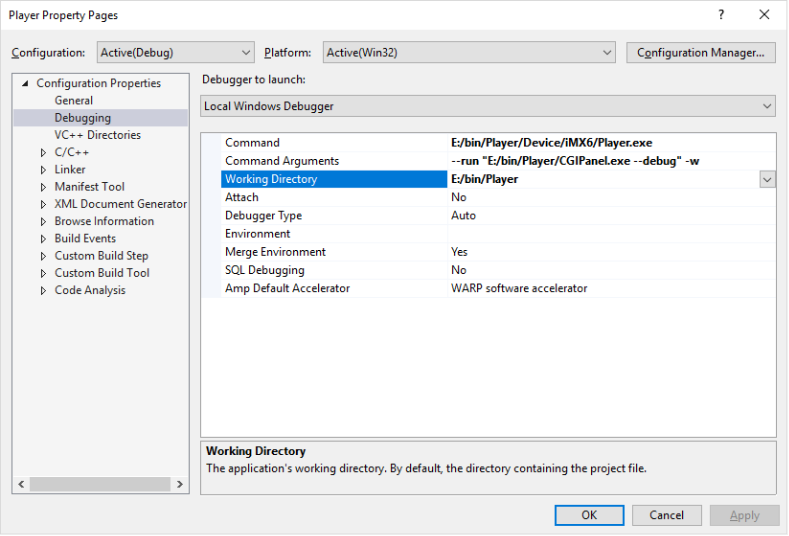
For debugging the Player set "Player" as startup project in the Player solution and start debugging.
With CMake, the required Debugging configurations are preconfigured as following:
Debugging Widget Life Cycle in SceneComposer
For debugging widgets used in SceneComposer please execute the following steps:
- Set SCHost as startup project in the dev solution and edit the properties as shown below.
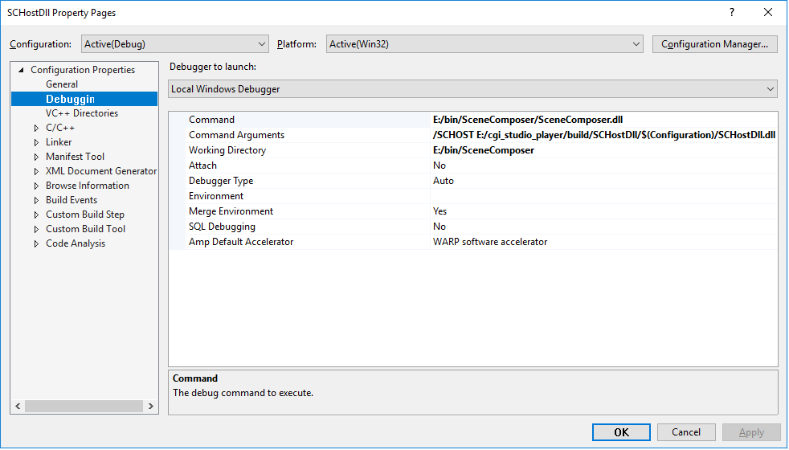
Set:
- Debugger Type to Native Only
- Command: The path to the file 'SceneComposer.dll' in your SceneComposer installation.
- After setting a breakpoint in a widget in the dev solution and pressing F5 (Debug), the breakpoint will get hit as soon as the widget is used by SceneComposer.
-
Debugging with SceneComposer only works while using a SCHost.dll including debug information! For this, take care that the CMake variable "CGIAPP_SCENE_COMPOSER_PATH" is set to your SceneComposer executable, and compile in debug mode. All dll files required by SceneComposer will then be automatically deployed to your SceneComposer executable directory.