
Building Own Application for Linux with a Wayland Display Server
Generate Makefiles with CMake
For general information about CGI Studio Build System and CMake properties available to configure Candera applications refer to CGI Studio Build System.
To configure and generate makefiles for compiling the CGI Player, follow below steps:
The first step for cross compiling is to make sure all the environment variables for the Yocto SDK are set!
$source /<path to the Yocto SDK installation>/environment-setup-<platform specific suffix e.g. aarch64-poky-linux>
- Folder containing top-level "CMakeLists.txt", e.g.
\cmake\Candera\/cmake/Candera/Player
- May not exist, create folder with CMake if necessary
- Root directory for generated makefiles / solutions
- Root directory for build artifacts

- Specify
“UnixMakefiles”Makefiles as generator for theprojectproject. - Specify tool-chain file for cross-
compilingcompiling.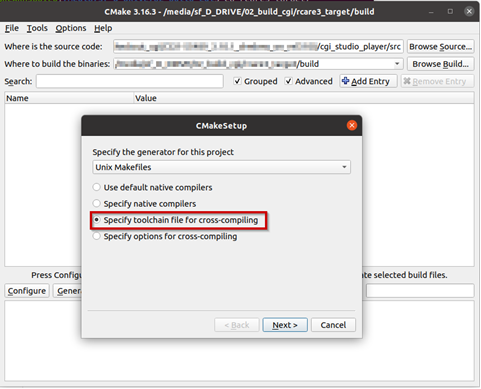
/cgi_studio_devices/src/Wayland/ToolchainFiles/GCC-toolchain-Wayland-Linux.txt
OpenGL ES 2.0 and 3.0 versions are supported please configure CMake variable "CGIDEVICE_GLES_VERSION"
- CMAKE_BUILD_TYPE-> Debug or
ReleaseRelease.
Building Application
useMake samesure Terminalthat sessionthe environment variables for allthe steps.Yocto SDK are set in the terminal! Either reuse the terminal used to start CMake for building the Player or call the environment setup script again.
$source . /<path-to-yocto-installation>/environment-setup-...<platform specific suffix e.g. aarch64-poky-linux>
- Open CMake GUI and configure the project (e.g Player, CourierSampleApp, CitDemoApp) according to Generate Makefiles with CMake.
- After generating your cmake files,
simplynavigate to the specified build directory (binary directory created in CMake GUI) and type "make"within terminalto start the buildprocess.or “make -j” to build with multithreading.
With some hypervisors, the Linux VM may get unresponsive when using the –j option. Reducing the number of used threads to the number of available cores improves the responsiveness of the VM during the build.
-
For CourierSampleApp and CitDemoApp asset file
have tomust be created withtheiraownmatching SCHost.dll as the SCHost.dll for the CourierSampleApp and CitDemoApp contain specialized Widgets.