
Shader Compiler
Shader compilation is triggered in the following situations:
- During shader editing, if requested via menu item "Shader" > "Compile Shader" or by pressing F7 key, the selected shader or shader program will be compiled using the platform's shader compiler.
- During scene editing, when the scene dependencies are generated, the shaders will be compiled using an internal shader compiler (so called "builtin://DefaultShaderCompiler").
- During asset generation, depending on the selected shader compiler type, the shaders will be compiled using platform's shader compiler (Target) or internal shader compiler (Simulation).
The compilation result can be seen in the "Problems Browser" panel. For further information please refer to section Problems Browser.
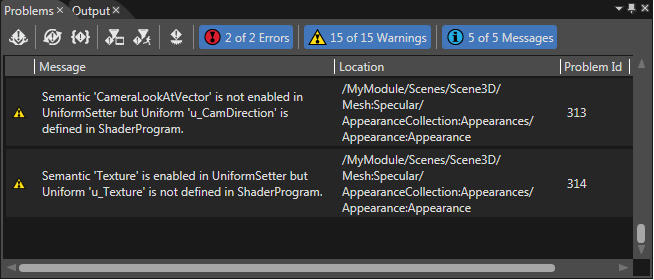
After successful shader compilation, a regarding message is displayed.
RCarD3 Shader Compiler
RCarD3 Shader Compiler provides support for exporting compiled (and/or linked) shaders to the asset file. It can be configured from File/Preferences section and provides some parameters which can be changed in order to achieve the desired behavior:
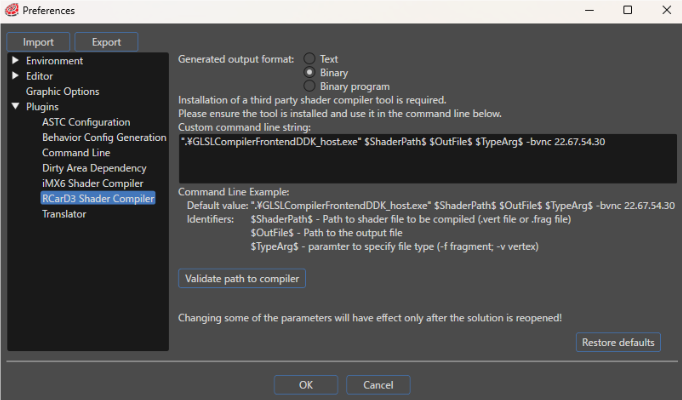
1. Output type:
| Text | Exports the source code of the shaders (separate source code for vertex and fragment shaders) |
| Binary | Exports compiled shaders (separate compiled vertex and fragment shaders) |
| Binary program | Exports a linked shader pair (in the asset file, the vertex shader will contain the compiled and linked pair and the fragment shader will contain an empty buffer) |
2. Command line - a configurable string of the following format:
<path_to_executable_file> [arg0] [arg1] [arg2] ... [argN] | expectedFileName:<output_file_name>
- a. The path to executable to be run in order to generate the compiled/linked shaders along. The executable itself can be specified alone (no path) if the path to it's parent directory is found in the system environment path. Paths which cointain spaces need to be delimited by double quotes.
- b. The arguments (parameters to be passed to execution). Some special parameters which identify the current processed shader can be specified (they are detailed below). Examples: $ShaderPath$, $VsPath$
- c. The expected file name specifier: specifies the name (without extension) of the output file and is separated from the rest of the command (a and b) by a pipe '|'. RCarD3 shader compiler expects output files with the following extensions:
i.) .vgcSL - compiled vertex shader (applies for Binary output only)
ii.) .pgcSL - compiled fragment shader (applies for Binary output only)
iii.) .gcPGM - compiled and linked shader pair (applies for Binary program output only)
Example: For binary output, "expectedFileName:output" - requires that a compiled vertex shader file will be named output.vgcSL and a compiled fragment shader file will be named output.pgcSL
The command line for "Binary" output is a little bit different than the one for "Binary program" output.
Binary output command line:
This command line is invoked separately for each vertex and fragments shader.
Example: ".\GLSLCompilerFrontendDDK_host.exe" $ShaderPath$ $OutFile$ $TypeArg$ -bvnc 22.67.54.30
Identifiers
- $ShaderPath$ - Path to shader file to be compiled (.vert file or .falg file)
- $OutFile$ - Path to the output file
- $TypeArg$ - Parameter to specify file type (-f fragment, -v vertex)
Binary program output command line:
This command is invoked for a shader pair (both vertex and fragment shader)
Example: ".\GLSLCompilerFrontendDDK_host.exe" $VsPath$ $FsPath$ $OutFile$ -vf -bvnc 22.67.54.30
Identifiers
- $VsPath$ - Path to vert file to be compiled (.vert file)
- $FsPath$ - Path to frag file to be compiled (.frag file)
- $outFile$ - Path to the output file
- &TypeArg& - Will be automatically replaced with -vf