
Building Own Application for QnxScreen
Generate Makefiles with CMake
For general information about CGI Studio Build System and CMake properties available to configure Candera applications refer to CGI Studio Build System.
To configure and generate makefiles for compiling the CGI Player, follow below steps:
- Open a terminal.
- Set the environment. This step is mandatory. Omitting this step will cause building with the host systems compiler instead of cross compiling.
call C:\Users\<username>\qnx<version>\<version>\qnxsdp-env.bat - From this console open CMake.
- Point CMake to source directory
- Folder containing top-level "CMakeLists.txt", e.g. /cmake/Candera/Player

- Folder containing top-level "CMakeLists.txt", e.g. /cmake/Candera/Player
- Point CMake to binary directory
- May not exist, create folder with CMake if necessary
- Root directory for generated makefiles / solutions
- Root directory for build artifacts

- Configure
- Specify Ninja Makefiles as generator for the project
- Specify tool-chain file for cross-compiling
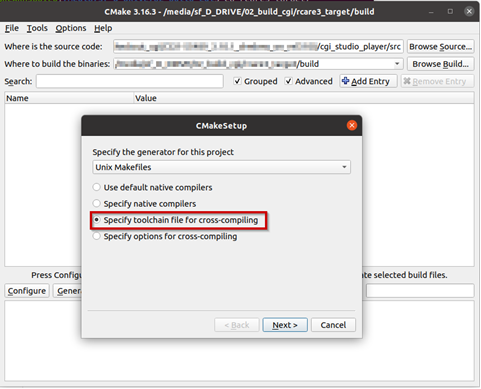
- Select the toolchain-file from the delivery (adapt for your toolchain installation and application specific needs)
-
/cgi_studio_devices/src/QnxScreen/ToolchainFiles/GCC-toolchain-<board>-QnxScreen-QNX.txt
-
- Adapt the CMake settings if necessary, e.g.:
- CMAKE_BUILD_TYPE-> Debug or Release
- Press Configure
- Press Generate
Building Application
-
Use same Command Prompt window for all steps.
- QNX environment variables first have to be set with qnxsdp-env.bat (QNX70\).
- Open CMake GUI and configure the project (e.g Player, CourierSampleApp, CitDemoApp) according to Generate Makefiles with CMake
- After generating your cmake files, simply navigate to the specified build directory (binary directory created in CMake GUI) and type "ninja" to start the build.