Effects
Use Effects
Effects describe the appearance of a RenderNode in a 2D scene. The number of effects may differ on each platform.
Combined Effects
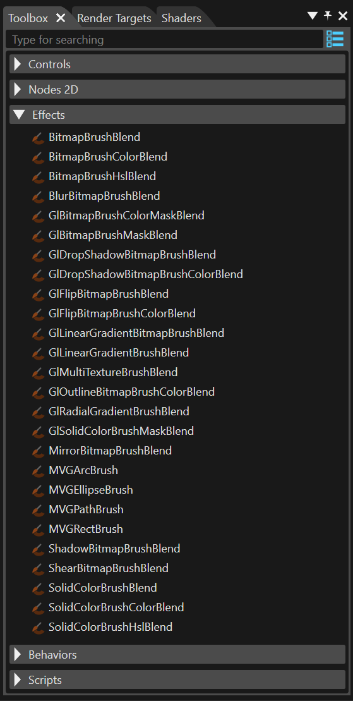
The effects provided in SceneComposer are combined effects. They can be dragged from the toolbox and dropped onto a RenderNode.
Background information
Combined effects are a combination of two or three basic effect types that are combined to an effect chain.
The following three basic effect types are used to form this effect chain
- Brush Effect: Acts as the input effect; it defines the source data for the node (e.g. SolidColorBrush, BitmapBrush)
- In-place Effect: Multiple different in-place effects can be concatenated (e.g. ConstantAlphaEffect, MaskEffect)
- Blend Effect: e.g. AlphaBlendEffect
A correctly configured effect chain consists of the following
- a Brush effect at first
- followed by an optional In-place effect
- finished by a final Blend effect
For usability reasons, Scene Composer only provides combined effects in the Toolbox by default.
Use Combined Effects
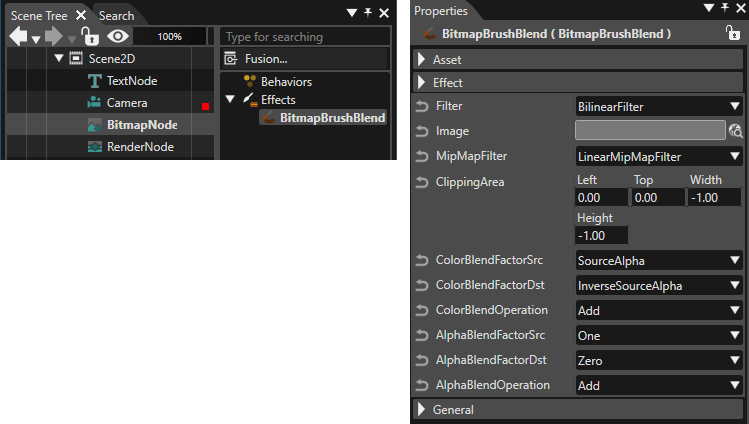
Several node types are already preconfigured with a specific combined effect. E.g when a BitmapNode is added to the scene graph, it is automatically linked to a BitmapBrushBlend combined effect
For user-defined nodes, use the following 2D node type:
- RenderNode: Drag a combined effect from the Toolbox and drop it over the desired RenderNode in the Scene Tree panel.
Follow these steps to view and edit the effect:
- Select the node in the left side of the Scene Tree panel.
- The linked effect will appear on the right side.
- Select the effect to display its properties in the Properties panel, where you can edit them.