
Instrument Cluster Solution
Instrument Cluster
Overview
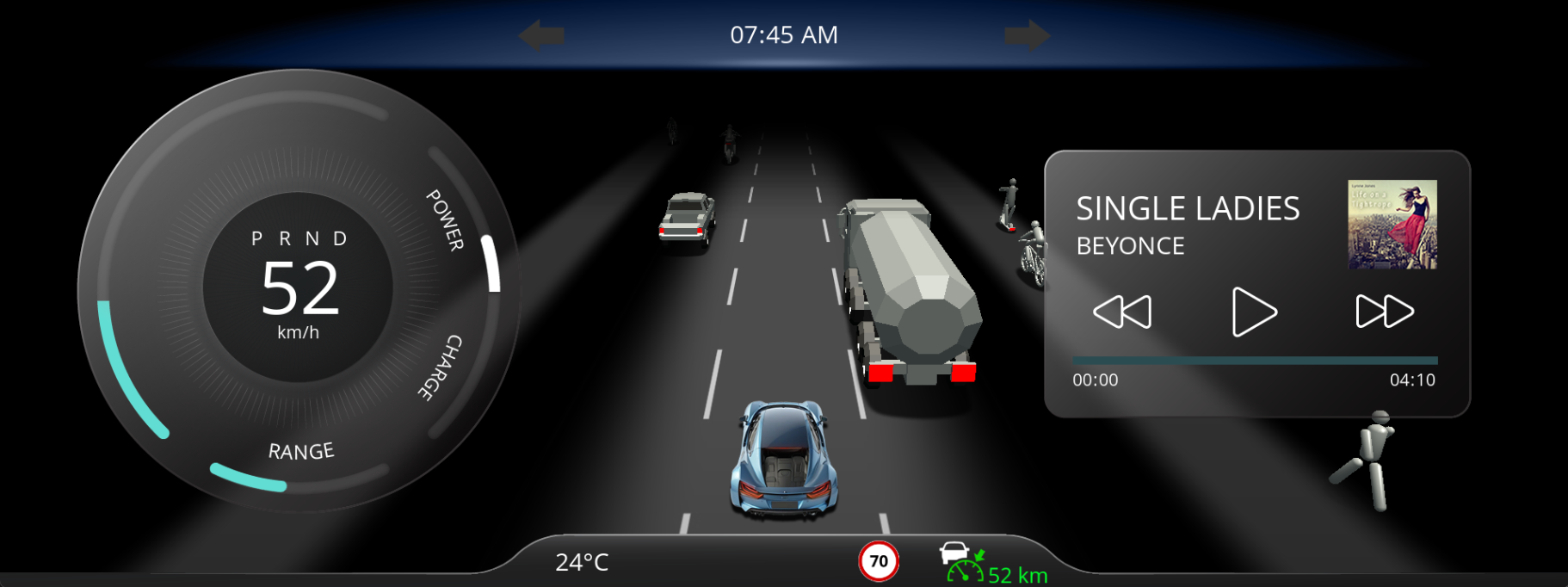
This solutions showcases an automotive instrument cluster covering several features, such as a 3D ADAS control and feature tiles.
It demonstrates a solution covering an automotive instrument cluster for an electric vehicle including advanced driving assistance systems visualization. As key feature is the ADAS control in the center of the solution and also the "floating" tiles with features such as music or phone control.
Solution Interactions
- For transition between different tiles, Up and Down arrow key inputs and animations were used to shift from one tile to another.
- Plus and Minus key inputs were used to set ACC distance in ADAS 2D scene
- Add and Subtract key inputs were used to set ACC speed in ADAS 2D scene
- Left and Right key inputs were used to handle main car positions.
Scene
| No. | Category | Scene Name | Description |
| (1) | ADAS | 3D_ADAS_DemoScene | 3D scene handles several objects visible on the street (such as bikes, pedestrians, trucks, cars and so on). All the objects are handled with a single ObjectControl feature. ADAS (Advanced Driver Assistance System) features were also included. For more details on ADAS features, please refer to 3D ADAS Control Solution. |
| (2) | ADAS | AdasScene2D | 2D ADAS scene links with 3D scene. For instance, if ACC set distance toggle button is enabled, then distance between car and next object on the road must be visible which can be set based on "plus" and "minus" key inputs. In a similar way, all others like LDD, Side assist, ACC indicators and so on were connected to the 3D ADAS demo scene. |
| (3) | Background | BackgroundScene2D | |
| (4) | Main | ClusterHomeScene2D | This scene has mainly cluster (circular slider based) to handle speed, power, charge and range. On increase of speed, power increases and charge (regeneration in this case) doesn't reflect the change. As and when speed starts to decrease, power drops to zero and regeneration increases. Range indicates battery of the car which reduces gradually. Another part of this scene is the car and adas telltales' control which are connected to 3D ADAS DemoScene. |
| (5) | Tile | MusicScene2D | Slider control indicates progress bar of song and on next or previous button, song information changes. At the end of every song, it automatically shifts to the next song in the list. |
| (6) | Tile | NavigationScene2D | The navigation scene/tile is a placeholder for a navigation solution integration, as there is no "standard" for navigation integrations and strong depend on the navigation software provider solution. |
| (7) | Tile | PhoneScene2D | All contacts are listed under the scene. On click of any contact, shifts to outgoing call scene where the user has the option to decline call and go back to contacts list. |