MJPEG Stream Behavior
Feature Description
The MJPEG Stream behavior allows the user to decode and play an MJPEG video stream. The MJPEG Stream behavior uses the onboard JPEG Decoder hardware to decode the JPEG frames and display them on a bitmap node.
Supported Platforms
At present, the Motion-JPEG decoder is exclusively supported on the Infineon Traveo 2 platform.
Limitations
The Motion-JPEG Decoder Behavior currently has the following limitations.
Enabling the Motion - JPEG Decoder feature
If the M -JPEG Decoder Behavior is being used, ensure that the JPEG Decoder feature has been enabled in the CMAKE options. While generating the project for target, turn on the CMAKE flag CGIDEVICE_TRAVEO2_JPEG_DECODER_ENABLED

How to use the Motion - JPEG Decoder
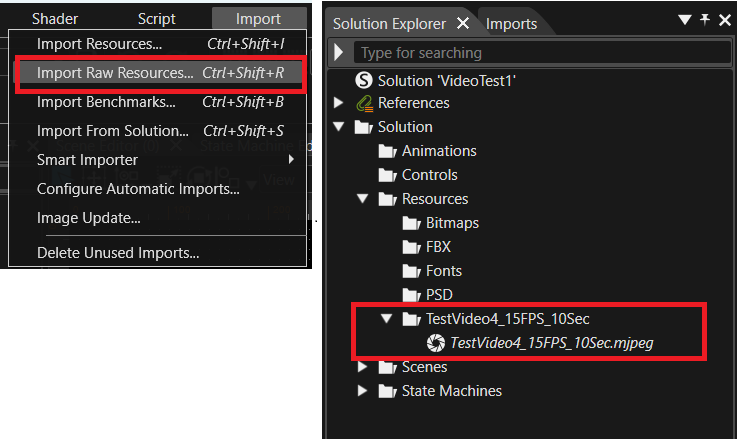 Add the Bitmap node to the scene: Add a bitmap node to a 2D scene.
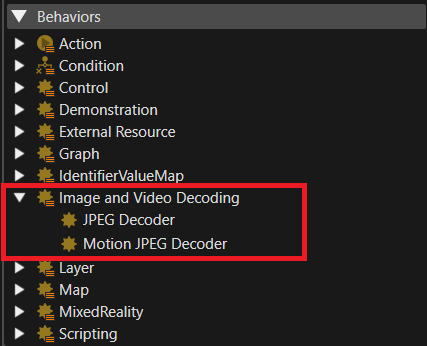
Add the Behavior to a Bitmap Node: Place the Motion - JPEG Decoder behavior onto a Bitmap Node in the scene.
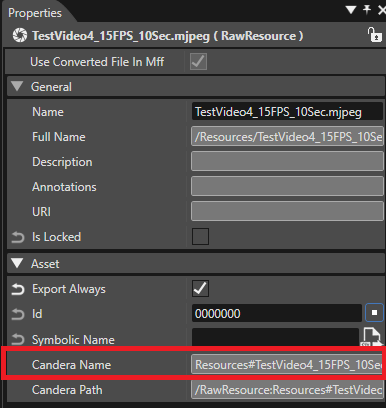
 Set the Resource Candera Name: Paste the Candera Name of the raw MJPEG video into the Resource Candera Name property using the steps below.
a. Step 1: Copy the Candera Name of the raw MJPEG video from the Solution Explorer under the Asset properties of the JPEG resource.
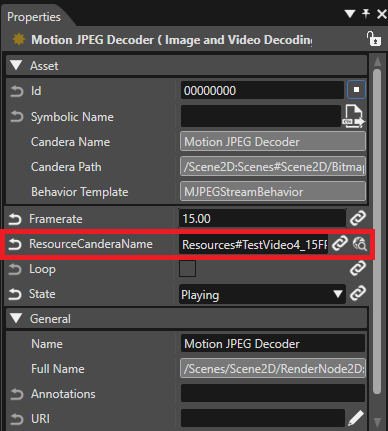
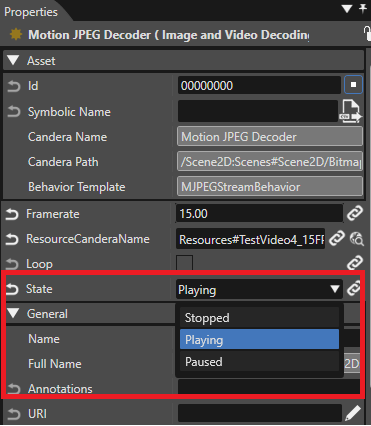
Playing in Loop: The video can be configured to play continuously in a loop, if required.