
Using Licenses
Licenses will allow you to decide which features to use within Scene Composer. This includes 2D, 3D, and any other features from the feature list (primarily plugin related features). You can access Licenses by going to Help > Licenses within the menu bar.
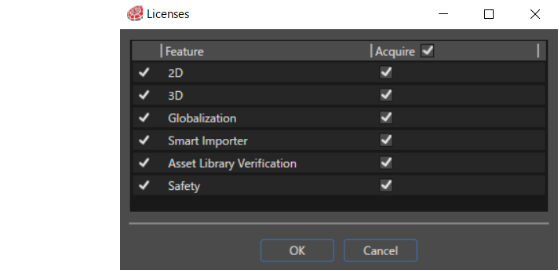
Licenses that are available by default are shown below,
- 2D : Candera 2D (Allows you to create and use 2D content.)
- 3D : Candera 3D (Allows you to create and use 3D content.)
- Globalization : Translator plugin.
- Smart Importer : Reference the Smart Importer article for more information.
- Asset Library Verification : Allows you to very that assets are current and up to date.
- Safety : Allows you to create Safety scenes to support functional safety for your solution.
To activate a feature, select the check box corresponding to the desired feature, then restart Scene Composer for changes to take effect.
For more information about the Safety function, please contact our representative.