
Sauna Screen
Overview
This solution showcases a modern sauna industrial automation system featuring advanced control functionalities, real-time monitoring, and an interactive user interface.
It demonstrates a smart sauna solution that includes digital temperature and time management, ventilation control, lighting management, and automated safety monitoring. A key feature of the solution is the centralized control interface along with integrated feature panels for functionalities such as ambience control, heating management, and system status monitoring.
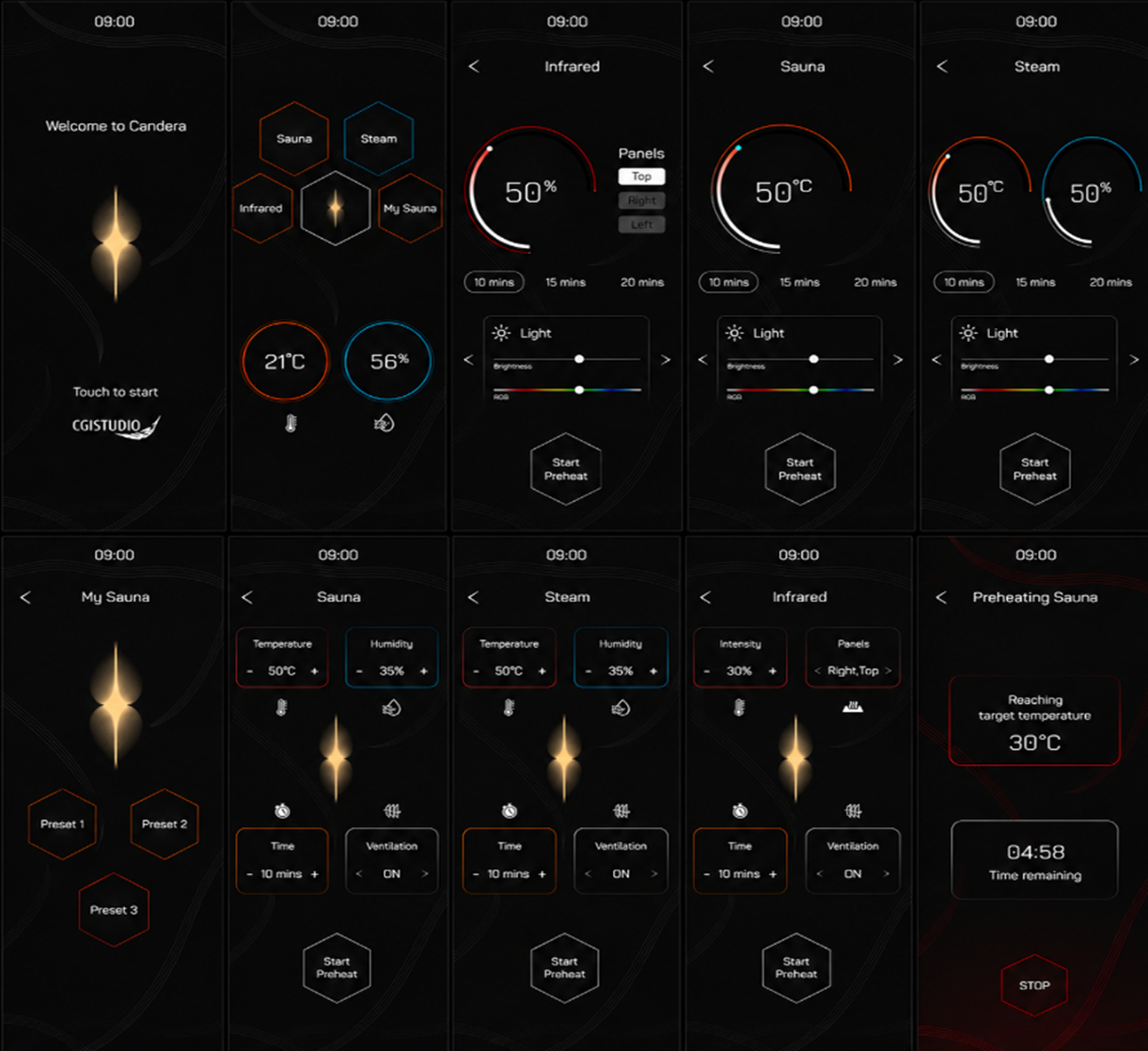
Feature Description
Below you can find an overview of all scenes and their individual content.
| No | Scene Name | Description |
| (1) | StartUpScene2D | This initial scene displays the Candera logo and acts as the entry point to the sauna automation solution. It allows touch interaction to transition from the startup screen to the main menu interface. |
| (2) | BackgroundScene2D | This scene features a background along with a digital time representation. |
| (3) | OptionScene2D | This scene acts as the main control interface of the sauna automation solution, providing access to different sauna modes such as Sauna, Steam, Infrared, and My Sauna. Each mode is represented through an interactive tile-based layout for simplified navigation between functionalities. In addition, the scene provides real-time environmental monitoring, where temperature and humidity values are displayed through circular indicators. The interface serves as a centralized entry point connecting multiple sauna control and ambience management features within the overall solution. |
| (4) | InfraredScene2D | This scene presents a modern infrared sauna interface designed to provide a simple and interactive control experience. It includes infrared heating management, session timing controls, panel selection options, and customizable lighting features to enhance overall comfort and ambience. The interface also incorporates preheating support to prepare the sauna environment before operation begins, enabling a smoother and more controlled infrared sauna experience. |
| (5) | SaunaScene2D | This scene handles sauna temperature control through a circular slider–based interface, allowing dynamic adjustment of the sauna environment. It also includes predefined session timing options and integrated lighting controls for brightness and RGB ambience customization. A preheat feature is integrated into the interface, enabling the sauna environment to be prepared before the session starts. |
| (6) | SteamScene2D | This scene manages the steam sauna experience through circular control interfaces used for adjusting temperature and steam intensity levels. It provides configurable session duration options for simplified operation and includes ambience lighting controls with brightness and RGB customization features. A dedicated preheat control is provided to initialize the steam environment before the session starts. Navigation arrow controls are also integrated within the interface, enabling transitions between multiple feature sections such as Lighting, Ventilation, and Music controls. |
| (7) | MySaunaScene2D | This scene provides personalized sauna configuration management through preset-based controls. It allows selection between multiple preset profiles, enabling quick access to predefined sauna settings and preferences. The interface enables quick transition between customized sauna profiles while maintaining a clean and interactive layout. The preset controls are integrated with the overall sauna automation solution for synchronized configuration and operation management. |
| (8) | Preset1Scene2D | This scene manages a predefined sauna configuration profile through dedicated controls for temperature, humidity, session timing, and ventilation management. The parameters can be modified dynamically using increment and decrement controls to customize the sauna environment based on the selected preset configuration. Ventilation status management and preheating functionality are also integrated to help prepare the sauna environment before the session begins. |
| (9) | Preset2Scene2D | This scene controls a predefined steam sauna configuration through dedicated management sections for temperature, humidity, session timing, and ventilation settings. Each configuration parameter can be updated interactively using increment and decrement controls to maintain the desired steam sauna environment. Ventilation management and preheating support are integrated within the interface to prepare the steam environment before the session starts. |
| (10) | Preset3Scene2D | This scene manages a predefined infrared sauna configuration through dedicated controls for heating intensity, infrared panel selection, session timing, and ventilation management. The intensity level and panel combinations can be configured dynamically to customize the infrared sauna experience. Ventilation control and preheating functionality are also integrated to prepare the infrared environment before the session begins. |
| (11) | RunningScene2D | This scene provides real-time monitoring and management of the active sauna session by displaying essential operational parameters such as temperature, humidity, selected sauna mode, door status, and configured session duration. The interface presents all session-related information in a centralized layout for continuous tracking of the sauna environment during operation. Live operational indicators are displayed throughout the interface to reflect current sauna conditions dynamically. Temperature and humidity values are monitored in real time, while the selected sauna mode and configured session timing represent the active session configuration. Door status monitoring is integrated to provide operational awareness and safety-related feedback during the session. A session countdown indicator is provided to display the remaining session duration before completion. Additionally, a dedicated stop control allows immediate termination of the active sauna session whenever required. All monitoring and control elements are integrated with the overall sauna automation solution for synchronized session management, operational control, and real-time system monitoring. |
| (12) | PreheatingScene2D | This scene manages the sauna preheating process by monitoring and displaying the progress of the heating cycle in real time. It provides target temperature tracking functionality, allowing the system to indicate the current progress toward the configured sauna temperature before the session begins. A real-time countdown display is provided to show the remaining preheating duration, helping monitor the estimated time required for the sauna environment to reach the desired condition. A dedicated stop control is integrated into the interface to allow interruption or cancellation of the preheating operation whenever required. Dynamic visual indicators are integrated throughout the interface to represent the active heating state and operational progress. The preheating controls and monitoring components are connected with the overall sauna automation solution for synchronized temperature management, operational control, and system monitoring. |
Controls
- The existing controls available in the Scene Composer toolbox are utilized to create this solution such as lists, sliders, radio buttons etc.
- A customized On/Off button control is used in the Infrared scene to manage panel selections such as Top, Right, and Left. This control works similarly to a checkbox, but it is customized to display any one image. The control is customized by configuring only the required properties related to state handling, image switching.
Transitions
Transition rules were used with Fade-shade animations are applied to the scene transitions to create smooth and continuous visual movement between Scenes. The transition flow is designed in a cyclic manner.
Example:
- OptionScene2D --> SaunaScene2D --> PreheatScene2D --> OptionScene2D: Fade-shade animation is used.
- StartUpScene2D --> OptionScene2D: Fade-Shade Animation is used.
State Machine
The GlobalStateMachine manages the overall navigation and operational flow of the sauna automation solution by controlling transitions between multiple scenes and interface states. It initializes the startup sequence and handles navigation from the initial screen to the main options interface, where users can access different sauna modes such as Sauna, Steam, Infrared, and MySauna. The state machine coordinates transitions between operational scenes including Pre-Heating, Current Session monitoring, and preset configuration screens such as Preset1, Preset2, and Preset3. User interactions including button selections, navigation controls, and preset switching are processed through transition rules and logic conditions to ensure smooth scene transitions. Additionally, the BackgroundScene is globally activated through the GlobalStateMachine to maintain a consistent visual appearance across all scenes while coordinating common interface animations and operational states throughout the overall sauna automation solution.