
Data Bindings
In Data Bindings tab, you can load a predefined data binding file and perform various customisations and simulations using the Value Generator.

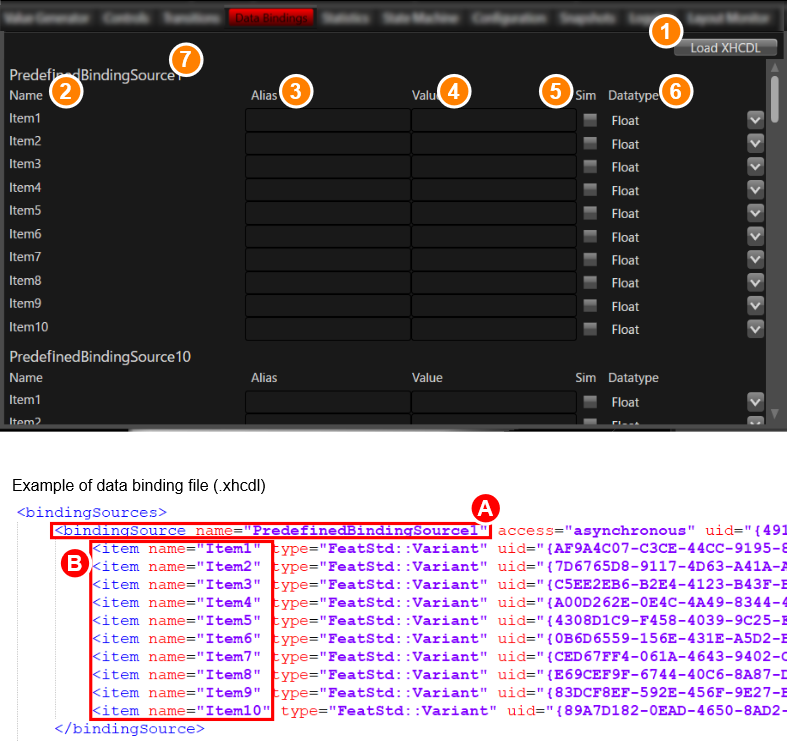
| 1 | Load XHCDL button |
Use this button to load an xml file containing predefined data bindings. The file format is *.xhcdl and files created with the following structure in the file can be loaded. The following naming convention inside of the xhcdl is required:
|
| 2 | Name | The data binding item name specified by “item name” in the loaded xhcdl file is displayed. The names specified as “ |
| 3 | Alias name | You can set a custom name for the data binding item name. This name will persist on Panel closing. |
| 4 | Value | Set the data binding value. After entering the value, a request to update the data binding value will be sent to the player. |
| 5 | Sim | Items with this checkbox checked can be simulated on the Value Generator tab. |
| 6 | Datatype | Change the data type. Select the any data type from the pull-down menu. After setting the data type, a request to update the data binding datatype will be sent to the player. |